Every day we offer FREE licensed software you’d have to buy otherwise.
$9.99
EXPIRED
Game Giveaway of the day — Football Live 1.01
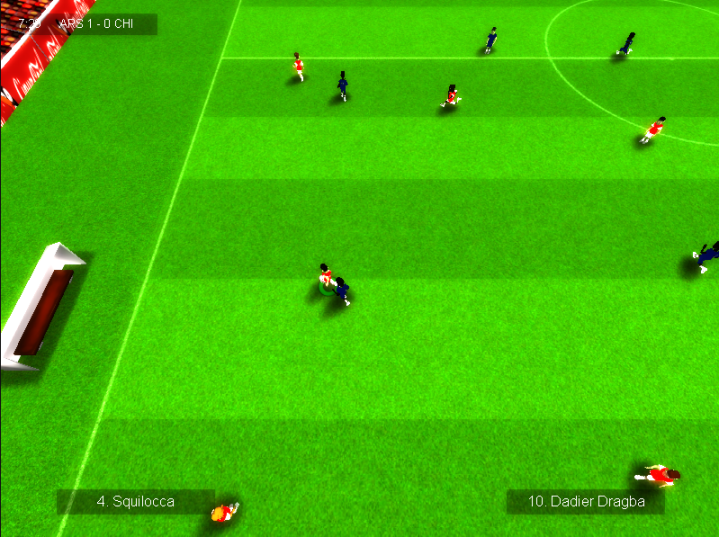
Football Live is a football/soccer game inspired by classic football games, trying to keep their ideals intact. Easy to pick up and play, hard to master.
$9.99
EXPIRED
User rating:
142
25 comments
Football Live 1.01 was available as a giveaway on July 28, 2012!
Today Giveaway of the Day

Solve math problems to gradually reveal a hidden coded word.
Football Live is a football/soccer game inspired by classic football games, trying to keep their ideals intact. Easy to pick up and play, hard to master.
Key features:
- Fully 3D engine with different cameras for you to chose.
- Fast paced gameplay, with adjustable game speed.
- Realistic ball physics.
- Score spectacular goals by mastering the aftertouch system.
- Unique career mode where your performance do matter, almost as much as results.
- Many tournaments, including the world cup.
- Many teams, including both clubs and nations.
- Team and player editor included.
- And much more.
System Requirements:
Windows 98/ 2000/ XP/ Vista/ 7
Publisher:
Xing InteractiveHomepage:
http://football-live.neogen2.com/File Size:
72.3 MB
Price:
$9.99
How would you improve Football Live 1.01?
No similar feedback found. Feel free to add yours!
Featured titles by Xing Interactive

A Man With a Monocle is an adventure/platform game developed by Neogen2 Creations for the PC. Follow Henry McAllister in your quest to discover the mysteries behind the Monocle and your ghost friend, Kain, while you go through many different and fascinating locations.
GIVEAWAY download basket

Developed by Overwolf

Developed by BeamNG

Play Facebook games in your browser without logging in.

A simulation game about the life of a truck driver.
Comments on Football Live 1.01
Thank you for voting!
Please add a comment explaining the reason behind your vote.
Please add a comment explaining the reason behind your vote.
iPhone app giveaways »

$7.99 ➞ free today

$0.99 ➞ free today

This is a simple camera app that displays the color information of what you want to know.
$4.99 ➞ free today

Habit Tracker Widget is the best tool to help you build better routines and stay consistent.
$2.99 ➞ free today

$4.99 ➞ free today
Android app giveaways »

Are you looking for a handy PDF viewer or a PDF converter to convert images into a PDF easily?
$11.99 ➞ free today

App allows you to convey your message to other people when its not possible to speak or shout.
$0.99 ➞ free today

Empire Warriors TD Premium is the defense game that you’ve always been finding.
$0.99 ➞ free today

An incredible mix of best RPGs and MOBAs with action games elements!
$0.99 ➞ free today
$0.99 ➞ free today
The very last thing you need would be to end up with the notorious "Unfortunate iPhone" screen. If the 4th
and 5th amounts give a number less than 41, then your iPhone 3G is
old bootrom. It took about an hour or so for it to finish mine.
Save | Cancel
SWTOR Companions have the ability to distinctive proficiency and individualities, and his or hers strengths carry over
within the Personnel Knowledge system. According to Shadrack's this is the world's
largest drive through synchronizes to music, LED Christmas light display in
the country. The animation of the characters is just as impressive, starting with Pinocchio himself (voiced
by real boy actor Dickie Jones).
Save | Cancel
Cars are available in top end models, sedans, hunchbacks and
even lower range economy models. t suffer from existing damage decreasing its performance.
There are special indicators whichtell youthat
a Bluetooth has been installed and it is ready to use.
Save | Cancel
after reading Game Giveaway of the Day – Football Live 1.01 I fell like heaven
Save | Cancel
I love Foosball and Australian Rules Footy (both live) - that's about it in the genre for me. I won't give it a thumbs down, because there are those who will still enjoy the game - the minority anyway.
However, I just HAVE to ask the obvious question ....
Why offer a game (free or not) that scored so poorly last time ???
I suppose the answer is that GAOTD still makes their money :/
Save | Cancel
On my PC, the sprites responded smoothly to gamepad controls but the ESC key did not always bring up the menu. I also disabled the "Bloom" effect (accessible through the Options menu) because my VGA card had issues with it.
Just for fun, I tried editing one of the in-game fake ads — and it sorta worked without causing any crashes.
IMO, if you've played Table Football ("Foosball" or even a board game version), today's game would probably a strike a chord with you.
Save | Cancel
Well am not into sports especially on a computer so have no comments on today's game. As for levels in the Fishdom Premium from a previous giveaway here's the update.
Currently at level 411 Cash earned $1,700,158
highest level score 17,182 and of course all tanks Gold Cups
and still playing. Am going to continue just to see if it ever actually has an end point! LOL
Save | Cancel
Here I go showing my American attitude...but, come on, it's only football to the rest of the world (to us, it's just stupid old soccer!!!!). Real football doesn't have round balls. 'Nuff said. Yeh, I know...leaving a great chance to diss the USA with this post...
Save | Cancel
@lahula: The Atlantis screensaver they offer isn't the one for the Atlantis game. And the one offered is only a demo. The one from the game doesn't seem to be offered anymore.
I'm not a soccer/football fan so I'm not really interested in this game. And they don't have Canada; these are all European teams. There also doesn't seem to be an option to turn the music and sound off.
Save | Cancel
@ 15 e 16. I'm not really sure about that. They are still public figures (for the teams, instead, may be true). So why not use fancy names? Bachelors against married would do fine for those who play.It's seems to me better than Anter, Bori and so on.If so, also the newspapers should pay for photographs made to players outside the football field.And this is not a 3D game that should make full use of image and name. Have a good w.e. everybody.
Save | Cancel
@Wot@n:
The Point is, if they use the real names of the players they have to pay lots of money for that...
Save | Cancel
#14 - that's because teams and players are brand names. If any developer want to use real names they should give a pot of gold to the gready leprechauns (Leagues and Platers associations). So be happy with Dadier Dragba :)
Save | Cancel
Terrifying! Teams like Inter, Juventus, crippled in the name. Yet they are known all over the world! Three years for this program ... Maybe it was better to read the newspapers and learn more about sports teams. Who is Olessandro dal Piaro? Of course, Alessandro del Piero. No Comment.
Save | Cancel
@10 RICHARD http://game.giveawayoftheday.com/footballlive/#comment-326918
because the true link is http://files.astrogemini.com/screensavers/atlantis3d.exe at this page http://www.astrogemini.com/atlantis-screensaver.html and it's the SAME FILE. have an error on the up link because playrix havent re-up the game with the good (new) link.
in the past i have the luck to down this file.
----------------------------------------------------------------------
i try football live just for fun and by curiosity, it same cool and easy. after 30min of play i uninstall this because i don't love fooball i prefer handball.
great thanks for GAOTD and her French Team staf
Save | Cancel
Looks like some game cloned from my old ZX Spectrum from the late 80's.
Save | Cancel
I read in one of the above comments about someone who had a game offered yesterday, and I was curious? Are there games offered "every" day? Because I only receive a newsletter on Saturdays, Sundays. So I'm only offered two games per week? Is there a different place to go check for daily game giveaways?
Thanks,
Cherish.
Save | Cancel
In The Rise of Atlantis Premium when you bet the game and try to get the free screen saver it sends you to http://files.astrogemini.com/rise_of_atlantis_reward.exe but it saids 404 not found. Why does it not work?
..........................Moderator Comment........................
I don't know Richard. If I was buying this game and had that problem I'd not be very pleased especially as I'm one of those who like screen savers just for their beauty (though not all are beautiful). I don't know whether we are entitled to any feedback from the developer, but it may be worth a try. check out the forums. I'm sure there will be a section dealing with this issue.
Save | Cancel
I'm having the same problem as I had with the Morbid Mansion giveaway, where the installer never even appears, with the we*.tmp executable just momentarily running and immediately exiting.
Save | Cancel
Surprisingly norton security suite had no problems with this one, it installed fine on win7 home .After playing a little I have to say it seems well thought out,detailed,with extensive player editing easy to use.I might have missed it but saw no way to trade players-maybe a future option??-which IMHO would be a nice touch.Not really my favorite type of game but looks interesting, well worth playing. THANKS GGOTD & NEOGEN2---nice game
Save | Cancel
попробуем. Выглядит стрёмно, но спасибо
Save | Cancel
Good game, works well. Bit hard to control but makes you want to practice even more. Works and I'm on Win 7 64-bit.
Save | Cancel
Reminiscent of Sensible Soccer on the Amiga. Simple gameplay (which i like) with a lot of nice touches and plenty of options. Would have been better had there been a joystick option (much more intuitive).
Save | Cancel
It is great to see something different being offered other than the usual match 3 or brick breakers or sickly kids games. Sadly this is not my favourite type of game but it is great to see this being made available for others. Thumbs up just for that. Thanks GGOTD
Save | Cancel
That's clever !! ;) A football/soccer game, when the Olympics starts !! :) Well done.
Anyway, still not my taste, so I won't download it. But I'm sure MANY GGAOTDers will be glad to see this one and try it.
Save | Cancel
If you have any problems running or installing today's giveaway please refer to the FAQ section in the Game discussion forums:
http://www.giveawayoftheday.com/forums/topic/11647
Please direct any queries or complaints to the blog regarding the new wrapper and the inclusion of the security measure Themidia. I won't moderate any more comments regarding this issue.
The giveaway team have included this security measure to ensure the wrapped executable and integrated registration code is safe from those who would steal it using various methods to extract the unwrapped executable; (you just have to check You Tube to see how easy it 'USED' to be before the introduction of the new security measures)
It is hoped that more developers will now feel safe that their products will only be available for the one day as opposed to every day (at least for those who were able to extract the unwrapped and registered executable).
To those that are not able to install the game; you should be able to install it by rebooting and opening up in Safe Mode with networking. I realize that if one of the giveaway's were infected by malware the Themida would be able to mask the fact, however, the giveaway team have always tested all of their games and programs thoroughly using several different anti-malware programs to ensure they are clean. So far there has been over 3000 programs given away via the giveaway project and not one has been infected with malware. That should assure those who think its unsafe to download install a giveaway when in Safe mode. Immediately on installing the game you should then reboot your computer and return to normal running.
As always its the community members choice as to whether they follow this advise. I know the risks, but i still post this suggestion so that those who are having problems installing the game and who who trust the giveaway team can still install the game.
If you wish to discuss the cons of this method please post it in te forums. Thank you.
Installation:
Today's game giveaway Football Live downloads to a 72.3MB (previous version was 67MB ) zip file that unpacks to a dual activation and set up file and a read me that contains installation instructions and the Terms & Conditions. To newcomers to the Game Giveaway dual activation and set up means that once the game has been installed it will automatically register itself, so there's no need to look for a registration key. :lol: The game installs to:
C:\Program Files (x86)\Neogen2 Creations\Football Live
I think the install path may depend upon where you last installed a Game Giveaway. Please do check the install path before you continue with the set up wizard because I've found some games even install into the last games folder, which could cause problems. (I think this has something to do with the Temp cache). If this appears to happen please would you report it here, thank you. The installed game is 91.2MB (previous version was 90MB in size).
Today's game does place a shortcut on the desktop though not in the Start menu programs list. If you wish to place a shortcut in the Start Menu/Programs list, go to the installed games folder and right click on the games executable and select 'Create shortcut', then cut and paste into a folder that you've prenamed Football Live (or maybe Soccer Live for our American cousins), or if you wish Fly Games with a sub folder Football/Soccer Live, then cut the whole folder to the following path:
C:\Users\named account or administrator\app data\roaming\Microsoft\Windows\Start Menu\Programs
To find the above path you will need to make your hidden folders visible, which can be done by selecting Folder options from the Control Panel (found in the Start Menu). you may have to change the view from 'Category' to small Icons via the view by deop down menu to the top right of the control panel window. when the folder Options window opens select the 'View' tab, then scroll down to where it says 'Hidden files and folders' and select Show hidden files, folders, and drives. Make sure once you've completed the task to change this back otherwise there is a danger that you may delete or move folders from the system. If you feel this is risky create a restore point before you start the task, but to be honest, it's very easy and unlikely to lead to any harm to your operating system.
The path will be different if you are using XP or earlier. I've posted a tutorial in the Games discussion forums HERE
Introduction:
This was given away last year where it received a poor 32% posiive vote out of 274 votes, with 23 comments which you can read via the following link:
http://game.giveawayoftheday.com/football-live/#comments
Reference accessed November 2011 HERE
Football Live is a game inspired by old-school football games like Sensible Soccer and Kick Off, trying to keep their ideals intact: Easy to pick up and play, hard to master.
Reference pdf manual
The Game:
Football live has quite a lot of options to explain. I will give a brief explanation here, but i would suggest you read the manual that you can find installed in the games main folder. It's a pdf document so make sure you have Adobe Reader otherwise you won't be able to access it.
when the game boots up you are faced with an array of choices from the main menu ranging from friendly matches, a career mode, tournaments and training as well as an editor a tropy room and options.
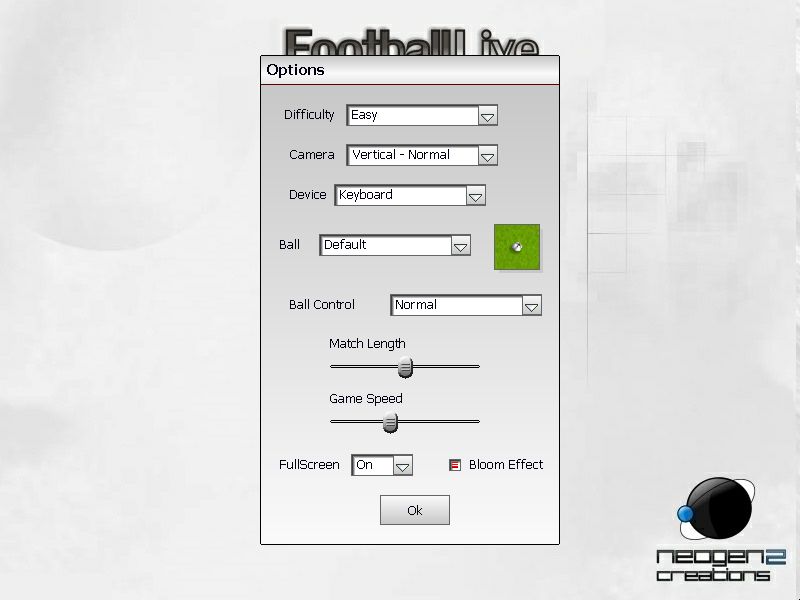
The options allows you to configure the game in several ways for example you can change the difficulty from Very Easy through to world Class via five choices. You can select how you are going to observe the game via camera amgles. these are Vertical (which is the default setting), Vertical Near, Vertical normal, and Vertical far. There's also an horizontal viewpoint and a top down. You can also choose the ball style such as classic, dots white or the default ball. here's a ball control selection which includes normal and free control. you can adjust the Match length and the game speed via sliders as well as toggle off bloom effects and windowed/full screen.
The editor allows you to change virtually everything to do with teams and players from their names, the names of the towns and countries as well the skill of each player. You rank each player according to skill via a slider. All the controls are intuitative.
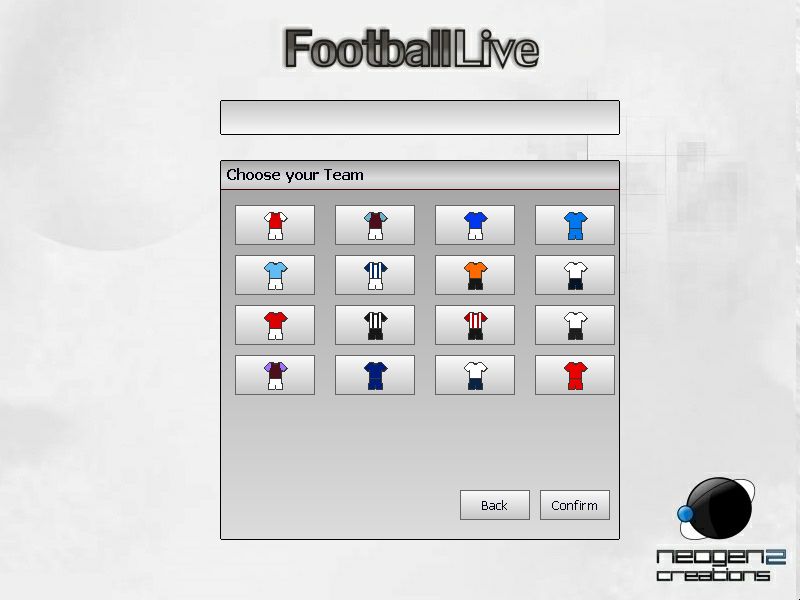
Each of the four playing modes offers something slightly different though the basic mechanics of each mode are similar. For example cllicking on either the friendly or the training modes allows you to choose to play in one of four european leagues (English, spanish, German and Italian) or if you choose to play a tournamant you can choose from 16 national teams from across the globe, for example, several European countries as well as African and South american and evn Japan (though no American team). Choosing a league will enable you to play in the premier disions in each of the leagues mentioned above, though some changes to teams may have occurred since this game was built last year.. I'm not into football so wouldn't know the difference..
Each of the leagues has sixteen teams to choose from. You will notice that all of the teams names have been changed slightly so as not to interfere with licencing. I presume games like the Football Manager series, Fifa Manager or Championship Manager hold all of the licences to use official team and player names, but that's just a presumption.
Once you've chosen your team, a brief look at the key bindings for gameplay (which can be found in the pdf manual as well), is followed by the squad management table and pitch layout. you can move your players around to correspond to the player positions which are marked out on the small plan view of the pitch. There are 11 positions to fill. you can select what ratio of players will play as defenders, midfield or attackers via the small window just below the plan of the pitch (field). There are seven combinations to choose from for example 4x5x1 means 4 defenders, 5 midfielders and 1 attacker, or a 4x3x3 combination which equates to 4 defenders, 3 midfielders and 3 attackers. you just click on the selections till you find the one that you want to use in game. The choice is dependent on the skill of each player you field. for example if you place three attackers who are ranked very low against an opposing team that had strong attakers you are likely to lose your match. You can also choose the way your players play by biasing the game towards attacking, defending or playing normally 9that is with a combination of attacking and defending skills).
All of the various codes used in the squad management table, for example GK means Goal Keeping abilities; the higher the score for this the better the goal keeping abilities the player has. Tac means tackling, the higher the tackling skill, the more likely the player is going to get to the ball. you can see descriptions of all of the various abbreviations in the manual. I would strongly recommend you read the manual before playing this game. The following information has been copied from the manual. There are some useful tips that may improve your gameplay experience if you take heed:
Game modes:
Friendly Match – A simple match where you can play a opponent of your choice.
Career – Play an entire season with a team of your choice and fight for your objectives while avoiding being fired due to bad results and not playing well. If you are just starting out it’s recommended to choose a smaller team otherwise you’ll be expected to win almost all your games.
Tournaments – Play one of the 5 available tournaments in the game with a team of your choice. You can fight for the English Cup, Spanish Cup, Italian Cup, German Cup and World Cup.
Training – Train your abilities by playing with a team of your choice, but without any opponents except for a goalkeeper. It’s recommended to spend some time training, especially if you are a beginner.
Editor– Edit all the players and teams available in the game, namely the player names, looks and attributes, and the team names and ratings.
Trophy Room– Here you’ll be able to see which trophies you won, with which teams and difficulty mode. Show off by taking screenshots !
Features:
Fully 3D engine with different cameras for you to chose
Fast paced gameplay, with adjustable game speed
Realistic ball physics
Score spectacular goals by mastering the aftertouch system
Unique career mode where your performance do matter, almost as much as results
Many tournaments, including the world cup
Many teams, including both clubs and nations
Team and player editor included
And much more !
Controls:
You can use a keyboard or game pad to play this game. The following are the key bindings you need to know to be able to play the sensible soccer like game.
A – Long Pass/ Tackling
S – Short Pass/Switch Closest player/ Take the ball of the opponent
D – Shoot
W – Pass into space
Shift – Run
Arrow keys – Move player
Enter – Skip menu
Escape – Open ingame menu
Images:
You can see a slideshow of about 20 images from the game HERE
System Requirements:
Conclusion:
This isn't a game for those who just want to have a quick game to fill in some time. It takes a lot of though and planning to play the game successfully. This isn't my type of game, so found it difficult to review. Overal though I think it's a well constructed game that's reasonable priced, (though that doesn't concern us here because we are getting it for free).
You can post comments and suggestions over in the appropriate forums over on the developers site HERE
I found the game an above average game in all aspects; the score averaged out at 7 out of 10
There is a free online soccer game that you can play for free. You can check it out via Steam called International Online Soccer
http://store.steampowered.com/app/90007/?snr=1_200_200_260_103_4
Score:
Gameplay - 7
Graphics - 7
Audio - 7
Replayability - 7
Originality - 7
Overall 7 out of 10
There are a couple of new Indie Game bundles available. The latest one Indie Gala VII has some fantastic games included such as Rig & Roll, Space Rangers, Death to spies and its sequel, UFO: Afterlight, Reign: Conflict of Nations, Kings bounty plus more. The Indie Royale July Jubilee Bundle with Puzzle agent, Geneforge Saga, Oniken, Mutant Storm: Reloaded, Unepic and Swift-Stitch and a new Groupees bundle that includes Dino D-Day, Hammerfight, Alien Breed, Tiny Bang Story, Iron Grip Warlords, Dogfighter, Syberia II, Dead Horde, A Stroke of Fate : Operation Valkyrie, I Will Fight For Food *1, Postal *1 and Depht Hunter *1,
Save | Cancel