Every day we offer FREE licensed software you’d have to buy otherwise.
$9.99
EXPIRED
Game Giveaway of the day — Football Live
Football Live is a football/soccer game inspired by classic football games, trying to keep their ideals intact: Easy to pick up and play, hard to master.
$9.99
EXPIRED
User rating:
121
23 comments
Football Live was available as a giveaway on December 18, 2011!
Today Giveaway of the Day

Clear the board of all pieces until only one remains.
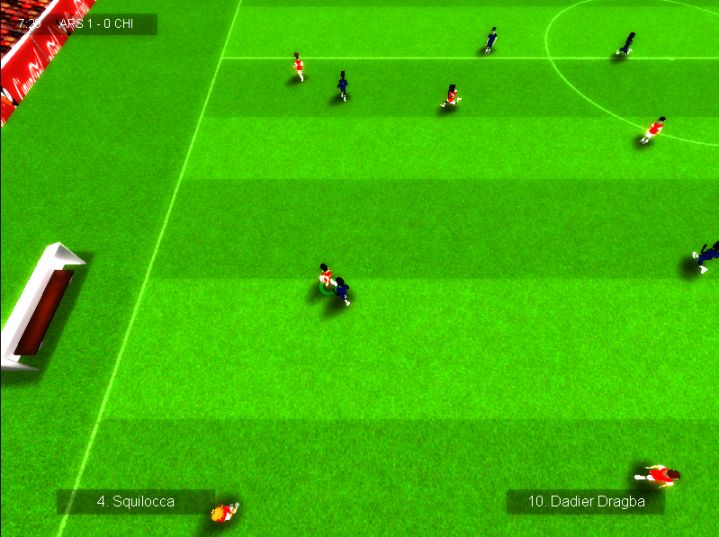
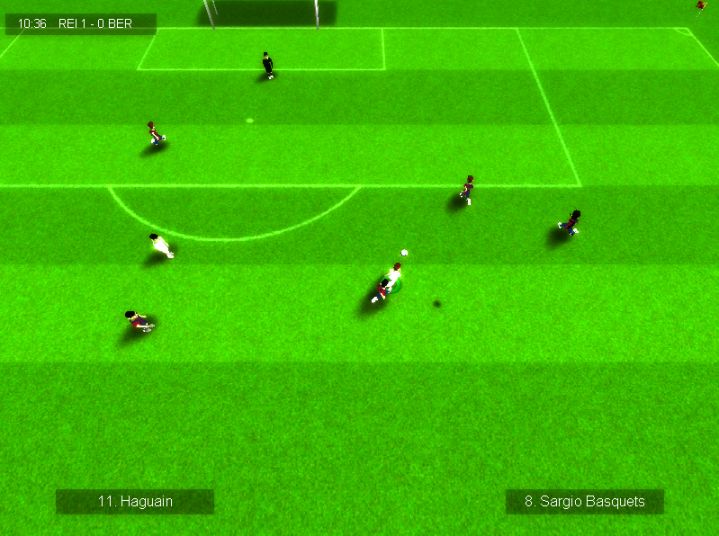
Football Live is a football/soccer game inspired by classic football games, trying to keep their ideals intact. Easy to pick up and play, hard to master.
Key features:
- Fully 3D engine with different cameras for you to chose.
- Fast paced gameplay, with adjustable game speed.
- Realistic ball physics.
- Score spectacular goals by mastering the aftertouch system.
- Unique career mode where your performance do matter, almost as much as results.
- Many tournaments, including the world cup.
- Many teams, including both clubs and nations.
- Team and player editor included.
- And much more.
System Requirements:
Windows 98/ 2000/ XP/ Vista/ 7
Publisher:
Xing InteractiveHomepage:
http://football-live.neogen2.com/File Size:
67.0 MB
Price:
$9.99
Featured titles by Xing Interactive

A Man With a Monocle is an adventure/platform game developed by Neogen2 Creations for the PC. Follow Henry McAllister in your quest to discover the mysteries behind the Monocle and your ghost friend, Kain, while you go through many different and fascinating locations.
GIVEAWAY download basket

Developed by Electronic Arts

Developed by PopCap Games

Developed by Overwolf

Developed by BeamNG
Comments on Football Live
Thank you for voting!
Please add a comment explaining the reason behind your vote.
Please add a comment explaining the reason behind your vote.
iPhone app giveaways »

Island Escape Survival Games is an intense, open-world survival adventure where players are stranded on an island.
$0.99 ➞ free today

$1.99 ➞ free today

Most meal planners hand you an empty week and wish you luck. 7Mealz Meal Planner hands you a system.
$0.99 ➞ free today

$0.99 ➞ free today

Harness the incredible strength and abilities bestowed upon you by the military's experimentation.
$0.99 ➞ free today
Android app giveaways »

$0.49 ➞ free today
![[VIP] Mr. Balcan Idle Giveaway](https://android.giveawayoftheday.com/wp-content/plugins/gotd_googleplay_plugin/images/100/2024/11/com.superclay.vipbalcan_app_icon_1731830562.png)
$9.99 ➞ free today

$2.49 ➞ free today

Blast & Smash: pop joy cubes - fun arcade puzzle game in match-three genre.
$0.99 ➞ free today

Step into the medieval kingdom of Maryland, ruled by King Henry, and prove your strength in Sword Fight!
$0.99 ➞ free today
Bit like Subbuteo table soccer on the PC, doesn't compare with the more expensive football games, and if you like football why ever would you play this unless you couldn't afford the much better soccer PC games! The biggest problem is the graphics, I suppose you pays your money and takes your choice! More money will get you very much better graphics. .
Save | Cancel
I will solve the "American Football" vs "World Football" and the other term "Soccer". All versions of this so-called sport SUCK. I hate them all. They're all a waste of time, space, and matter.
Real sports involve more than thick headed muscle bound morons either carrying a ball or kicking one.
Want a real sport? Try something like RACING, or FIGHTING.
Save | Cancel
This game will not run I keep geeting a memory violation - junk.
Save | Cancel
Good game, good graphics, smooth play. I don't have the hang of the controls yet, but maybe that will improve.
I was a little confused when I saw football and found that it is soccer, but then again, I am an American. Whether or not Football first referred to soccer or American football, or maybe was it rugby or gaelic football? There are many thoughts on the subject, but maybe there could be a subtitle stating something descriptive such as World Cup, or bring your vuvuzelas.... Well, maybe not. One last thought, even J.K. Rowling allowed the change to the name of her first book of the Harry Potter series from the Philosopher's Stone to the Sorceror's stone, (ok, maybe she was bullied by the American publishers), but I don't really think it matters all that much, I just wanted to add to the comments, because some of the posts with people defending the word football meaning soccer is funny. Oh well, I digress,
I really do like the game, seems like a nice quick time killer, wish it was an app.
Save | Cancel
Morning all, Snoozles here.
Nice to see a real football game given away. A great idea except it does not function properly.
1) A loud screech is always heard when the software is on. I installed this on two separate systems with exactly the same results.
2) Game play is too fast and the controls do not appear to respond nearly as fast as they need to in order to keep up with the game play. I set the controls to the most easy settings. Even in practice, I only scored once during 90 minutes.
3) Graphics are fair. But that is only just my opinion and perhaps my keekers are too bad. Players (the "active player) can run through solid objects and disappear.
4) There are not enough options for control.
5) A DESKTOP SHORTCUT should be installed, or at least an option for the shortcut at installation time.
At least it's football and not the "carryball" that Americans pass off as football.
My Scoring:
Download and installation - 7
Registration process - 10
Graphic Appearance in Game – 2
Background and Colour - 3
Audio – 0
Game Play - 2
Replay Ability - 1
Originality - 8
Total 4 out of 10
DEVELOPER: Please make this programme work properly. Get rid of the SCRRRRRRREEEECHHH, fix the controls and make the tutorial better - newbie level.
Thanks to WhiterabbitUK, GGOTD, posters to the forum and Neogen2. Cheers.
Save | Cancel
It's not a question as to whether it's been unzipped correctly---the .exe wouldn't even be able to run from a corrupted download. The problem here is that the software wrapper runs, but the FL installer does not. Watching the memory usage on setup.exe would indicate to me that it's trying to launch the process, but I'm not seeing that process appear at all.
The suggestion to install to a different path is wholly irrelevant---the installer subprocess itself does not launch, though the GGOD wrapper runs as normal.
I've attempted running in compatibility mode, though why, I have no idea, since we're not dealing with anything but a standard msi-style installer in an exe wrapper. This has not changed the setup file's behavior.
........................Moderator comment.....................
The suggestions I made were just that; not probable fixes. When the probable hasn't worked the improbable sometimes can; unfortnately in this case that wasn't to be. Sorry you didn't get the game to work.
Save | Cancel
Not responsive at all on my windows 7 tablet. I had hoped it would work.:0(
Save | Cancel
I got a nice white screen all time....
Save | Cancel
Very difficult to control. Not for newbie players. You can never get close enough to shoot. Opponent always takes ball. : (
Great idea though. Just make it so that you can defeat the other team in easy mode.
Save | Cancel
Is it me but isn't the ball sound exactly like the one from Kick off 2? Also Rugby is a far better game American football is a bit tame for me!
Save | Cancel
@2: It is 3D. If you look in the game's folder, there are several .3ds meshes. People don't use those just for flat surfaces.
The bloom effect is overkill on my graphic card. It makes the game look way overexposed.
Save | Cancel
What? No Tim Tebow to choose from? You call this football??
Save | Cancel
Wow, first non-bug suggestion. I personally like the game. When I think of football, I first wonder if it is American or the worldwide version as I take spanish. Mind you, why is American football called football, if the goal is to score touchdowns without the ball hitting the ground. Sure when you punt, try to score a field goal or kick it off, it usually hits the ground, but the majority of the game is spend passing the ball. Yet, we can't use the name handball since some game took that name, a basketball-soccer mix. Anyway, I love the game but feel as if the players should have been bigger and the goals more detailed (in addition to existing). Also, I would love the fact that playing with you players in career mode would increase that experience which would lead to a better player, and also if the ability to buy items for you team in a store would be added, while you could get the money from winning and loosing games (obviously you get more money for winning a game). In addition, when you win a tournament, you get tourney points, which gives you whole team as a whole more experience and better abilities. Just some helpful ideas.
........................Moderator comment.......................
Thank you for your feedback
Save | Cancel
Well, of course the problem's on my end. I'm not sitting here trying to impugn the validity of the available software, obviously other people have been able to get it to work. I was more hoping for some sort of starting point as to where I might begin troubleshooting---should I be looking for setup.exe to spawn an additional installer process, is there an obscure logfile it might be dumping the failed launch to, that sort of thing.
.........................Moderator comment.........................
sorry, didn't mean to come over obstructive. It's been a very busy day (no excuse really). Have you checked to see that the downloaded zip file is the full download? Maybe the zip file isn't unpacking correctly. I'd also try unzipping it with a different zip file (I've linked to a whole bunch above in my review @ comment #1. Install to a specific path. (do you have 64 bit or 32bit?), if 64 bit install to My Programs (x86) if 32 bit to Program files. Try using compatibility mode. I don't thik there are any fixes for this problem mentioned in my problems section (at the end of the review, but please do check just in case. Lets hope one of the resident teccy's can help before the end of the giveaway.
W.R.
Save | Cancel
Love a game like Sensi, but I can't get this one to install. The setup.exe process launches, checks the availability, then dumps straight to the end, checking for whether or not you want to make this page your starter---it skips the installer entirely. I've redownloaded the file (not as if it's a corrupted download, if it were, I wouldn't have been able to extract the .exe properly, let alone run it.)
...................Moderator comment........................
No one else is reporting this problem. So far a quarter of the way into the giveaway there has been around 1500 downloads, which although not a high number is still quite good for such a specialist game. Personally I won't be keeping this one though for test purposes I have got it to install and play on an XP Pro 32 bit, a Win 7 Pro 64 bit , a Win 7 Ultimate 64bit and a Vista Home Premium 32 bit. Systems vary from a single core laptop to dual core and quad core cpu's in desktops and one gaming rig. I've had no problems installing and running on all four computers. I would say in all probability that the problem lies at your end and not the actual game.
Lets hope the more technically minded can come up with a solution for you. :)
Save | Cancel
Oh, com'on---It's not really football...it's that silly SOCCER...
...........................Moderator comment....................................
I think the term football was coined for what Americans call soccer before American football was invented. Why do you call it silly soccer. It's much more popular than American football. Virtually every country in the world plays soccer. There's a world cup that take place every 4 year that's watched by billions. Wheras American football is largely confined to America. Even america are paying millions for players like Beckham (even though he's well past his prime).
That said I actually prefer watching American football to soccer even though i'm a englishman. I've never liked the sport, either playing it or watching it. I used to be forced to watch my regimental team play regularily because they held the army cup on several occassions (7th signal regiment BAOR) and many of the players went on to play in the UK's league. I much preferred athletics and cross coutry. :)
Save | Cancel
As an American, "football" has a special meaning, and it doesn't mean "soccer". There are two mysterious games for me, your 'football', a bunch of guys standing on a field and some of them occasionally running around briefly; the other is cricket, where people stand around for days to see a score 0f 65,000 to 2 or something. "Live SOCCER" would help in the States.
I'd try it, but the game is a mystery to me. Good luck.
......................Moderator comment....................
As I point out below, soccer is a much more popular sport than American Football. It's played all over the world to world class standards, wheras American football is by and large restricted to America.
Save | Cancel
On three attempts on my Win7 X6 (DX11), I couldn't go past the team players chart; when I pressed continue, the cursor froze. The only solution I know was to use the Task Manager to kill it. But, I'd sure love to play it.
Any helpful suggestions from the good troubleshooters?
Save | Cancel
Looks like Sensible soccer! if it plays the same i'll be extatic :)
...................Moderator comment.........................
The developers said Sensible Soccer was their inspiration
Save | Cancel
Wow, this looks almsot exactly like the good old SWOS!!
Stephen please hurry up on the review :)
Ill DL and test it anyways though. I love old styles.
.......................Moderator comment.....................
Okay i've posted my review, but it's a little disjointed. I fell asleep at the computer last night waking up about 30 minutes before the game change over, with no review written. I was falling asleep while writing the above, so please forgive any glaring mistakes.
Save | Cancel
The game is bugged. I cannot believe that the developers spent three years in developing the game and werent even able to remove bugs from a final match statistic ... or whatever that should be. A wonderful example for a rushed realease. No. That is NOT good. I just needed to use ctrl+alt+del to kill and continue with the game (after this comment) after just 7 minutes of gameplay. Well, if i really continue to play. Bugs will kill every football game. You know Ascaron software? They got bancrupt because of bugs in their football managers. So developers: beware!!
Save | Cancel
67 MB SETUP for (suppose installed game to be 3-4 times bigger) for a non-3D football game .. where I will have to use a zoom/ magnifying glass to see the kickers running ?
wow,. cool.
anno 1992 ?
LOL .. then .... what comes 2012 ? :D
Save | Cancel
Developers rely on good feedback to improve their games. If you download this game please take some time once you’ve played it a while to leave some constructive feedback either positive or negative. The more constructive feedback we get, the more likely developers are going to give more games away. The giveaway site already has a very good standing with the search engines. Developers want their products out there on the WWW, this site has the potential to do that. The game giveaway project gives away on average between 9 to 17 thousand downloads for each game depending upon what genre and how obscure the game is. That’s a lot of homes these games are being downloaded into and a lot of potential cash that’s being lost by the developers. If we get better games because of better feedback, the community are likely to continue to benefit from the generosity of the developers. Satisfied community members are then more likely to visit the home sites of those developers and purchase games that they may not have bothered with before they discovered the developer via the game giveaway site, thus giving the developers more incentives to give away more decent games.
Installation:Please leave some feedback once you’ve checked the game out. It can be positive or negative, but please explain why your reasons for the feedback you post. Thank you in advance to all those who take the time to post a constructive comment. Thank you.
Today's game giveaway Football Live downloads to a 67MB zip file that unpacks to a dual activation and set up file and a read me that contains installation instructions and the Terms & Conditions. To newcomers to the Game Giveaway dual activation and set up means that once the game has been installed it will automatically register itself, so there's no need to look for a registration key. :lol: The game installs to:
C:\Program Files (x86)\Neogen2 Creations\Football Live
I think the install path may depend upon where you last installed a Game Giveaway. Please do check the install path before you continue with the set up wizard because I've found some games even install into the last games folder, which could cause problems. (I think this has something to do with the Temp cache). If this appears to happen please would you report it here, thank you. The installed game is 90MB in size.
Today's game does place a shortcut on the desktop though not in the Start menu programs list. If you wish to place a shortcut in the Start Menu/Programs list, go to the installed games folder and right click on the games executable and select 'Create shortcut', then cut and paste into a folder that you've prenamed Football Live (or maybe Soccer Live for our American cousins), or if you wish Fly Games with a sub folder Football/Soccer Live, then cut the whole folder to the following path:
C:\Users\named account or administrator\app data\roaming\Microsoft\Windows\Start Menu\Programs
To find the above path you will need to make your hidden folders visible, which can be done by selecting Folder options from the Control Panel (found in the Start Menu). you may have to change the view from 'Category' to small Icons via the view by deop down menu to the top right of the control panel window. when the folder Options window opens select the 'View' tab, then scroll down to where it says 'Hidden files and folders' and select Show hidden files, folders, and drives. Make sure once you've completed the task to change this back otherwise there is a danger that you may delete or move folders from the system. If you feel this is risky create a restore point before you start the task, but to be honest, it's very easy and unlikely to lead to any harm to your operating system.
The path will be different if you are using XP or earlier. I've posted a tutorial in the Games discussion forums HERE
Introduction:
Reference accessed November 2011 HERE
Football Live is a game inspired by old-school football games like Sensible Soccer and Kick Off, trying to keep their ideals intact: Easy to pick up and play, hard to master.
Reference pdf manual
The Game:
Football live has quite a lot of options to explain. I will give a brief explanation here, but i would suggest you read the manual that you can find installed in the games main folder. It's a pdf document so make sure you have Adobe Reader otherwise you won't be able to access it.
when the game boots up you are faced with an array of choices from the main menu ranging from friendly matches, a career mode, tournaments and training as well as an editor a tropy room and options.
The options allows you to configure the game in several ways for example you can change the difficulty from Very Easy through to world Class via five choices. You can select how you are going to observe the game via camera amgles. these are Vertical (which is the default setting), Vertical Near, Vertical normal, and Vertical far. There's also an horizontal viewpoint and a top down. You can also choose the ball style such as classic, dots white or the default ball. here's a ball control selection which includes normal and free control. you can adjust the Match length and the game speed via sliders as well as toggle off bloom effects and windowed/full screen.
The editor allows you to change virtually everything to do with teams and players from their names, the names of the towns and countries as well the skill of each player. You rank each player according to skill via a slider. All the controls are intuitative.
Each of the four playing modes offers something slightly different though the basic mechanics of each mode are similar. For example cllicking on either the friendly or the training modes allows you to choose to play in one of four european leagues (English, spanish, German and Italian) or if you choose to play a tournamant you can choose from 16 national teams from across the globe, for example, several European countries as well as African and South american and evn Japan (though no American team). Choosing a league will enable you to play in the premier disions in each of the leagues mentioned above, though some changes to teams may have occurred since this game was built last year.. I'm not into football so wouldn't know the difference..
Each of the leagues has sixteen teams to choose from. You will notice that all of the teams names have been changed slightly so as not to interfere with licencing. I presume games like the Football Manager series, Fifa Manager or Championship Manager hold all of the licences to use official team and player names, but that's just a presumption.
Once you've chosen your team, a brief look at the key bindings for gameplay (which can be found in the pdf manual as well), is followed by the squad management table and pitch layout. you can move your players around to correspond to the player positions which are marked out on the small plan view of the pitch. There are 11 positions to fill. you can select what ratio of players will play as defenders, midfield or attackers via the small window just below the plan of the pitch (field). There are seven combinations to choose from for example 4x5x1 means 4 defenders, 5 midfielders and 1 attacker, or a 4x3x3 combination which equates to 4 defenders, 3 midfielders and 3 attackers. you just click on the selections till you find the one that you want to use in game. The choice is dependent on the skill of each player you field. for example if you place three attackers who are ranked very low against an opposing team that had strong attakers you are likely to lose your match. You can also choose the way your players play by biasing the game towards attacking, defending or playing normally 9that is with a combination of attacking and defending skills).
All of the various codes used in the squad management table, for example GK means Goal Keeping abilities; the higher the score for this the better the goal keeping abilities the player has. Tac means tackling, the higher the tackling skill, the more likely the player is going to get to the ball. you can see descriptions of all of the various abbreviations in the manual. I would strongly recommend you read the manual before playing this game. The following information has been copied from the manual. There are some useful tips that may improve your gameplay experience if you take heed:
Game modes:
Friendly Match – A simple match where you can play a opponent of your choice.
Career – Play an entire season with a team of your choice and fight for your objectives while avoiding being fired due to bad results and not playing well. If you are just starting out it’s recommended to choose a smaller team otherwise you’ll be expected to win almost all your games.
Tournaments – Play one of the 5 available tournaments in the game with a team of your choice. You can fight for the English Cup, Spanish Cup, Italian Cup, German Cup and World Cup.
Training – Train your abilities by playing with a team of your choice, but without any opponents except for a goalkeeper. It’s recommended to spend some time training, especially if you are a beginner.
Editor– Edit all the players and teams available in the game, namely the player names, looks and attributes, and the team names and ratings.
Trophy Room– Here you’ll be able to see which trophies you won, with which teams and difficulty mode. Show off by taking screenshots !
Features:
Fully 3D engine with different cameras for you to chose
Fast paced gameplay, with adjustable game speed
Realistic ball physics
Score spectacular goals by mastering the aftertouch system
Unique career mode where your performance do matter, almost as much as results
Many tournaments, including the world cup
Many teams, including both clubs and nations
Team and player editor included
And much more !
Controls:
You can use a keyboard or game pad to play this game. The following are the key bindings you need to know to be able to play the sensible soccer like game.
A – Long Pass/ Tackling
S – Short Pass/Switch Closest player/ Take the ball of the opponent
D – Shoot
W – Pass into space
Shift – Run
Arrow keys – Move player
Enter – Skip menu
Escape – Open ingame menu
Images:
You can see a slideshow of about 20 images from the game HERE
System Requirements:
Conclusion:
This isn't a game for those who just want to have a quick game to fill in some time. It takes a lot of though and planning to play the game successfully. This isn't my type of game, so found it difficult to review. Overal though I think it's a well constructed game that's reasonable priced, (though that doesn't concern us here because we are getting it for free).
You can post comments and suggestions over in the appropriate forums over on the developers site HERE
I found the game an above average game in all aspects; the score averaged out at 7 out of 10
There is a free online soccer game that you can play for free. You can check it out via Steam called International Online Soccer
http://store.steampowered.com/app/90007/?snr=1_200_200_260_103_4
Score:
Gameplay - 7
Graphics - 7
Audio - 7
Replayability - 7
Originality - 7
Overall 7 out of 10
Problems installing, activating and running today’s game:
If you have difficulty downloading or activating the game you can try again later or do one of the following – for example once downloaded when you click on the dual activation and set up file you may get the message “Failed to connect. Please try again later” Check to see if your internet explorer isn’t offline (thanks to MrSnoozles/Mike and GMMan for that fix). If the previous suggestion doesn’t work go check out previous comments from the last several weeks and look for comments from GMMan and Mike. They have also posted their possible fixes for this problem.
Mike suggests that you check to see if Internet Explorer is offline (even if you use firefox). If it is make sure that it’s online thn try again. I’ve always tried re-booting my modem and/or router with some success, though Mike has said that doing that does nothing. Still, it’s worth a try if all else fails.
If you are getting the black screen problem right click on the games executable and select properties then click on the compatibility mode and select the disable visual themes. This should fix the problem, if not try disabling the display scaling on higher dpi settings and disabling the desktop composition.
Other fixes include changing your screen resolution, installing the latest direct X (remember that XP uses DX 9 or earlier only, Vista uses DX 10 or before and Win 7 DX11 or before). Also try updating your graphics drivers. The main two chip manufacturers are NVIDIA and ATI both of which offer driver downloads for free. Just go to the respective manufactures home page and you’ll find a link to the driver download page. To find out which graphic card or graphics chip your computer uses type in Dxdiag in the search field (Vista or Win 7) or the run command (XP); this opens up the DirectX diagnostics panel. click on the display tab and look to the left panel. You should easily see what graphics card or chip you are using. (This is required information when selecting the correct download from the developers site).
If you are having problems unzipping the game giveaways zip file, for example getting a message saying the file is invalid try using a different file archiver such as 7-Zip http://7-zip.org/ , J-Zip http://www.jzip.com/ , CAM UnZip http://www.camunzip.com/ , Hamster Free Zip Archiver http://ziparchiver.hamstersoft.com/en/home , GZip http://www.gzip.org/ , B Zip2 http://bzip.org/ , peazip http://www.peazip.org/ , ZipUnzip http://www.info-zip.org/UnZip.html , FreeRAR Extract Frog http://free-rar-extract-frog.pwpw.de/ , RAR File Open Knife http://www.rar-file-open-knife.com/rar_file_open_knife.php , ALZip http://www.altools.com/ALTools/ALZip.aspx , The Extractor http://theextractor.org/ , RarZilla Free Unrar http://www.philipp-winterberg.com/software/rarzilla_free_unrar.php
Okay, that should be enough. there are actually many more free versions available. also there are other commercial titles such as the well-known WinRAR, Stuffit, WinAce, NXPowerlite and Corel Winzip Pro, but IMO 7-Zip is probably one of the better freebies. I did purchase a copy of Stuffit when it was on sale a few years ago, but didn’t like the interface for some reason, so hardly ever use it.
Save | Cancel