Every day we offer FREE licensed software you’d have to buy otherwise.

$9.99
EXPIRED
Game Giveaway of the day — A man with a Monocle
A Man With a Monocle is an adventure/platform game developed by Neogen2 Creations for the PC.
$9.99
EXPIRED
User rating:
121
33 comments
A man with a Monocle was available as a giveaway on September 24, 2011!
Today Giveaway of the Day

Destroy the entire mountain in fifty hits.
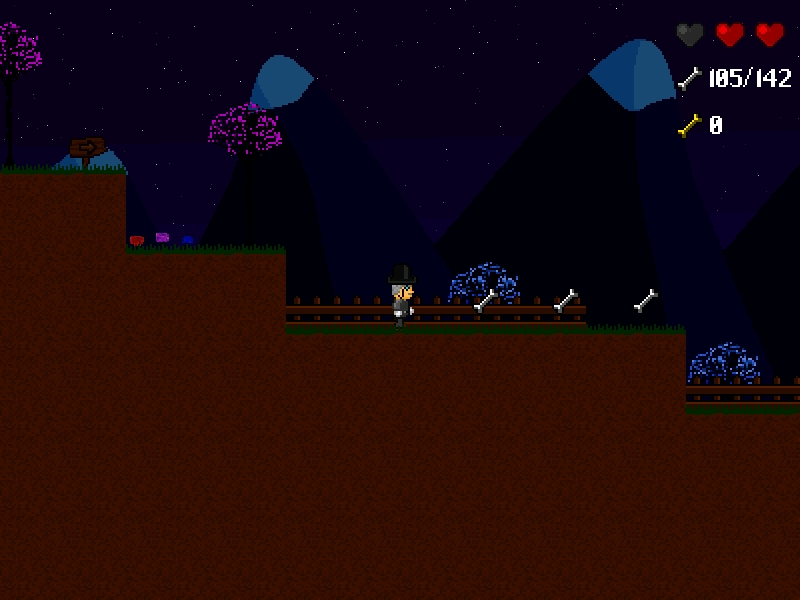
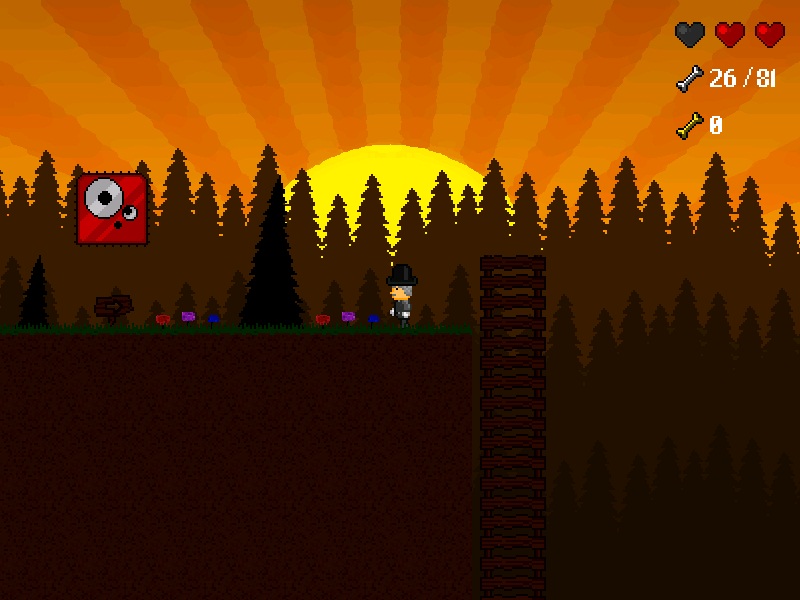
A Man With a Monocle is an adventure/platform game developed by Neogen2 Creations for the PC. Follow Henry McAllister in your quest to discover the mysteries behind the Monocle and your ghost friend, Kain, while you go through many different and fascinating locations.
A Man With a Monocle is a story-based but at the same time old-school platformer, featuring over 55 levels coupled with countless challenges to overcome, alternative passages and many hidden secrets waiting to be discovered.
System Requirements:
Windows 98/ 2000/ XP/ Vista/ 7
Publisher:
Xing InteractiveHomepage:
http://amanwithamonocle.neogen2.com/File Size:
15.5 MB
Price:
$9.99
GIVEAWAY download basket

Developed by Electronic Arts

Developed by PopCap Games

Developed by Overwolf

Developed by BeamNG
Comments on A man with a Monocle
Thank you for voting!
Please add a comment explaining the reason behind your vote.
Please add a comment explaining the reason behind your vote.
iPhone app giveaways »

Just provide a width, length, depth and you’ll get an volume, instantaneously.
$0.99 ➞ free today

ChordMarker is a chord chart editor built for practice, rehearsal, and performance prep.
$0.99 ➞ free today

DueView connects to your iOS Reminders and turns your task habits into simple, useful stats.
$0.99 ➞ free today

$0.99 ➞ free today

$9.99 ➞ free today
Android app giveaways »

Collect recipes from around the world and create the ultimate food truck!
$0.99 ➞ free today

A strategic combat game about a forgemaster who accidentally awakened a dragon.
$0.99 ➞ free today

Embark on the ultimate cosmic journey in the premium edition of the hit space idle RPG!
$0.99 ➞ free today

$2.49 ➞ free today

An idle game where you adventure by collecting various weapons and powerful heroes.
$0.99 ➞ free today
That is very fascinating, You are a very professional blogger. I've joined your feed and stay up for in the hunt for extra of your fantastic post. Additionally, I have shared your web site in my social networks
Save | Cancel
Robichris: I can assure you that is a false positive, we never bundled any of our software with malware of any sort and we regularly check for false positives so we can contact the antivirus companies to check the file with more detail and therefore see it's harmless.
Could you point out which antivirus software you are using/triggered the false virus alert ? Thanks in advance !
Thanks everyone else for the positive comments and constructive criticism, it is greatly helpful !
...................Moderator Comment...............
Thanks Mike for your reply. For what it's worth I ended up really enjoying playing this game and I'm not really into platform games. It's a pity that you posted so late becasue the community appreciate it when the developer makes an appearance during the actual giveaway. :) Keep up the good work. Maybe make some changes as suggested by the community them see what the community thinks again. :) Maybe add some boss levels just to break things up. :)
Save | Cancel
I downloaded this yesterday and played for just a few minutes before I had to leave for the day. It looks like an interesting game, and I will play it further, but I found the lack of information regarding the playing controls to be frustrating. Yesterday, I did not have time to read the full review (and so did not look in all the folders). A link in the menu would be very helpful. I am not a huge fan of using my keyboard and would prefer mousing controls. I also did not like that I was transported to the next level without warning as I didn't realize that I had not collected all of the bones necessary. I look forward to playing more of this game and I'm sure that my children will enjoy it too =). Thank you GGOTD for continuing to find games and thank you Whiterabbit for your always helpful information.
.....................Moderator comment.................
Thank you for your feedback
Save | Cancel
Had no problems w/ installing or getting the game to run. I've only gotten through about 5 levels, but am enjoying the game. I'm partial to platform games,so I didn't really have any big issues w/ the controls. I agree w/ Brenda about not being able to see below me. Some games have the controls set up so that if the up or down arrow is pushed you can 'scroll' up and down a bit. Either that or some type of map option might help. Overall, I'm enjoying the game! Thanks:)
Save | Cancel
I keep getting this with both full version and even tried the demo version.
This application has failed to start because the application configuration is incorrect.
Reinstalling the application may fix this problem.
I tried the full version.
I tried the demo version.
My PC runs Windows XP, I tried making a shortcut and changing
the compatibility modes. It keeps giving me that error.
I cannot get this program to run on my PC. Sorry.
Any suggestions? I still would like to try this game as it looks pretty fun.
..................Moderator comment..................
Try changing the screen resolution. Failing that don't ddelete the game and post this problem in the forums. There's a possibility that there is a compatibility issue with something you have running in the background. Try Game Booster first, which shuts off system/windows programs that aren't necessary to run the game. If that doesn't work try a clean boot. (Drastic I know but it depends how much you fancy playing this game
Save | Cancel
Love it when GGAOTD gets these kinds of games. This one reminds me a bit of Henry Hatsworth, one of my favorite DS games.
Pros:
-Pretty nice retro style graphics, fitting to the type of game it is. I particularly like how the background's lighting changes between levels as if time was passing. It's a nice added touch.
-Tight controls. I never feel like the controls are why I've failed a jump. However, sometimes collision feels a bit strange.
-Good gameplay. The levels are pretty straightforward, but searching around for bones adds a bit of exploration to it. It can make the levels surprisingly deep and interesting.
-Level editor adds replayability. Haven't tried it yet, but an editor's always a plus and helps keep the players' interest.
-Multiple difficulty settings also add replayability and allow players of different skill levels to enjoy the game.
-Intro does a good job of explaining enemies, bones, springs, etc.
-Likeable main characters and story.
Cons:
-Graphics can feel a bit like they're just cut and pasted around.
-No widescreen options.
-Minor spelling and grammar issues.
-Game glitched once and wouldn't let me exit the first level (had to restart it to get through). I haven't been able to recreate this glitch, however.
Suggestions:
-Allow the player to map their own controls.
-Show what keys (for the predefined layouts) each action is mapped to somewhere in-game.
-Possibly make it so that when the player holds up or down for a second or two, the camera scrolls up or down, respectively.
-Add a level select so players can return to previously completed levels without restarting the entire game.
-Make the level editor accessible from the game's main menu.
-Add some indication you're about to exit the level. I've exited accidentally before I was finished collecting bones.
Overall, it's an enjoyable, charming platformer with good controls (crucial to the genre, in my opinion). I personally like this game a lot. Thanks Neogen2 Creations and GGAOTD!
............................Moderator Comment.....................
Thank you for some superb feedback Angel
Save | Cancel
I just ran the 1.1 patch on their site since already have the previous version, first into the wrong folder then the correct one \ Games, now a little cleanup to do and it does seem to run okay , really scrambles my desktop shortcuts after it exits though. haven't been able to get to the levels where the bugs were.
............................Moderator Comment.....................
Maybe you should download the giveaway version and see if that works without scrambling your desktop shortcuts?
Save | Cancel
Please more Playrix!
Save | Cancel
Got this game from the last time it was offered but downloaded it to get the updates. It's fun retro grabbing bones game. I created the shortcut to the manual and the levels editor also. This should be IN the game..It Needs a help file in the game. It is way over priced too.
Thanks GGOTD and Neogen2 Creations for the game and That Wabbit for the great review.
@toris Thanks for "The game can be closed down by pressing ALT+F4"
@belgther Braid was in one of the Humble Bundle packages.
@APC Free Jill of the Jungle Games... Wabbit posted these"
[url=http://www.giveawayoftheday.com/forums/topic/9833#post-91469]Week 143 - Good Games to Grab - Jill of the Jungle - Jill Goes Underground « Giveaway of the Day Forums[/url]
[url=http://www.giveawayoftheday.com/forums/topic/9834#post-91471]Week 143 - Good Games to Grab - Jill of the Jungle - Jill Saves the Prince « Giveaway of the Day Forums[/url]
[url=http://www.giveawayoftheday.com/forums/topic/9835#post-91472]Week 143 - Good Games to Grab - Jill of the Jungle (Sidescrolling Platform) « Giveaway of the Day Forums[/url]
All these games are including in Wabbit's and others efforts for their game Project...Good Games to Grab. This is the game project that has been goin on for 3 years.
Another example is a game Chazzo just posted. Just go the link and see the screenshot..[url=http://www.giveawayoftheday.com/forums/topic/10489#post-95453]Week 156 - Good Games to Grab 3rd Anniversary - Dreamball 64 (arcade) « Giveaway of the Day Forums[/url]. You know you want to play it..
.....................Moderator Comment........................
Thanks for the feedback. Delenn; Dreamball looks like a very good ball rolling game that's simlar to Marble Madness. There are loads of excellent Sky Roads clones to be found in the forums,
Save | Cancel
RE: #13 joe,
Thank you Stephen. I will give it a look.
Save | Cancel
Fun but with this simplicity, it should have been an online flash game. Reminds me of super tux!
Save | Cancel
My Avast told me there is a threat when I downloaded this game! I hope it is a false positive as I have never gotten a game from this site that had threats before.
Save | Cancel
Hey, WR :)
Here is the change log from the company forum for the 1 to 1.1 version.
Version 1.1
-Improved player control
-Improved collision detection
-Dialogue and cutscenes can be skipped (including initial sequence)
-The game can be closed down by pressing ALT+F4
-Improved documentation for newcomers
-Fixed bugs in level 10,21,26,27,34,43 and 51
-Fixed unlockables access bug
-Fixed some minor bugs
Save | Cancel
Ran and installed fine on Win 7 Home Premium.
Meh... an ok game, but not enough going on to hold my interest.
Save | Cancel
Seems pretty interesting. On Normal you get infinite restarts. Game runs fast on my computer, but no idea why it takes so long to load. Also, there should be a better GUI for the editor so that you can select a level folder instead of shuffling files in and out of the temp folder.
Another improvement: make full screen setting apply upon going back to the main menu. Also indicate the button that you should press to move forward with the dialogue (it's jump, which is "X" in Keyboard 2 Mode). Speaking of keys, also have customizable key mappings. I'd like to use Space to jump instead.
................Moderator Comment............
Thanks for your feedback GMMan
Save | Cancel
Love the retro idea as I was a platformer fan in the Speccy/Atari ST(e) days. It seems to run a bit fast on my computer (quad core 2.3ghz, Win7 Pro x64) though the speed may be correct and it's me that's too slow. The controls don't feel quite right, but I am sure that's something I will get used to, and I agree with #2 Brenda about the "instant death" syndrome, which is totally unnecessary. I've only played 2 levels so far, so I am hoping there's more to the game than collecting bones.
................Moderator Comment............
Thanks for your feedback
Save | Cancel
The game installed and ran well on Windows XP and 7. About the story and gameplay, I should admit I have seen better games in indie genre. A Braid giveaway would be cool (although that's very unlikely to happen).
Save | Cancel
I miss games like this!! I only played 2 levels, but it reminds me of all the games my kids played (uh.. yeah.. right... JUST my kids ) back in Windows95 days! I'd love to see more games like this!
I'm hoping that, as I go along, there will be secret areas and bonus gems. And I'd like to get points for jumping on the enemies and killing them. Right now, it seems like all I'm doing is following a path to get the bones.
................Moderator Comment............
Thanks for your feedback
Save | Cancel
Played this first go time around. Improved but not a fan. Do note that in Options there are 2 choices for Keyboard control. I choose non default 2 and the X Z keys failed ingame. 1 is for 1 player I thus assume. Didn't read .PDF if in there.
Played into level 2 easily enough. But level 2 jumps got too twitchy leaping. from sky blocks. That's always a bugger in this kind of game. Well fell to death 3 times and then game dumped me to black screen & desktop. Win 7 x64 Ultimate. Plays 24" widescreen. Nice retro flair. If a fan 7 of 10. For me 3 of 10 where 4Elements is tops.
Thanks GOTD for these weekend treats.
................Moderator Comment............
Thanks for your feedback
Save | Cancel
Hi,
I have Vista Home Premium (2007) SP 2. The game seems to load and comes up with the initial screen. However, my cursor isn't present, and if I use the enter key when one of the options is blinking, nothing happens. I am able to go up and down the options with the arrows. Finally I tried to exit. It did not respond to ESC, so I finally used task manager.
What am I doing wrong?
Faith
................Moderator Comment............
I've not tested it in Vista yet, so don't know whether it's a Vista thing. You could try changing the resolution. also try compatibility mode. If you've not updated your graphics drivers in some time it may be a good idea to do that as well. I hope this helps. If you have any problems re-post here.
Save | Cancel
YAY!!!! A game that works for me. Not often the case. It seems like fun, although, I didn't play it much before writing this. I was just happy that it actually worked.
Great review as usual Stephen. You don't get enough credit for the time and effort you make to create the reviews that you do. It goes way beyond what a lot of people would do. Especially as a volunteer. Thanks for that and all the times you try to help me when games don't exactly play nice with my computers.
..................Moderator Comment.............
Hi Joe, did you read my reply to your last post in fishdom. there was a fix in the end, so, if you still have the game installed try it out. :) Just read my ammended review.
Save | Cancel
Controls need re-vamping. No list for gamepads that are compatible, when I switched options to gamepad, (mine is a high end one, this is first time it didn't work) mine didn't work, and was unable to change ANYTHING even to go back and change options to keyboard. Only way out was control/alt/esc. Should have mouse options. Original reason for trying to change input was not being able to grab the ladder to climb up. Right now, huge thumbs done. Looked like it could be fun, but controls need some standardization and add a mouse option. Thanks anyway GOTD.
Save | Cancel
Very Donkey Kong - but fun for my grandson (5 yrs) - would be better with "mouse control" as well (even if just for menu and basic maneuvers) - all-in-all - not bad
Save | Cancel
Uinstalled... I would never pay $10 for a retro game like this ! I have layed those away decades ago ! Why make something that you can get for free ? Is it a Trojan horse from some old hacker dude ?
Save | Cancel
Downloaded and installed fine on win7 home - plays well on my hp mini for those of you who use the minis it does fine with the graphics card. I would like to suggest to the developers to also make the mouse a controller option. Played 2 levels, enjoyable game, love the old time graphics feel. Great game thanks neogen2 and ggaotd, and to stephen for his reviews as always
~wildspirit~
.................Moderator comment.................
Thank you for your feedback.
Save | Cancel
I have tried it the last time I could download it. (I don't remember the date.)
It's a good game with nice graphics.
Good difficulty as "Jet Set Willy"
Thanks for the game.
Save | Cancel
Installation in to XP SP3 fine and without any problems.
I enjoyed this. It took me smoothly through each level, slowly increasing difficulty allowed me to progress with a sense of achievement. You have to collect all the bones before the level is complete. You get a gold bone on completion of this. I used to enjoy the old Duke Nukem 1+2, Jill of the jungle (old apogee games under DOS). This is of the similar ilk under windows. Will play until completed.
.................Moderator comment............
Thank you for your feedback APC :)
Save | Cancel
just a note:
there is a full manual included in the game directory in pdf format.
.................Moderator Comment.................
Thanks nektar, I forgot to mention that. :lol:
Save | Cancel
Wish there was a way to make the game controllable with trackball instad of keyboard.
...................Moderator comment...............
Have you tried changing the controller to gamepad and seeing if the trqckball works with that?
Save | Cancel
Downloaded this as it looked like the sort of game a friend's daughter likes playing on my computer.
But when I tried running it, I had a warning pop up from one of my security programs it was trying to capture my screen! I removed everything from my screen and permitted it to do so. Then Windows reported the program had stopped working. Repeated attempt had same result.
I don't trust this software and am removing it.
...................Moderator comment.......................
All games given away are thoroughly tested using several security programs to make sure all giveaways are safe and malware free. The game giveaway has been giving games away since December 2006 and there has never been a problem. Some users do report hits by various AV programs but these have always been false positives.
Save | Cancel
Cannot start "a man" on XP 32bits: improper congiguration
.......................Moderator Comment.....................
Try redownloading and installing. It worked with no problems on the XP (with SP3) 32 bit system that I run for testing these games. If that doesn't work try changing your screen resolution temporarily to see if it works.
Save | Cancel
Nice game... thumbs up from me. Lots to explore, the pixilated graphics works for the retro feel of a late 80s title, somewhere between Mario 1 and Mario 3. The first enemies were hard to see (even on a 20" full screen)... made me miss the goombas. Controls are stiff... no momentum in moving or jumping (the controls respond instantly to your every keystroke) which makes the game feel a little plain. I hate having to die because I don't know if is a hole below are ground: never had this problem in any of the Marios. Value wise, I would be thinking somewhere at or below the $5 mark for what is out there now.
......................Moderator Comment..................
Thank you for your feedback Brenda, much appreciated. :)
Save | Cancel
Developers rely on good feedback to improve their games. If you download this game please take some time once you’ve played it a while to leave some constructive feedback either positive or negative. The more constructive feedback we get, the more likely developers are going to give more games away. The giveaway site already has a very good standing with the search engines. Developers want their products out there on the WWW, this site has the potential to do that. The game giveaway project gives away on average between 9 to 17 thousand downloads for each game depending upon what genre and how obscure the game is. That’s a lot of homes these games are being downloaded into and a lot of 'potential' cash that’s being lost by the developers. If we get better games because of better feedback, the community are likely to continue to benefit from the generosity of the developers. Satisfied community members are then more likely to visit the home sites of those developers and purchase games that they may not have bothered with before they discovered the developer via the game giveaway site, thus giving the developers more incentives to give away even more decent games.
Problems installing, activating and running today’s game:l>Please leave some feedback once you’ve checked the game out. It can be positive or negative, but please explain why your reasons for the feedback you post. You could also leave suggestions for improving the game, for example, this game could do with more block types for the levels editor, add more power-ups, describing the ones you think would be suitable, add some mini games (which seem all the rage in some arcade games now) or enable the user to be able to change the in game music easily.
Thank you in advance to all those who take the time to post a constructive comment.
Regards
Whiterabbit aka Stephen
If you have difficulty downloading or activating the game you can try again later or do one of the following - for example once downloaded when you click on the dual activation and set up file you may get the message “Failed to connect. Please try again later” Check to see if your internet explorer isn't offline (thanks to MrSnoozles/Mike and GMMan for that fix). If the previous suggestion doesn't work go check out previous comments from the last several weeks and look for comments from GMMan and Mike. They have also posted their possible fixes for this problem.
Mike suggests that you check to see if Internet Explorer is offline (even if you use firefox). If it is make sure that it's online thn try again. I’ve always tried re-booting my modem and/or router with some success, though Mike has said that doing that does nothing. Still, it’s worth a try if all else fails.
Other fixes include changing your screen resolution, installing the latest direct X (remember thta XP uses DX 9 or earlier only, Vista uses DX 10 or before and Win 7 DX11 or before). Also try updating your graphics drivers. The main two chip manufacturers are NVIDIA and ATI both of which offer driver downloads for free. Just go to the respective manufactures home page and you'll find a link to the driver download page. To find out which grapic card or graphics chip your computer uses type in dxdiag in the search field (Vista or Win 7) or the run command (XP); this opens up the directX diagnostcs panel. click on the display tab and look to the left panel. You should easily see what graphics card or chip you are using. (This is required information when selecting the correct download from the develoers site).
A Man with a Monoclel>:
Installationl>:
A Man with a Monocle downloads to a 15.5Mb zip file that unpacks to a read me with terms and conditions and a dual setup and activation module. Once installed the file size is 24.7Mb. The default installation location is as follows:
C:\Games\A Man With a Monocle
There are no shortcuts installed so you'll have to create your own. If you want a shortcut in the Start Menu/Program folder you're not sure how to create a shortcut in the start menu/programs folder you can find a short tutorial in the game discussion forums that tells you how to create one. The game works on Win 7 Pro and Ultimate 64 bit and XP Pro 32 bit. I've not tested it on my Vista platforms yet. (May do so later if I have the time). Today's version (v1.1) is an updated version from the one we got last year, for examle you can now skip cut scenes like the one at the beginning of the story. Previously you had to sit through these scenes. I've posted the full change log at the end in an addendum. There's no uninstaller provided; however, to uninstall just delete the installed folder and shortcut that you created. It's a free standing game so there's virtually no registry entries involved (apart from installation entires).
Introductionl>:
Today’s game giveaway was previously given away last year (Nov 20th 2010). It received a positive 35% out of 355 votes. You can check out the 35 comments HERE. Please excuse any inconsistencies in my review below that do't take account of the changes from v1 to v1.1, I don't have the time to search and edit them out at the moment. :(
reference: accessed HERE on 19th November 2010
The Gamel>:
The main menu is navigated by the arrow keys. To select from the various choices in the main menu use the up and down arrow keys. To toggle between full screen and windowed mode use the left and right arrow keys. Selections are automatically saved. The main game is the story mode with other modes available once unlocked. Those that require unlocking are greyed out; The Custom Campaign mode is open at the start of the game but Iron monocle and Charles's Story are closed. To open these you need to earn an unspecified number of golden bones, to earn golden bones you have to find every white bone on the level that you are playing.
Once you’ve selected Story mode you can select your difficulty from Normal, Hard and Hardcore. At the start of the game you have to watch the story unfold, which can take a few minutes. There seems to be no way of avoiding the story. As each dialogue finished you can proceed to the next one by pressing enter or X. Once the game starts proper you have to collect bones. Each level has a specific number to collect. Once you’ve collected the correct amount you are awarded a golden bone which will replenish your life as well as go towards unlocking new game modes (beware the end of each level as you can be transported to the next level with no chance of returning to complete your collection of bones). Apart from the first level, levels are inhabited by various enemies (10) that you must avoid or kill by jumping on top of them. If you touch any of these enemies (apart from jumping on them) you will lose a life. You can also lose lives by falling to your death especially when walking on unstable ground that collapses under you after a few seconds. When walking to a ladder you can immediately climb, but if the ladder is going down you need to press either the up or down key to grab a hold of the ladder or you will fall. to dismount from the top of a ladder you have to use the jump key (X). You can pick up new lives occasionally as power ups (in the shape of a red heart) and there are jumping platforms that enable you to make extra-long jumps. You'll also find locked doors of various colours (violet, blue, green and brown) that require the same colored key to open them. Keys are usually found in secret chambers). The maximum number of lives you can have is three. Once you lose a life you restart the game from the beginning of that level,or where you left it previously (when ending the game. Beware when restarting a game not to choose new game if you have already progreesed through part of the game otherwise you will lose all of your progress. When you lose a life and have to restart from the beginning of a level you still retain the bones that you collected (which IMO rather defeats the object of having lives in the first place). To the top right of the playing arena you can see how many lives you have plus the number of white bones you’ve collected and the number you require to complete that level. There’s also an indicator telling you how many golden bones you’ve collected.
Look for secret areas; these are usually signposted discreetly, and seemingly point to nowhere, but you'll find you can walk through what look like blind endings to secret compartments. Sometimes you cn disappear along the top of the screen but there will be hidden bones so make sure you walk your character as far as you can before returning to the point where you disappeared. (I don't think it was my monitor that caused this becasue I use quite a large sized one (25") with the resolution set to maximum, so all parts of the game would show.
The game includes a levels editor which enables you to create your own levels. The different layers such as Main layer, background layer and objects layer are selected by clicking on 1,2 and 3 respectively. Each section has a collection of blocks. To select a new block such as grass, no collision walls or flowers use the mouse wheel to scroll through the various blocks that you can use. You can also select blocks by right clicking anywhere on the playing area and then move your mouse up and down to scroll through the various blocks. To place a block use the left mouse button, to erase a block use shift and left mouse button. The developer has created a section in the forums specifically for you to upload your creations so that you can share them with others. When I last looked (last year) there were no custom made levels uploaded, but hopefully with the number of giveaway community members that downloaded this last year, plus this years users we may soon see some custom made levels, all of which are free. I’ve posted a link to the developer’s forums below.
If you find the music annoying you can change it by replacing the .ogg files (5) found in C:\Games\A Man with a Monocle\Music\. You'll need to convert your MP3's/WMA or other sound files to ogg and rename them to the files you are replacing. As a precaution I'd back up the original sound files, but if you don't and a problem does arise you can always download the demo from the developers site; though be sure not to install the demo over the full version.
If you have any problems running the game please post in the developers forums which I've linked to below. You will need to create an account. I posted a review in the giveaway forums last year which you can post any problems that may arise or even to let the community know that you've uploaded custom levels with download links. You can find the forum post HERE. :) There is a PDF document in the games folder which tells you everything you need to know about the game from what's it all about, the game keys, options and the editor.
Modes of Playl>
Story Model>
Normall> - Accessible, not too hard, not too easy. You have a total of 3 lives.
Hardl> - More challenging, you have 2 lives and the only way to replenish them is to get a Golden Bone.
Hardcorel> - This is the hardcore mode. You’re hurt, you die.
Extrasl>
Custom Campaignl> – Play campaigns made by other people. The campaign must be copied/pasted into your “CustomCampaign” folder, in the game directory.
Iron Monoclel> – Unlockable by finishing the game in the Hard or Hardcore modes. You have 3 lives, but if you die it’s gameover and you can’t restart your game again.
This mode has exclusive levels that aren’t in the Story Mode.
Charles’s Storyl> – Unlockable by finishing the game with at least 20 Golden Bones in Normal mode. In this mode you can play with Charles as the main character, you have only 2 lives and finite restarts. You start with 3 Golden Bones, every time you die you lose one, once you lost them all its game over and your save is wiped out, with no restart possible.
This mode has exclusive levels that aren’t in the Story Mode.
Control Schemes and keysl>:
Keyboard 1l>:
Keyboard 2 (default) l>:
Gamepadl>:
Keys for Editorl>:
Moving Platform
Featuresl>:
• A unique and unpredictable story
• Old-school platforming action
• Travel across many different and fascinating locations
• Over 55 levels full of secrets and hidden passages to discover
• Un-lockable game modes and a new playable character.
• Create and play new campaigns for the game
• Soundtrack written exclusively by Swedish composer Johan Hargne
• And much more !
Imagesl>:
You can see about 30 images as a slideshow HERE
A Man with a Monocle Forumsl>:
You can find comments and a place to post bugs and other issues as well as making suggestions to improve the game via the Developers forums. It only take a few moments to register and then post your comments, so please if you do have any suggestions please take the time to post in the developers forums. Who knows, we may get a much improved game if enough community members take the time to post their ideas and bug reports. Thanks.
Alternatively you can post comments, suggestions and bug reports over in the game discussion forums [url=http://www.giveawayoftheday.com/forums/topic/8876#post-85507][b]HERE[/b][/url]. I've placed a return link in the forums to make it easier to return to this comments section.
What other reviewers are sayingl>:
• "One of the best stories I've ever seen in a indie game"- GamerGround (8/10)
• "It's more of a steal than a deal, and should be snagged up immediately" -HarryBalls.com (4.5/5)
• "AMWAM has a lot to offer to fans of the tried and true side-scrolling platformer" - IndieGameReviewer (3.5/5)
Conclusionl>:
The game is reasonably well made apart from poor instructions on how to play the game or use the levels editor, though if you look in the games folder you'll find a PDF file that explains just about everything you need to know. The developer should include a link in the options menu to access this file. There are lots of challenges, secrets and a couple of modes (which unfortunately I wasn’t able to test as the demo I used to write up the review when I wrote this last November doesn’t have access to them). The graphics are retro 90’s style which may put some off, but I would recommend downloading the game and checking the game play out for yourselves as this is one of those games I think you'll either love or hate. As platformer’s go this is about average IMO; however, I’m not the best person to ask as I expect something very different from the usual run of the mill platformer’s (hmmm, what’s normal about platformer’s, lol) before I get interested in playing one. I'm not overly enamoured of platform games anyway unless they have something very special about them, for example Gish, Wik & the Fable of Souls, Trine, Aquaria, The Undergarden, Doc Clock: The Toasted Sandwich of Time and Gumboy Crazy Adventures (to name just a few that I like). There is quite a lot to this game, but it's slow to start and may give the impression of being shallow and uninspiring. The game is anything but if you are willing to invest some time in it.
The inclusion of a levels editor and the ability to share custom made levels with other owners of the game via the developer’s web site is a big plus for this game as it should extend the life of the game in terms of replayability. Unfortumnately I couldn't figure out how to save the level I created, (well edited as you get a preformed level when you start the level editor and have to edit the various tiles that are available).
I originally gave this game a six out of 10, but I persevered with this game when it was first given away and found it a lot more entertaining that when i'd first played it. So I'm updating my original score of 6 to 7 out of 10. I think the game deserves it. There's more to this game that at first seems, which lead me to change my mind over the scoring. That plus the ability to create your own levels quite easily means that this game has quite a good replay value.
I did find that that automatically being transported to the next level when you ran up against the end of the level annoying when I'd not completed collecting the required number of bones to win a golden bone, I don't remember there being any warning that it was the end. You require golden bones to regenerate your health and help you open up new modes; which isn't possible if you are transported to the next level before completing the quest to find the right number of white bones. It's definitely a problem that needs addressing (IMO); maybe by placing a sign at the end of the level that says something like ‘Point of No Return' or 'To the Next Level'; that would enable players to turn back to collect more bones if needed, though it's not possible to return all the way to the beginning because some areas are blocked simply because of the way the levels are designed. This could be overcome by including a reset button that takes you back to the beginning of the level.
I'd also consider adding a levels map so that you can see your progress and make it so that you are allowed to replay any previous levels. There is no access to the levels editor via the main menu; to access it at present you have to create a second shortcut; which needs to be added to the main menu. Also a help menu would be great. In it you could explain the basic game play and instructions on how to use the levels editor as well as explaining how to upload the levels to your ftp and how to incorporate other player’s custom made levels into the game; (not everyone knows how to do this).
The storyline at the beginning of the game needs to be shortened by placing all the dialogue onto one page rather than trying to give an appearance of a conversation. Though since the developer updated the game to include the ability to skip cut scenes it's no longer a hassle.
For me something’s missing from the game. The basic game play is there, but there's nothing special about the game that would distinguish itself from the countless other platformer’s that are available either as commercial or freeware alternatives. You need to add something extra special that will make this game stand out. The name is definitely unusual and implies a different sort of platformer, but IMO it doesn't deliver on that impression. I'd also consider lowering the price to $5. You can get some excellent games from places like Big Fish and Gamehouse for less than the price you are asking, and there are hundreds of freeware platformer’s some of which are ‘much’ better than this game (check out the link to Caimans Games).
Alternativesl>:
There are several decent platformers available from the arcade section of MyPlayCity including a new Turtix adventure called Turtix: Rescue Adventures:
MyPlayCity
Also more commercial quality platform games are available at Gametop; (there’s no specific section for platformer’s so check under arcade and puzzle games). Finally you’ll find 540 freeware platform games over at Caiman Games, some of which are excellent and of a very high standard. You can also get older platform games from many of the abandonware sites such as Abandonia, GamesWin and The Game Archives (just a selection of the growing number of Abandonware sites. A lot of the games from these sites do require DOSBox to work. You can find a short tutorial on how to set up DOSBox in the game discussion forums.
Here's an additional Abandonware site that lists loads of Old School Platform games
Addenduml>:
It seems I was wrong about the versions being the same. You can now skip the cut scenes unlike with the first version given away last year. this is a big improvement on the original. The following is the update log:
Version 1.1
-Improved player control
-Improved collision detection
-Dialogue and cutscenes can be skipped (including initial sequence)
-The game can be closed down by pressing ALT+F4
-Improved documentation for newcomers
-Fixed bugs in level 10,21,26,27,34,43 and 51
-Fixed unlockables access bug
-Fixed some other minor bugs
Save | Cancel