Every day we offer FREE licensed software you’d have to buy otherwise.
Game Giveaway of the day — The Sandbox of God: Remastered
The Sandbox of God: Remastered was available as a giveaway on August 14, 2010!
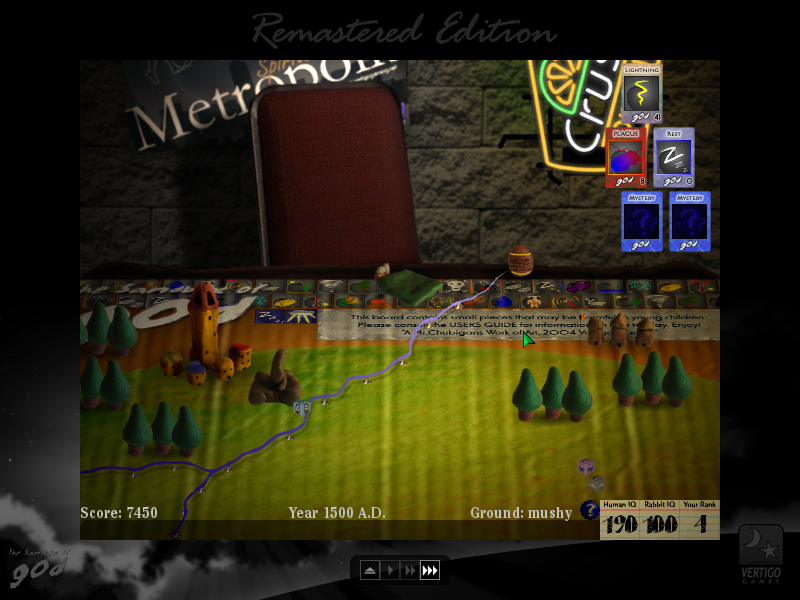

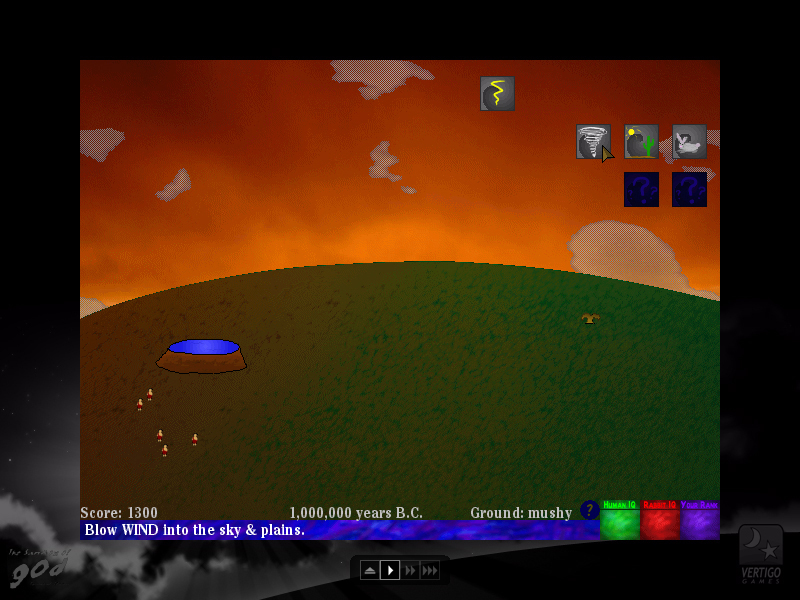
The Sandbox of god is a puzzle at heart, where every decision you make affects your outcome in the end.
For instance: You can use each godly power only once. So say you use the rain function. Then you make a comet hit the earth. The ground, being mushy, allows the comet to get stuck in the ground and become a mountain. But if you use the comet function first, the comet will leave a big crater. Then by using a rain function, you can fill the hole with water, making a lake.
Originally released in 2004, this new version of the game adds a whole new graphical interface, new sound and music, two new modes, extra features and more!
System Requirements:
Windows 2000/ XP/ Vista/ 7
Publisher:
Xing InteractiveHomepage:
http://www.vertigogaming.net/blog/2010/01/05/the-sandbox-of-god-remastered-now-available/File Size:
15.9 MB
Price:
$3.95
Featured titles by Xing Interactive
The Oil Blue is an indie action sim where you explore the world's oceans in search of oil, landing on abandoned oil outposts and reclaiming them under the watchful eyes of a major energy company. Download the demo and see why reviews from sites such as About.com are saying it’s "...a rich and rewarding experience that’s really unlike any game out there."
GIVEAWAY download basket




Comments on The Sandbox of God: Remastered
Please add a comment explaining the reason behind your vote.

iPhone app giveaways »





Android app giveaways »




There seems to be a bug. I can defend against the plague, save the farm and increase IQ, but the checklist does not show Plague Defended as completed.
Save | Cancel
Avast antivirus don't let me download the game.
It says it is a threat.
.........................................Moderator Comment..........................
all games put up by the giveaway yeam are tested throughly. Your security is either too sensitive, or you got a false positve.
Save | Cancel
played the older one, although it is difficult and short, had to play for hours as I have to get it right.Amaturish but fun.Would not buy though, would rather buy a better callibre game
Save | Cancel
Re #16... I altered the resolution, went 8x6, tried several other settings and got nowhere on any of them. Using XPsp3, perfectly normal setup, and it's unfortunate. Kept getting "problem with the program.." and gone. Wanted to play it, but just not working for reasons I have no idea... Gonna delete it and shrug. Any further ideas?
..............................Moderator comment...................................
Have you updated your DXDiag recently? Otherwise I'm out of idea's, sorry.
Save | Cancel
Well, isn't this a fun little game...installed and ran fine under Vista 32 on my laptop - always a plus being able to run a game on the laptop. No problems so far, but I DID go to the developer's website first and read up on the game - something I try to do with ALL software given away here. What did I find there? Well, to speed up turns just press the little "fast-forward" buttons, for 2X and 3X speed-ups. To exit the game just hit the "Esc" key, then choose "Quit" from the menu. So simple, but if I hadn't gone there to read I wouldn't have known. (I also copy any pertinent material or dload helpful materials if available, and create a shortcut to the software's most informative page and save that in the software folder so I can easily find it again) Now that isn't very hard, is it? Sometimes I read these comments and think - what ARE you thinking? How can you have such basic problems and NOT find a solution, but then, I'm an old-school geek who learned computers in the days of DOS and that does give me a bit of an advantage, at least in how I think about computing, mainly, learn all I can about the thing before I try it out! If everyone here did that, I think we'd have a LOT more helpful comments, rather than the complaints that pile up...
Having got THAT off my chest, this IS a rather simple little game, but it's certainly NOT for everyone, IMHO. If you like god-games, this one can be fun, although the gameplay is basic (consisting mostly of making choices from the limited ones presented), you do have a chance to think about what you'll do next and then see the results, displayed in rather simple graphic form - in my case, in a window since I won't lower my screen res to the native 800x600 the game chooses, and selecting "Fullscreen" makes it look stretched. Beyond that, I've had NO problems, and rather enjoyed playing it, at least in the basic game because I haven't tried the new board or war options yet. All in all, this one's a keeper, because it's the kind of simple game I can play while I'm thinking about something else, and still enjoy the game.
How would I improve it? Maybe convert the choice-boxes and buttons to 3D instead of the flat colored rectangles they are now. And perhaps improve the images - the meteor sequence is a hoot, for example - and that wouldn't take much to do while improving the look of the game.
All in all, one's a keeper for me; I enjoyed it, it doesn't take a lot of skill or brainpower to play, and I'm sure to spend hours playing it and trying the other possibilities. I only give it a 3 out of 5 because it IS rather primitive, but if you're into simple god-games this one fills the bill nicely.
.............................Moderator Comment.................................
Thanks for the mini review. Some good idea's for improvement there. I agre about the flatness. an upgrade to 3D could improve the game greatly.
Save | Cancel
Nice effort, no complaints, just not my type of game, but my type of game is more like Doom circa 1993, and only in God mode, so...;p
As for the lack of game GOTDs, I can well understand the lack of participants for the reasons given, and I don't see the need for a daily game GOTD anyway, a weekly one is fine. However, I can't see why, if you guys go after the smaller developers and get them to give a fairly new and polished game away as more of a beta test than a finished product, in hopes of attracting customers to the rest of their line, and the GOTDers understand that their feedback should be constructive and explanatory, it shouldn't work?
In all honesty, most of the regular GOTDs are just the same old s*** rebranded, and even though most of the game GOTDs are fairly old, I still look forward to them since they are always a pleasant surprise and worth a try.
..................................Moderator comment.............................
You can get all the old Doom games at the moment from Steam at a decent price. Great to revisit the old game.
Save | Cancel
@2 way to go- complaining about getting a cool FREE game.
@3 try again- being God takes practice for us mortals.
@1 thanks Stephen for another great post, BIG thanks to VERTIGO & GGOTD for the offer, this is a keeper!
Love- KT
Save | Cancel
This game is very similar to the flash games at Eyemaze (http://www.eyezmaze.com/). You pick from a set of options and the outcome changes based on the order you choose.
Boardgame mode seems to be the same as classic mode, but with different graphics. Both modes move kind of slow, but the addition of speed controls helps. I didn't find Warfare mode to be as much fun as the other two.
Save | Cancel
@ Moderator in Laggy #19
I tend to agree with you both here. I must be honest I don't know the details of the agreement between GAOTD or GGAOTD with developers, but if you are truly going to be stricter on the moderation, then maybe you could delete the negative comments, and the comments that are negative but constructive, and pass those along to the developers. Reading some of these comments, it seems that some of the people are ticked off that they did not get a game similar to God of War or World of Warcraft - Look at what you pay for these games that the developers can spend millions on rendering, etc! I am not saying they are not worth it, but have some realistic expectations people. When games don't run, normally it is the users fault - for not updating their drivers, etc. Just like with a car, you need to change the oil, rotate the tires, check the air, and also know how to drive in different conditions. Compatibility mode was created for things like this game - use it! On the rare occasion that a game or utility is just 'awful because it does not work' I have seen the GAOTD team scramble to find a substitute and apologize for the inconvenience - it happens.
Bottom line is this. Developers do want to hear what people liked about the game as well as what they did not like, however some people are not meant to give advice because of their sarcastic, narcissistic, and unrealistic negative attitude will make any constructive criticism unwelcome because it is truly an attack that is showing how much better they are than the developer (sometimes). I guess I would like to say that regurgitation of the negative attack comments to a fair constructive criticism of the game would be a better way. This is not about censorship, but about improving a process, that we are part of. GAOTD users are, in essence, Testers in effect. Lets give good feedback, constructively criticizing when needed, and praising their time and efforts, along with the GGAOTD crew.
..............................Moderator Comment.............................
Well said Kevin. I couldn't agree more.
Save | Cancel
I too, got "An unexpected error occurred while running the game". Tried everything I could think of to no avail. Never mind, I probably wouldn't have liked the game anyway. Now uninstalled. Running XP Pro, SP2.
Save | Cancel
personally I do not read or care what other people comment. I download it and try it. If it is not for me I delete it. Whatothers think have nothing to do with what I think, or like, or want, or enjoy so i don't bother... most games usually have a website or an email that you can email the developers your comments about what you "think" might make a better game... but then again that is your opinion and not necessarly the opinion of others or what others might want to change in the game...
Save | Cancel
I think the problem with some of the comments is that if they slack the game off, others WILL think its not even worth their time to install the game to begin with.
I strongly suggest that every one should just install it and try it them self and see if they like it or not.
Moderators please delete any non-constructive comments cause they are just waste of spaces and do nothing for other people at all.
.................................Moderator comment..........................
I posted a note earlier this year stating that I was going to be much stricter in my moderation, only allowing constructive comments, but sometimes it's difficult to decide what is and isn't constructive. Some negative comments can be very useful to a developer.
Save | Cancel
Another excellent Vertigo game - thank you!
To find "The Sandbox of god" here, is like meeting an old friend again.
But my skills as an creator are evil-evil, well at least one rabbit survived ;)
Save | Cancel
It seems like it would be fun to play if only it went faster. It is exceedingly slow on my laptop and my desktop, running XP pro and XP home respectively. I got bored with waiting for the scenes to load and for the events chosen to act out.
................................Moderator Comment.....................................
The game runs fine on my system. It doesn't run slow, nor does it take long for any screen to laod. there has got to be something with your system thats causing the problem. Have you tried running game booster. that will shut down any background windows programs, plus any others you select that can be turned off. Once you're done playing you just click a button to return the computers services to normal. you can download Game booster via the following link for free:
http://www.iobit.com/gamebooster.html
Save | Cancel
I get.. "Problems encountered when starting the game"... Game installs just fine, but crashes on loading - OK, so I've downloaded it a couple of times, done the usual... and I get the same "Sorry, game doesn't work." What do I do now?
..................................Moderator Comment...............................
Try updating your graphics drivers. you didn't mention which O.S. you used. It could be a compatibility issue. try playing the game in compatibility mode. Also, if you have your screen resolution set too hight it may crash. The game wasn't designed to play on high res screens, with a default screen resolution of only 800 x 600. try reducing your resolution temporarily. If it works and you like the game it may be worth keeping and turning the resolution down whenever you fancy a game. Yeah I know, it's a little annoying, but some games are worth the effort. I'll post more suggestions if and when i think of them. i'm busy writing up tomorrows game. :)
Save | Cancel
An enjoyable game. I wish turns went a bit faster and that the writing on the blue bar at the bottom was not in blue.
Thank you!
Save | Cancel
Worked fine for me. I ran first in Win7 (64) then moved to my netbook and ran in Win7 (32). Both worked fine. I also used the escape key to get back to the menu where you can quit. I moved to my netbook as it looks better there due to the small screen size (800x600).
Save | Cancel
Excellent game from my friend David. I waited for ages for this new updated version. I've already got a copy of it though, but I appreciate the offering.
While the main game is indeed the same as the original, the extras alone are worth the price of admission. The childish graphics are intended as this more of a humorous type of game than a serious one (though I'm sure David would disagree with me there lol.) Thanks to Vertigo and GGOTD for The Sandbox of God.
Save | Cancel
I played a little and the game seems brilliant. Thanks.
Save | Cancel
unexpected error occurred while running the game.
I'd love to give more information, but that's all I got from it.
Uninstalled
Save | Cancel
@7 Phil K
I also did install it on Win7-64.
To escape from the game i pressed the Esc-button.
Then you can choose to quit.
Ootje
...............................................................Moderator Comment...................................
There's also an upward pointing arrow at the bottom of the game arena on each game mode that will take you back to the main menu where you can leave the game essily. :)
Save | Cancel
I also have problem when running in Win7-64. :(.
Save | Cancel
Win 7-64, played but didn't want to close. Had to use drastic measures to get it TO close. Uninstalled.
Save | Cancel
The graphics are childish but I think that is intentional. It doesn't mean they are no good, Picasso drew childish pictures. I used to have the old version. I haven't tried the new parts. I still find the game amusing and I'm keeping it.
Save | Cancel
damn, just bought this tuesday ...
But an excellent game defiently worth downloading :D
Save | Cancel
This game is very enjoyable. I'd almost managed to achieve all the landmarks in the freeware version, but I guess I'll start over with this one!
Thanks, people!
Save | Cancel
Excellent (shortish) little game by Mr. Chubigan, but in this version you get some extras that are not in the freeware version.
Crashed my PC when exiting in Win7-64, but running as XP SP3 did the trick.
Save | Cancel
the worst ever seen, childish graphics and very poor gameplay.
will wait for the next game giveaway...will delete this one ;-)
Save | Cancel
I just wish this was true; "Every day we also offer licensed games you'd have to buy otherwise, for free!"
:-(
Only the 2nd game this month, can't the GOTD game team be bothered much these days?
............................Moderator comment............................
I just found your comment in the spam folder, hence the late posting Yes they can be bothered. it's not for the lack of trying. The problem is no one wants to give their games away any longer. (i'm sure the many negative, non constructive comments has had a little to do with that, but the major problem is the ongoing recession we are in. Many game houses are struggling. Ony recently one of the biggest was closed down and many have been soaked up by companies like real arcade, who can afford to undercut the smaller buisnesses. also, some of the gamehouses now have their own giveaways, which limits the game giveaway even more. At least they do get games when they can.
Save | Cancel
Sandbox of God Revamped.
Introduction:Installation:
The downloaded zip file is 15.9Mb in side and unpacks to a dual activation and set up module (the file with the key image) and a read me document. To install and activate the game just click on the file with the key symbol which is orange in color, (may look light green if you’re color blind). By default the game installs to:
C:\Program files\The Sandbox of God Remastered
but this can be changed if you wish. The final installation size is 17.9Mb. A shortcut is installed to the desktop and the Start Menu program list. You can uninstall the game via the Start menu shortcut or directly from the installed folder.
The following are reviews and information from various sources. I’ve had such a busy week, that I though I’d save time by posting this information rather than write a full review of my own. I apologise for this, but I just didn't have the time to write one, (which is a pity because I really like this game). I’ve played the original freeware version of The Sandbox of God loads of times and loved it, so when the developer decided to remaster the original I was ready to purchase it just as soon as it was released. The game as stated by the developer is DRM free, which is great (and for those who don't know what that means, there is no online registration required for the purchased version).
In my opinion it’s a great indie game that's well worth the paltry sum of $3.95. However, today you don’t even have to pay for it. :)
The Game:
Today's remastered version of the game is built on the updated 2004 release of The Sandbox of God. The main differences between the freeware version (v1.52) and the commercial version (v1.56) are the latter remastered version has two new game play modes called ‘Warfare’ and the ‘Simulated Boardgame’ Modes. The game also includes all the updates made to the original freeware version such as using the latest Game Maker 8 engine instead of Game Maker 5; which basically means faster processing. There’s also a new save system and you can play the game in a slightly larger resolution than from the original; though when you consider the size of the average flat screen monitor now, the retro screen resolution of 800 x 600 seems rather absurd, but this is because the new version is just a remastered version of the original. You can play the game in full screen via the toggle in the options menu, but there will be a large black border filling in the area not covered by the game. If you wanted the game area to look larger, with a smaller black border you would have to temporarily reduce the size of your screen resolution via the properties window.
The options menu contains a music toggle, the windowed/full screen toggle, an erase data button, which enables you to restart the level and a go back button that takes you to the main menu. The main menu gives you access to news and updates as well as any patches that may be available.
I'm not sure whether the giveaway version will qualify you for updates due to the giveaway clauses that you can find in the read me that accompany the game in the zipped download file, but I don't see how that function can be omitted from the giveaway version. The best thing to do is contact the developer if and when an update has been made to see if it is possible. Choosing ‘New Game’ from the main menu opens up a new screen that gives you access to all three available modes, that is Classic Mode, Simulated Boardgame Mode and Warfare Mode. The news and updates button also gives you access to a spoiler free hints guide that is very useful for those new to the game.
.
.
Simulated Boardgame Mode:
You can still play The Sandbox of God: Remastered (SOG:R) in it’s classic style or switch to the new ‘Simulated Boardgame’ mode. In this new style, SOG:R simulates how one might play a board game version of the Sandbox of God in their basement using light gels, clay figures, blocks and cards, and Christmas lights. Switching between the classic style and the board game style can be done between rounds.
For help click on the question mark that’s situated next to the in game score card to the bottom right of the playing area. You will be prompted to go there when you first start the game.
The Sandbox of God Warfare Mode:
Quote by the developer:
When you choose the Warfare mode you can follow the online guide (via the menu once you choose the Warfare mode) by clicking on the online guide button, which explains what the Warfare mode is and lists all the different cards such as Lightning, Wind, Man, Earthquakes, Medicinal, Seedlings, Plagues , Comets, Explosives plus several more (see the three images below for the full list and explanations).
The objective of this game is to survive wave after wave of rabbits over the course of many eras, until man cannot defend themselves any more. There are many tools at your disposal to help you in this quest, so let’s break it down!
You’ll notice the store at the beginning of the game. You can buy powers from here and add them to your inventory. You can hold up to ten cards in a single battle round, assuming you have the game cash to purchase them. Any cards left over at the end of a round will carry over to the next round.
Your main city’s health is displayed over itself by a bar graph; you cannot place any items within the dotted radius, or move any units within those boundaries, (see the images above and below).
As you progress through each era, you’ll notice that you’ll unlock new cards. As your technology improves, so do the rabbits, so plan accordingly. You win money with every rabbit defeated along with a nice bonus for destroying their huts and cities.
Here’s all the cards available in the store:
Simulated Boardgame Mode:
You can still play The Sandbox of God: Remastered (SOG:R) in it’s classic style or switch to the new ‘Simulated Boardgame’ mode. In this new style, SOG:R simulates how one might play a board game version of the Sandbox of God in their basement using light gels, clay figures, blocks and cards, and Christmas lights. Switching between the classic style and the board game style can be done between rounds.
For help click on the question mark that’s situated next to the in game score card to the bottom right of the playing area. You will be prompted to go there when you first start the game.
The Sandbox of God Warfare Mode:
Quote by the developer:
When you choose the Warfare mode you can follow the online guide (via the menu once you choose the Warfare mode) by clicking on the online guide button, which explains what the Warfare mode is and lists all the different cards such as Lightning, Wind, Man, Earthquakes, Medicinal, Seedlings, Plagues , Comets, Explosives plus several more (see the three images below for the full list and explanations).
The objective of this game is to survive wave after wave of rabbits over the course of many eras, until man cannot defend themselves any more. There are many tools at your disposal to help you in this quest, so let’s break it down!
You’ll notice the store at the beginning of the game. You can buy powers from here and add them to your inventory. You can hold up to ten cards in a single battle round, assuming you have the game cash to purchase them. Any cards left over at the end of a round will carry over to the next round.
Your main city’s health is displayed over itself by a bar graph; you cannot place any items within the dotted radius, or move any units within those boundaries, (see the images above and below).
As you progress through each era, you’ll notice that you’ll unlock new cards. As your technology improves, so do the rabbits, so plan accordingly. You win money with every rabbit defeated along with a nice bonus for destroying their huts and cities.
Additional Information:
The original Sandbox of God was freeware. You can download that version from the following link:
http://www.vertigogaming.net/game/sandbox
Just look to the top left of the page for the download link.
According to Felix Atagong's unfinished project the freeware version seem to have had the hidden Easter Eggs removed, plus despite the update there has been no new content added. This means the original walkthroughs are still valid for the Remastered classic mode and freeware version all of which can be found via the following links:
Walkthroughs
Sandbox of God Walkthrough Part 1 - Walking through the Valley of Eden:
http://atagong.com/archives/2006/10/entry_292.html
Sandbox of God Walkthrough Part 2 - Bad Moon Rising:
http://atagong.com/archives/2006/10/entry_293.html
Sandbox of God Walkthrough Part 3 - Under the Vulcano:
http://atagong.com/archives/2006/10/entry_294.html
Sandbox of God Walkthrough Part 4 - I want to be a Little Fishy:
http://atagong.com/archives/2006/10/entry_295.html
Sandbox of God Walkthrough Part 5 - It’s the Final Countdown:
http://atagong.com/archives/2006/10/entry_296.html
Walkthroughs for the Remastered Version:
Spoiler Walkthrough by John of Jayisgames.com
http://www.vertigogaming.net/sogspoilerwt.txt
Non Spoiler Mini Strategy and Hint guide by chubigans:
http://www.vertigogaming.net/sognonspoilerwt.txt
Music;
It is possible to change the in game music if you find it annoying. Just follw the path detailed below:
C:\Program Files\The Sandbox of God Remastered\oggmusic
You’ll need to rename and convert the music you wish to use before changing it.
Alternative Games
Vertigo games are offering several games for free. Acid bomb and Acid bomb 2 which are precursors to today’s giveaway are a couple of them. Wizzard of Ozz actually posted some of the freeware Vertigo games last week as part of our ongoing free games for the weekdays project. You can find download links those games below:
Prisms of Light 1 & 2
You have to guide light using prisms (really!):
http://www.giveawayoftheday.com/forums/topic/5714#post-59959
Sandbox of God:
This game was recently upgraded and has been released as a commercial game for less than $5. The original version is still available as freeware though. I purchased the updated version and apart from some minor graphic enhancements I found little difference between the freeware and commenrcial version. You can find detils of the freeware version via the following link:
http://www.giveawayoftheday.com/forums/topic/4391#post-47148
and directly from Vertigo:
http://www.vertigogaming.net/game/sandbox
Vivid Conceptions:
A great platformer.
http://www.giveawayoftheday.com/forums/topic/5743
The original version of Shellblast called Acidbonmb and its sequel Acidbomb 2 can be downloaded from the following links. I’ve quoted the information found on the Vertigo gaming website for each of the games :
Acidbomb:
http://www.vertigogaming.net/acidbomb.php
Acidbomb 2: Rearmed:
http://www.vertigogaming.net/acidbomb2.htm
Quote:
There are several more free games from the Vertigo site, which have been posted in the free games for the weekdays project, so I’m not going to mention them here
=================================================================
Save | Cancel