Every day we offer FREE licensed software you’d have to buy otherwise.

$6.90
EXPIRED
Game Giveaway of the day — King's Smith
King's Smith is a new time management game. As a young apprentice of your grandpa you are slowly learning how to become a master blacksmith. Through your journey around a kingdom you will encounter many strangers and learn many new abilities that will help you to upgrade your armors and equipment even further. Can you fulfil your dreams? Will you become a King's personal smith? There can be only one! Prepare for challenge!
$6.90
EXPIRED
User rating:
260
45 comments
King's Smith was available as a giveaway on August 15, 2010!
Today Giveaway of the Day

Assemble a picture of certain number of puzzle elements.
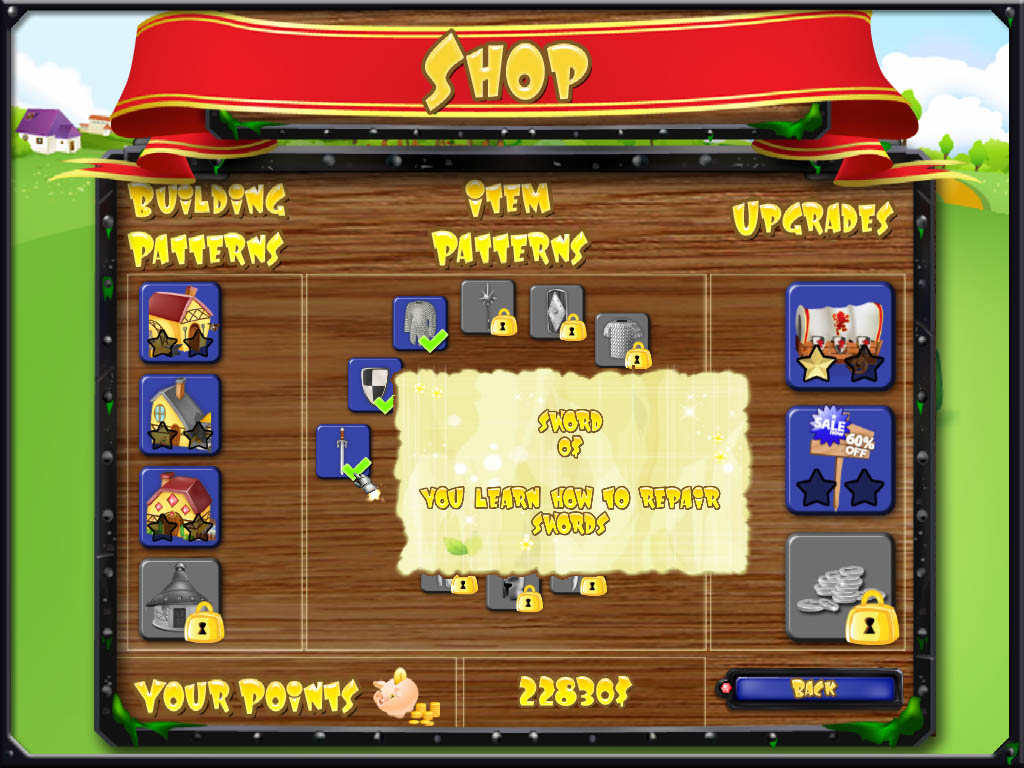
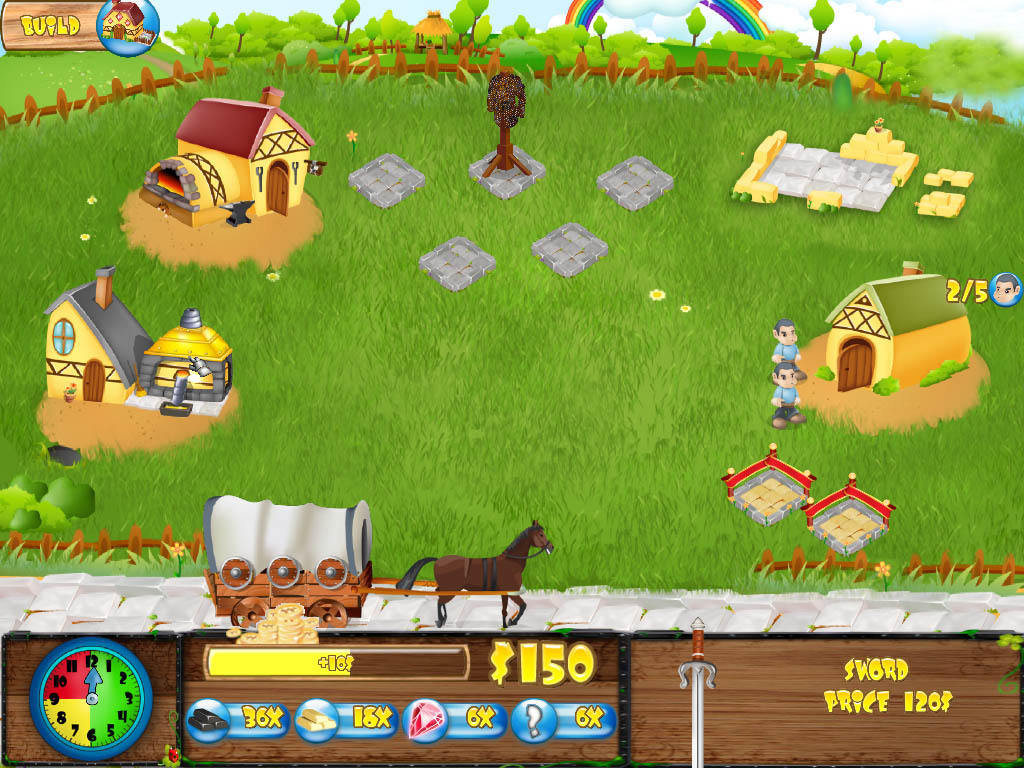

King's Smith is a new time management game. As a young apprentice of your grandpa you are slowly learning how to become a master blacksmith. Through your journey around a kingdom you will encounter many strangers and learn many new abilities that will help you to upgrade your armors and equipment even further. Can you fulfil your dreams? Will you become a King's personal smith? There can be only one! Prepare for challenge!
Key features:
- Manage your own smithery
- Buy new patterns, upgrades and bonuses
- Travel through exotic countries
- Repair unique pieces of equipment
- Become a master blacksmith
System Requirements:
Windows XP/Vista/7; 900 MHz processor; 3D graphic accelerator; 512 MB RAM
Publisher:
Xing InteractiveHomepage:
http://www.runningpillow.com/downloadKS.htmlFile Size:
59.7 MB
Price:
$6.90
GIVEAWAY download basket

Developed by PopCap Games

Developed by Overwolf

Developed by BeamNG

Play Facebook games in your browser without logging in.
Comments on King's Smith
Thank you for voting!
Please add a comment explaining the reason behind your vote.
Please add a comment explaining the reason behind your vote.
iPhone app giveaways »
$2.99 ➞ free today

Create Stickers from your favorite images, and add them to Telegrams sticker packs to use them in any conversation.
$0.99 ➞ free today

Create beautiful graphics, flyers, logos, infographics in as little as 10 minutes!
$2.99 ➞ free today

This app is an professional tool for learning and training of English letters.
$2.99 ➞ free today

Speed Up Video helps you changing the playback speed with ease, and with NO WATERMARK.
$4.99 ➞ free today
Android app giveaways »

$0.99 ➞ free today

A stunning action RPG filled with heroics, adventure, and a diverse assortment of creatures and fiends.
$0.99 ➞ free today

$1.49 ➞ free today

$1.49 ➞ free today

This is a unique circle icon pack with Squid's tentacles inspired design on the bottom.
$1.49 ➞ free today
Looks quite a cool game
Save | Cancel
I have 2 basic problems with this game. The first is that there is this sinister guy who sells you products for cheaper - apparently stolen? It is not teaching our children very good principles? We want to dissuade our children from buying grey products and stolen or pirate products.
The 2nd problem is, whereas the game starts in a rather innocent way, magic is introduced at a later stage, which is also against the Biblical principles which many parents are teaching their children - there are no upfront mention of magic being part of the game.
Save | Cancel
This is a great game..And this site can help you to have more strategies click here windows for games which you'll enjoy! We have more games..
Save | Cancel
Game is kind of fun. Not very deep, but entertaining. It has some grammar issues in the dialog that don't say much for the author's English, and for me the game starts to crash repeatedly around level 6-7, which is too bad.
Save | Cancel
Late reply but thanks for the game. I really enjoy it.
Save | Cancel
"I hope that I can drag items to somewhere else because new items are blocking the older items."
That pretty much sums up what i disliked in this otherwise really great game. Though i think the time limit is sometimes a bit too harsh to get the levels solved with a gold star. I will try to get all 4 bonus levels unlocked, but im already searching for a cheat i may have to use to do so when im out of patience. :)
Save | Cancel
My only criticism of the game: the English is appalling.
Save | Cancel
After playing again, I managed to pass, what I noticed is that it'll take the number of knight plates you have on display +1 or 2. The first time that I need to have 11 magical knight plates is because I have full 10 on display already. The 2nd time I play I only have 3 on display and the request was 5.
I also noticed another bug at the next level.
The level that you need to be faster than the other blacksmith at giving 50 repaired items to the cart. It seems that if you did not submit any armor to the cart, your opponent's bar will not start. Only when you submit the first item then it'll start.
Oh, and I'm using Windows XP, not wide-screen.
I finish playing the game.(did not play any extras)
My comments is that there are a few spelling mistakes plus the font is very hard to read.
Too little upgrades. Be more generous at it.
Personally, I don't like the cursor to have particles because magical items have particles too so the screen look too busy.
I hope that I can drag items to somewhere else because new items are blocking the older items. Or at least be able to exchange items/drop items off the display stand because most of the time I want something off the display stand to exchange with another one but can't.
Save | Cancel
Notice quite a few bugs while playing.
1. Music and sound volume slider does not work after clicking apply. The music and sound is at the same volume.
2. At the last chapter, 3rd level, the last request(I think it is the last request) the bad guy will ask for 11 magical knight plate to be displayed. The problem is there is only 10 display stand.
3. And still at that level. Because of that problem I cannot finish the game. When the clock is at 12 it stays like that. No game over.
Save | Cancel
It's one I *almost* bought when it came out. However the font and the tone of it put me off.
As a free game, I'm thoroughly enjoying it, even if the translation of some of the phrases is slightly off. I enjoy the game play - it's quite different from a lot of TM games, and I've only had to replay one or two levels to get expert. Another 10 to go and I'm finished :)
Save | Cancel
Nice game but the game stopped by level 7 or 8 end that is not nice i can not play further. I have vista on my pc.
Save | Cancel
No need to install java appears problem with shortcut
Save | Cancel
I GOT no java installed when using shortcut installed by game installer , BUT if make own shortcut or short game from exe in program files - the game works --
The shortcuts lead to same exe so got confusion here - so try making your own shortcut and game works!!
Save | Cancel
If you have troubles with java, dont use icon on your desktop to run the game. Run the game directly from the game folder.
.........................................Moderator Comment.......................................
It appears that this game is suffering from the same problem as Galacon by the same developer. Very weird.
Save | Cancel
game play is pretty fun, but the font really hurts the eyes. As in, it not only hinders ease of reading, but actively assaults the brain's neurons as it tries to decode. It is the combination of the font's colour (bright yellow), the caps with exception of "i", the irregularity of overlapping* , the invasion of each letter against the next**, and lack of spacing in between.
* in the word "ABLE", B lays on top of A, as well as L. Font would be slightly easier to read if each successive letter either lays on top of the next, or lays underneath, but not both.
** Some letters overlap at the top, some at the bottom, some don't at all.
Save | Cancel
Ok Win 7 Ultimate 32X. Cute little game. Ran right away. Rem to click on the various building sites that appear. So after smithy, there's a goldsmith to build. Upper left corner indicates to build one. So click on the building site itself just below first smithy.
You'll see a quick black square smear & building begins, done fast.
I had assigned 3 of 3 guys to work first smithy. Could seem to adjust
that labor count thereafter. But when a sword or shield is processed
by first smithy, drag item onto goldsmith bldg & it gets all fancy for better price. Haggle a bit helps but not sure if various buyers
have set patterns. Sometimes your No gets better offer 1 or 2 times.
Most often they just walk away. Shields do well. Don't take low ball prices or you might get a string of them.
Fun busywork game w/ biz twist. Might seem too much like work for some esp if a stock broker or trader. I can see a market maker tiring
of it fast. Thanks GOTD.
Save | Cancel
Looking in the folder where the game installs it crashes due to java errors extremely frequently. STrangely it worked for me immediately after install on one of my computers, but since then it just loads up and crashes... ALOT not even at the same time. Glad I didn't pay the full price.
Save | Cancel
-Stephen:
received new key - not working.
saw message regarding your PM and - can't access it!
please try to reset it manually or contact me via e-mail.
Ouch - I need to contact goodgaotd! Hand him my mail, please.
.............................Moderator Comment.......................
I tested the new password and it let me into your account. I'll redo it in the morning. It's very late and I need to get to bed (past 3am). I'll Email you.
Save | Cancel
King's Smith works well on Linux Ubuntu 9.10 with Wine 1.2.
I had to do 'winetricks vcrun6' first, and then install Sun's jre, but after that the game runs fine.
Save | Cancel
installed well on windows xp sp2.
after playing about 6 levels the computer restarted,
I don't know why....but it had something to do with Java.
this game installs an older version of Java...
Secunia warned me with a popup....saying this Javaversion has to be patched. I tried to remove the older version, but that did not work.
I reinstallated the game....
now my computer works ok again.
I think this game should be offered with the newest Java version.
I like the game....it'a pity.
............................Moderator Comment............................
Thanks for the info Alicias
Save | Cancel
Before downloading I tried to reinstall it to see if the full screen vs. windowed mode was an issue. It ran right from the reinstall in windowed mode. I quit the game and attempted to re run it using the desktop icon, and I get the Java error.
Very strange.
..........................moderator comment....................
Both games given away by this developer seem to have problems playing on some community members computers. i can still only flay the last one by clicking directly on the executable. whenever i create a new short cut it wont play. Thankfully it's worked fine for me so far; but i will be installing win 7 soon. I'd be tempted to actually buy this game, but not sure due to the problems.
Save | Cancel
Works for me in Win7 x32 and x64 (desktop & laptop). Like Sorrow (#2 above) I also do not care for the font. It should be easier to read. Also, I found the music volume changed from song to song. It should be a more consistent volume as it is just background music. My initial impression of the game play is positive.
Save | Cancel
Oddly enough, the game seemed to run just fine up until I asked it to run in Windowed mode. When I restarted it started giving me the same "Need Java" error.
I'll check out installing the additional Java version(s?) I need.
Save | Cancel
The game is a little wrong on widescreen monitor. The start screen and such are fine, but in the game the interface can disappear at the side.
This is mostly on the left side at the top area.
Otherwise, it is running fine on my computer,
Win 7 64.
It is a fun game to play.
Save | Cancel
Hi, Stephen.
Hope you see this...
Having problem accessing my account on forums. Knew on your problem with personal account hacked, that's why I haven't mailed you on this matter.
Please help me out!
Thanks.
...........................Moderator Comment.........................
I'll see what I can do. I'll Email you using the email I see with this account.....
Edit.....
In fact I went into your account and changed the password for you. You'll now be able to log on using the new password, which is the first part of the email you used to register the account beginning with o and ending in z, there's a number spelled out in the name as well. Let me know that it worked for you. I'll email you later just in case you didn't come back to the comments section.
Save | Cancel
This game need to check the size of window, it is default is way off the window only see left side of window and cannot see right half side of window, so do not know how to set the size of the window.
Save | Cancel
If you don't want to be bothered trying to install a new version of Java, try double clicking on ks.jar in the program folder. I'm not sure how well it works, considering that it probably should be launched through she.jar (which returns an error if you double click it), but it did work for Galatron.
About the game: Unfortunately, I was unable to load the game. To clarify, the game loaded about 75%, and then I decided that I don't want to wait for it any longer. Checking Process Explorer, the game uses up 467 MB of RAM at that time. Now, my computer is a bit old, and has only 512 MB of RAM, so you can see where the problem is.
Other time management games I've tried will load in about 20 seconds, while this one goes on and on and on. Same experience with Galatron. I wish the developer would use a language capable of being compiled into a native machine language executable, but if it's the only language they know, you can't do much about it. (After all, I can only program in AutoIt3.)
If you'd like to save a bit of space, delete the jre folder from the game's folder. It's just another copy of Java, and from all the problems above, it seems the game doesn't use it anyways.
................................Moderator comment.........................
Thanks for the info GMMan.
Save | Cancel
Thanx guys for finding a solution, never thought of different versions of Java! O_o
Installed 32-bit version of Java and the game works now...
*off to forge an Excalibur* :)
.........................moderator comment....................
thanks for confirming that it works. :)
Save | Cancel
I just had a thought, anyone who is having difficulties should download a freeware program called Secunia. This will check all the major apps such as flash, java etc on your PC and see if they are up to date. It is actually for closing security holes in your system but it could save time in checking everything separately
...........................moderator comment......................
thanks for the info. :)
Save | Cancel
I just installed the game on my Windows 7 Home Premium 64 bit and it works fine. I checked dxdiag and I am using Direct X 11 so not sure what the problem is for other Windows 7 users :o(
Save | Cancel
Nope, I am running the 32-bit version of XP SP2. Any one have any other ideas?
...........................Moderator comment.................
Try updating your graphics drivers and DX9 files. you can find which graphics chip you have running the dxdiagnostics utility, just type dxdiag into the run command box then select the disply tab. You'll probably have NVidia or ATI. Whichever it is go to the developers home page and follow the promps for downloading the latest drivers.
also check to see if it works in windowed mode.
Save | Cancel
the game downloaded fine for me, just played the first level, vista 32 bit, thanks for the free game this week
Save | Cancel
WOW,Not my kinda game so will not download but thanks to GAOTD and the pubs of software and games for all the free stuff throughout the years. More Games, More Games is what I would like to see.
Save | Cancel
Thanks GGOTD, downloaded, installed, and running great on Win 7 x64. No problems whatsoever, I love these time management games. Great give away today.
Save | Cancel
Tried installing on Windows XP SP2 with Java v6 Update 21 and every time I try to start the game, the screen blanks (like it's getting ready to start), but then I'm returned to the desktop (with no error message or anything else). Any ideas?
........................Moderator Comment....................
check the comments above. If you have the 64bit version you also need to install the 32 bit version for it to work. let us know if you get it working. thanks.
Save | Cancel
Downloaded, installed, activated fine on Vista x32. The game has vibrant, attractive colors, and is easy to use without reading Help File. This is exactly my cup of tea. Thanks, GOTD & WR.
Save | Cancel
Just checked the publishers support page: PC System requirements - Windows XP/Vista or Mac OS Leopard
No Win 7 support?
I've installed Windows 7 XP mode and got the same java error message I mentioned earlier. Too bad 'cause the game seems fun but they forgot Win 7 support! :/
Thanx GAOTD for making this free though! :)
For Win 7 users, here's a link to download XP mode: http://www.microsoft.com/windows/virtual-pc/download.aspx
...........................Moderator comment........................
hi superZed, hopefully the solution above will solve the problem. (fingers crossed) :)
Save | Cancel
If you only have 64bit Java installed, I think you will also need to install the 32bit Java to run some 32bit applications
e.g IE64x will not recognize 32x Java and normal(32x) IE will not recognize 64x Java
...............................moderator comment...................
Thanks for the solution. two of you posted it indepenently. :)
Save | Cancel
@ 4 ZuperZed on windows 7 Ultimate x64 you have to install both versions of JRE, the 32bit and the 64bit and the game will run without any problems.
I have no problems with the game at all.
.............................Moderator Comment......................
Thanks for the solution. :)
Save | Cancel
Works with win 7, 32 bits home premium.
Save | Cancel
Thanx for the quick reply...
Tried XP and Vista compatibility mode, no success. I already have the latest graphics drivers, Java and DirectX.
Downloading Windows XP mode for Windows 7, will let you know if it works when installed.
Save | Cancel
Can't start the game, I get this message on Windows 7 Ultimate (x64):
"Java has not been found on your computer. Do you want to download it?"
...and yes, I do have Java installed...
...........................................Moderator Comment..........................
Hmmm, seems like it may be a problem common to win 7. Have you the latest version of java? also you could try playing it in compatability mode,or seeing as you have the Ultimate version of win 7 use the XP functionality thats built in (though I think you may have to download it from Microsoft). Maybe it's not compatible with the x64 version????? (I must install my copies soon. Been trying to sort out my computers, deleting all the garbage i've accumulated before i install. :)
Save | Cancel
Download, install and active it normally. But when I click King's Smith icon to begin playing, I was kicked out of the game. I'm using Windows 7, Java v6 u21, have you any suggest please?
........................................Moderator comment.....................................
I haven't got around to installing win 7 yet so can't say whether it's the new Os that is the problem. hopefully others using the latest windows platform will be able to confirm or negate whether this is a win 7 problem. in the meantime you could try updating graphics drivers and your direct X drivers. 9Not sure whether the game is compatible with DX 11 though. try installing DX 9.oc as well. though if it wants to overwrite X 11 i'd leave it. Also see if you can play in windowed mode.
Save | Cancel
Works OK on my computer (Vista). Good so far, only had time to play the first level twice.
The font is a bit much.
Kings-smith does remind me a little bit of Plant Tycoon. Just the selling part. And that would remind me of Lemonade Stand. But they are all different enough from each other.
Save | Cancel
King's Smith
Installation:The downloaded zip file is 59.7Mb, so if you are on dial-up it may take a while to download. Once unpacked you will find a read me with the conditions of use and a dual activation/set up module. Installation is simple - click on the set up/activation file, and then select the path you wish your game to be installed to. The default path is C:\Program files\KingsSmith.
The installed file is 128Mb in size and shortcuts are installed to both the desktop and start menu programs list. There is no shortcut to the uninstaller, but you can find one within the installed game. You can create a shortcut to that if you wish. You'll find details of how to create a shortcut in the start menu/programs list in the games discussion forums:
http://www.giveawayoftheday.com/forums/topic/2594
Introduction:
Can you fulfil your dreams? Will you become a King's personal smith? There can be only one! Prepare for a challenge!
King's Smith is a new time management game from Running Pillow, the developer who gave us Galatron a few weeks ago.
Who says a woman can't be a blacksmith? Well, pretty much everyone, except your grandfather. He's a master smith, and is willing to take you on as an apprentice in King's Smith. As a young apprentice blacksmith of your grandpa you are slowly learning how to become a master blacksmith. Through your journey around a kingdom, meeting new challenges, you will encounter many strangers and learn many new abilities that will help you to upgrade your armours and equipment, which you can then sell to make a nice profit. Make a name for yourself, and you may just find yourself working as the King's Smith!
The Game
King’s Smith is a time management game which is simple and straightforward to pick up the game play easily. When you first start an account (you can set up multiple accounts, so this game is ideal for the whole family) there is a simple tutorial that walks you through the stages of the game. I've taken screenshots of all of the early stages which you can see via the link below under images. The graphics are cartoon like and well done though not as crisp as games like farm frenzy. The game is fully mouse controlled and will save your progress up to the last completed game. It will not save progress part way through a level. The game is timed, but only for the purposes of awarding you either gold silver or Bronze stars. The game will always at least award you a bronze star, even if you take more than the allocated time to complete each level.
As the blacksmith you must buy rusty, old equipment from the vendor in the wagon. He will offer many types of wares at different prices. You will be able to tell whether the price is good or not by the thumbs up and down. If you turn down the price another wagon soon appears. Occasionally there is also a blackmarketeer, who will sell you improved goods for a good price. After you buy from the vendor, you place your rusty part on a stone platform where it will create revenue for you, or alternatively put it in your workplace. (the building with the outdoor fireplace), a worker will leave the home and work on your piece. Once completed, you hang your ware either back on the stone platform or sell it at the bottom right. People will come look at your goods and offer money for them. You can haggle with the price. To help you a thumbs up or down will appear telling you whether the price is good or not. Do remeber to move any equipment that you placed in the smithy once it has been repaired otherwise you'll be losing valuable income. As you progress new selling platforms become available and new types of buildings for making gold or jewel encrusted wares available. The more you process a an item you've purchased, the more profit you will make. try to get the most expensive items on the stone platforms as they will create more revenue for you at regular intervals. there is an indicator that will let you know when revenue is going to be credited to you.
Like other sim games, the stats are all on the bottom and you will get audio confirmation for many actions taking place. As the play progresses, more items will be offered for you to repair or improve then sell on or earn cash by keeping the equipment. In addition, you will need to buy raw materials that are on sale often, and build more buildings to expand your business. Blueprints for new buildings will become available throughout the game. Occasionally the raw materials can be purchased at sale prices. this is the best time to purchase your raw materials. Later in the game you can purchase power ups that improve the amount of discount you can get. It will get quite busy as you progress, but upgrades from the shop will help ease the work load occasionally. Once you meet your goals, which are listed to the top left of the screen, you go on to the next level. The end of level stats board will count up all your resources. these are allocated points which are then converted to gold coins, which can then be used to purchase upgrades or new items to buy. You can also upgrade the vendors wagons so that they sell more items to you each visit. There are more options to choose from like gold swords, more buildings to erect and employees to hire. There are five areas to complete each with several stages, so there's lots to accomplish in this cute looking time management game
Images:
You can see general in game screenshots via the following link:
http://s571.photobucket.com/albums/ss160/Whiterabbit04/Kings%20Smith/?albumview=slideshow
Tutorial images and level progress to level 6 {over 100 images}:
http://s571.photobucket.com/albums/ss160/Whiterabbit04/Kings%20Smith/Kings%20Smith%20tutorial%20screens/?albumview=slideshow
Features:
• Manage your own smithy
• Buy new patterns, upgrades and bonuses
• Travel through exotic countries
• Repair unique pieces of equipment
• Become a master blacksmith
Plus much more...
PC System requirements
• Windows XP/Vista or Mac OS Leopard
• 900 MHz processor
• 3D graphic accelerator
• 512 MB RAM
Conclusion:
Don't let the quaint graphic fool you into thinking this is a simple game. Initially the game starts off quite slow. slow enough for me to enjoy playing this game. (I rarely enjoy time management games as I like to play at my own pace). I liked the ability to be able to haggle with your vendors and clients for a better price. The game reminded me a lot of the Farm Frenzy series which is about the only time management game other than this one that I really like.
The game was easy to learn and play thanks to the straightforward tutorial that is devoted to the first level, though it continues whenever something new is introduced into the game. I managed to capture all the screens up to level six. I wasn't able to play anymore with the demo i used to write up this review. The game started off a little slow initially, but soon speeds up. I found the game play was quite addictive. The cartoon characters and background were entertaining and the music appropriate, though as mentioned below, you can change this to whatever you fancy if you wish. The easy going speed and the graphics are ideal for the family game and I think you'll have lots of fun playing together with this game. It’s worth a good 7.5 out of 10 or even maybe an 8 for family orientated game play and a riveting game plan. (I rarely give games 8 or more, so this being from a genre I don't usually play would indicate that I think it's a worthwhile game to keep in your games library. I’ll definitely be keeping this one. Thank you to Running Pillow and the game giveaway team for giving and finding this little gem of a game.
--------------------------------------------------------------------------------------------------------------------------------------------------
Additional Information
Music:
If you don't like the in game music, or feel like a change (changing the music to some of your favourite music can help towards the enjoyment of playing the game) you can easily change the music by swapping the music files for ones of your own. You will need to rename your music files to the ones found within the installed games music folder because they are in the .ogg format. This is easily done by using one of the many freely available converters. There are several audio converters to be found in the freeware library. I would back up the original music just in case you run into problems; but, if you forget you can always install the demo and use the music from that if required.
You'll find the music files by following the path:
C:\Program files\KingsSmith\resources\audio\music
You can find free audio converters via the following link:
http://www.giveawayoftheday.com/freeware/cat/Audio_Video_Audio_Encoders_Converters/
--------------------------------------------------------------------------------------------------------------------------------------------------
Other similar games:
You can download several time management games from Gametop called Lovely Kitchen, Apple Pie, Wendy’s Wellness, Travel Agency and Cake Queen.
You can download any one of the above free games via the following link:
http://www.gametop.com/category/time-management.html
You can get loads of time management games from MyPlayCity now. Just look at the titles available totally for free:
Cake Shop 2, Fashion Craze, Nanny Mania, Beach Party Craze, Magic Farm: Ultimate flower, Cake Shop, Wendy's Wellness, Jenny's fish Shop, Lovely kitchen and Farm Frenzy 1 & 2. All of the MyPlayCity games are available from the following link:
http://www.myplaycity.com/top_games/
Please do remember that the games from both sites will open up your browser when you close the game down, but it is totally innocuous. You may also find that during the installation process check boxes will appear indicating tool bars and even your home page may be changed, but you can stop this by un-checking the box. Gametop are increasingly resorting to pop ups as well, so ensure your pop up blocker is primed. All that said, the games from both sites are safe and of a good quality, so if you’re looking for more time management games for free, they are the places to visit.
======================================================================
Save | Cancel