Every day we offer FREE licensed software you’d have to buy otherwise.

Game Giveaway of the day — My Farm
My Farm was available as a giveaway on March 8, 2008!

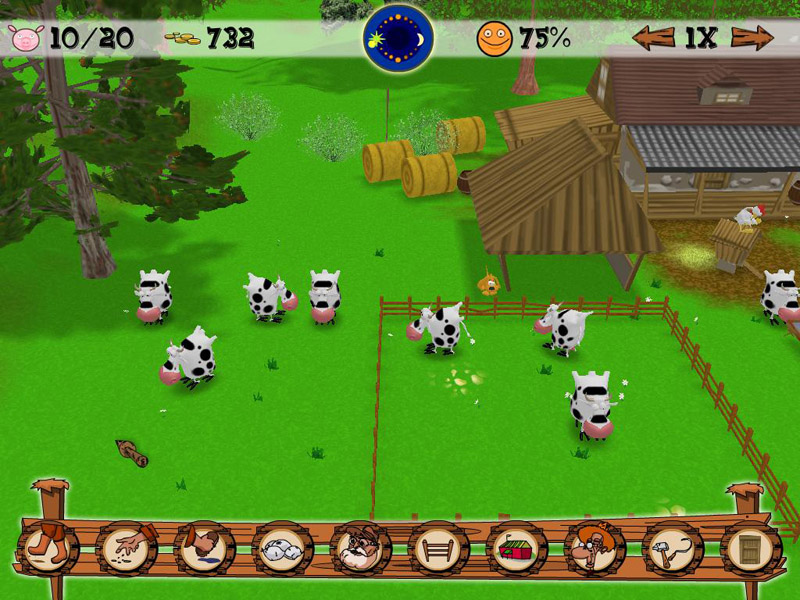
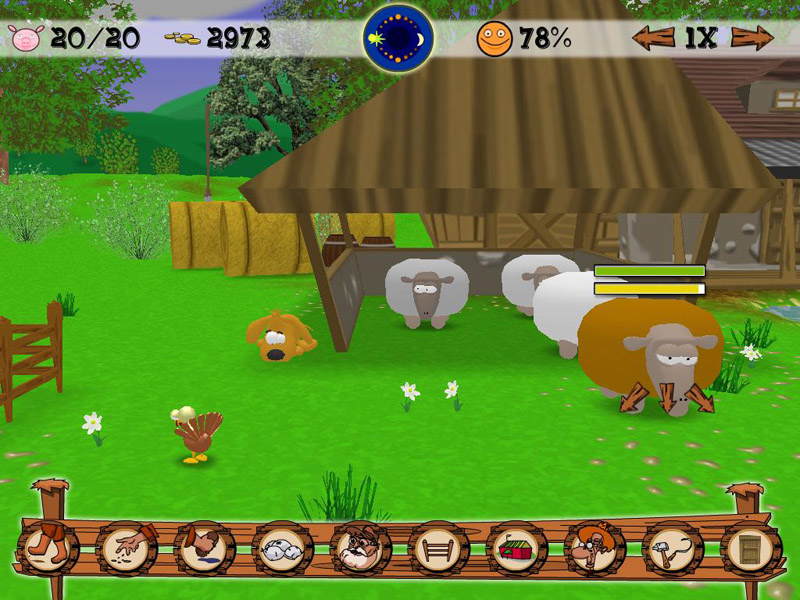
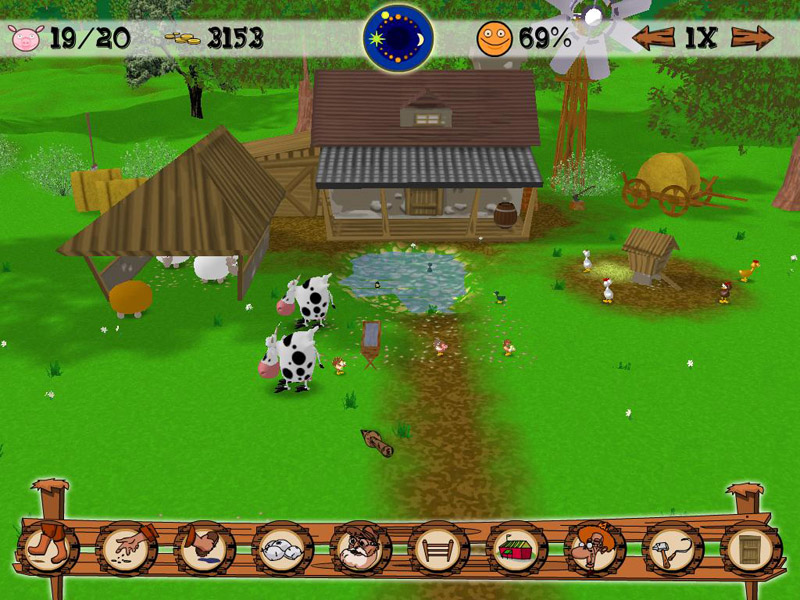
My Farm is a 3D breeding simulation with 5 categories of animals which produce eggs, milk and wool. To expand and develop your farm, you have to build new elements: henhouse, pond, fences, windmill, etc. Take on the challenge and build the richest and most beautiful farm of the country!
How to play?
To move about on your farm, use the mouse. When you reach the edge of the screen, on the right, on the left, at the top or at the bottom, the view will change. With a right click of the mouse you can change the view at will. With the mouse’s scroll wheel you can zoom in or out of parts of the farm. Finally, a left click of the mouse is used to select your animals or installations.
System Requirements:
Windows XP; Processor speed : 1 GHz or faster; Minimum Ram needed : 512 Mb; DirectX 9c
Publisher:
Xing InteractiveHomepage:
http://www.merscom.com/File Size:
63.7 MB
Price:
9.95 €
Featured titles by Xing Interactive

Ingenious is easy to play, but very difficult to master! Conquer the board through the careful placement of rows of colors. With every move, you create new possibilities. The more colored pieces are placed next to each other, the more points you can gain. The color that you need the most points in is the most important, because in the end, it will decide who wins or loses.

Help biologist Dr. Rose Thompson with her experiments in the creation and preservation of new species of flowers! Combine different combinations of free-floating proteins and cells to cause chain reactions, which will help grow all kinds of amazing flowers. Make sure she fills her daily quota before time runs out.
In this unique puzzle adventure, the world of Kuros is dying. As a descendant of the Elemental Masters, it is up to you to restore Kuros to its once beautiful state by harnessing the powers of Wood, Fire, Water, Metal and Aether. Powerful and ancient Glyphs hold the key to restoring Kuros to its former beauty. Break through layers of rock by matching Guardstones and uncover the mystery of the Glyphs.
GIVEAWAY download basket




Comments on My Farm
Please add a comment explaining the reason behind your vote.
iPhone app giveaways »





Android app giveaways »





@40 - Go to Installations, the hen house is there, and you can place it.
This is a lovely game. I have been thoroughly enjoying it. The sounds are wonderful. My only tiny problem is that you can't scroll in a circle. As a sims player, I'm used to that, and it would be a help for that one hen who always hides behind the henhouse. Thanks GGAOTD and Merscom.
Save | Cancel
Installed and works fine for me (on XP), and if found it fun and funny. :) Thanks, GGAOTD and Merscom! :D
Save | Cancel
My 7-year-old has played this game for the past two days and loves it! His farm currently has 19 animals, has the cock, windmill, and guard dog and is working his way to the tractor. Great game!
I will be using it to teach the value of investment and budgeting.
Save | Cancel
Loaded OK, but game won't go beyond opening screen. It freezes the whole PC. Rubbish.
Save | Cancel
I would of loved to build the farm. I have clicked on the hen house to buy at least 10 times. It takes my money, but will not put out the hen house! Any one have an answer for me??
Thank you for offering the great games! Yes, there are a few I would not play, but am very happy that this site exists just the same.
Save | Cancel
ChrisRobt :
You can change the "grass" to a green color from the options menu.. it works much better :)
Gail: You sell eggs by going to the shopkeeper, at the top of that menu is a "sell" option, click there and you can sell the eggs (and other produce from future animals!)
All in all, I do like this game. But I've noticed that once you get all the anmials, you just sustain them, there is no forward motion or next level like in Farm Frenzy (a great game that I actually splurged on) or even the Flower one we all struggled through a month or so ago from GGAOTD. There isn't any way to "breed" them, as the game itself suggests, you just buy babies and grow them.
I've also found this game doesn't play well on my PC, it skips, as if it's running slowly. I had fun with it for a couple hours, but I'm already bored with it... I hope to see it advance in the future, I'd definetly try it again with more of a goal in mind.
Thanks GGAOTD!
Save | Cancel
I also would have loved to download that game, but couldn't even open the website page!! :)
Save | Cancel
I first looked at this game, it seemed like watching grass grow. My 5 year old and 3 year old play zoo tycone, and are pretty good at it. If the 3 year old sees unhappy people, she puts them in the fish tank..
Anyhow, the 5 year old and his cousin 14 year old played farm, and loved it.. So, guess it is just not for 65 year old farts like me.. Great game, thanks.
sethben
Save | Cancel
i would have loved to have this game,
but all day yesterday the website wasn't reacable...kept saying website failure :(
is there any way i still can get this game ?
greetings
Save | Cancel
This would be a cute game for kids. It doesn't get too complicated and you can decide what animals to have and how many animals. My only gripe is there can only be one person playing the game. So, you can't have several family members playing on their own farm. Basically, someone can restart someone else's farm. The company needs to add the ability to let several people play on the same PC on their own farm.
re #29: I'm a bit suspicious of most fun. The program wants to act as a server. That means mostfun can request data from your PC or your PC can receive client communications. I'm always suspicious of the something for nothing scenario and with it acting like a server, that makes me doubly suspicious.
Save | Cancel
I had trouble loading the page for this game yesterday :(
I missed out :( :(
Save | Cancel
i actually did not enjoy this game.
i found the gameplay very slow and too repetitious and not in the least bit challenging.
i suppose i could be biased though since i've played a few other farm simulation/time management games. all in all, it was alright, but after giving it a shot and testing it out for about an hour i decided that was enough for me and uninstalled it.
i might buy the game for a 6-7 year old, for under $20, but i myself would not play it again.
Save | Cancel
I install game it was working ok until I started buying things - it asks me to go to a site to update a file and it costs money 'why?' http://indeo.ligos.com. Can anybody help me......?
Save | Cancel
This is a fun game but after you reach a certain point, you are just gaining points with no real challenge. I just set the days to go faster to make it a little bit more challenging. Like Robert McMains, I didn't find this listed on the Merscom site so I guess that means that there's no chance for this game to be expanded to a bigger board, more animals and other game options. I haven't really played Sims games so I don't know how this compares but it is cute and the first day I got it, I played it all night long. I suspect they'll be putting the Exotic Farm version of this up soon.
Save | Cancel
scrogs - Yeah! I love Farm Frenzy too!!! That is one game I would buy, if it were $10, but not $20.
Save | Cancel
#16 Ginger Miller - I like Spellagories, too. I was thusly glad to find it at MostFun.com. You can download full versions of any of their games and play for free (unlimited playing times/periods). They are ad supported - like watching TV, with commercials - but the ads are non-intrusive.
Save | Cancel
Spellagories?
PlayFirst, IGN, DoubleGames, FlashArcade... free *trial*.
Save | Cancel
Downloaded and installed just fine. The first time I installed it, I let it run automatically and it was just stuck at the opening screen. No loading, no cursor, no nothing. Second time I installed it, I can't get it to run anymore; I always get the 'Sorry for the inconvenience' error message. Oh well.
Save | Cancel
how come my first message was erased loll pretty funny
but everytime try to download this i get a 403 error acces denied and its tell me to allow cookie.anybody can help me ??
Save | Cancel
It looks like fun but when I quit the game it disabled and turned off my second monitor forcing me to reboot. Thats unacceptable.
Save | Cancel
This is very cute! The only small problem I had was when I was installing the codec (thanks Whiterabbit!) I hadn't shut my Firefox down and it froze. I shut down my Firefox and tried again and there were no more problems. I just thought I'd mention that in case anyone else has similar issues.
Oh and Mike (#13) we spell words like colour with a "u" in Australia, where I come from, and England too ;-)
Save | Cancel
So, this was a total flop for me - despite the program reinstalling DirectX 9 on my PC (XP Pro), the game takes me to the opening screen and freezes.
-.-
Big bummer - I love sims and this looked like a real fun time killer!
Save | Cancel
i was so happy to finally see a sim game!!!!
it's alright i think. i absolutely love sim games and i had fun playing it. my three problems - 1. no directions or tutorials, 2. i had a huge problem with how it responded to my mouse, the jerky movements made it hard to control, 3. the side scroll was more annoying than helpful.
has anyone figured out how to breed the animals?
Save | Cancel
Installed with no problem but when I run it, the hen is walking around on a black screen. The clock says it is daytime; how do I change this??
BTW, I am working on a laptop with Vista Home Premium
Save | Cancel
Cute...wish they'd give away Farm Frenzy by Alawar. I'm in love with it and too cheap to pay the $20. lol.
Save | Cancel
Thank you so much for this game offer. The download took about 10 minutes with DSL (Windows XP) and then I needed to update to Direct X 9, but after that I was ready to play. Boy, this game came with about a 12 page manual ... will have to do some reading before I continue. The music, the animals and Uncle Bob are great and I think that I'll enjoy this game alot, once I figure out how to play it. Thank you !
Save | Cancel
How do you sell the eggs? I need more money to expand.
Save | Cancel
Great game very hard to stop playing, I downloaded it the last time it was given away, I found the manual helpful as it gives you ideas of ways to play the game.
Save | Cancel
I have been searching for a wwword spelling game called "spellagories", that is free. Is there any way you could help me on this matter? It would be greatly appreciated. Thanks
Save | Cancel
So happy they brought this back as a repeat cause i missed it the first time around Thank you Merscom and GGAOTD it is much appreciated i had thought i wouldn't ever get this game :)
Save | Cancel
I played this for a while, used the turkeys to build up wealth then bought a fense and a couple of cows(skipped over pigs and sheep). I was disappointed that there was really not much after that. I wish there were more levels of game play... or if they are I'd like a hint on how to reach them.
I gave it a thumbs up because I enjoyed it an have been playing non-stop for an hour and a half.
Save | Cancel
This is a very addictive game. I wouldn't call it exciting, but it is hard to stop playing. Some words are Canadian spellings (colour). All in all, I think it was a good game.
Save | Cancel
Lol! This game is worth downloading just to look at the hilarious renderings of the animals! (as well as Old Jack...) Looks to be a cute little time-waster, when you're in that non-rushed mooood.
Save | Cancel
the problem with this download is i have dial-up and ... just kidding,looks good. i'll give it a try
Save | Cancel
Installed fine, Runs fine.
gameplay is basic, fun for a while, longer for a child though.
Can i heck as like get the chickens to behave!! The Turkey took ages to feed upto the next level too.. I must be the only farmer with a bulemic turkey!
great fun, great little game 8/10 on the scoreboard from family KZR with the under 10's scoring as high as the adults. a fun game for all, just dont expect too much from it.
Save | Cancel
help I can not activate or unzip the game. And what is the german language for. I dont anderstand.
Save | Cancel
Downloaded and (I think) installed okay, but not for me! My thanks, though.
Save | Cancel
Game installed perfectly, but im unable to launch it, i get " D3DERR_INVALIDCALL(Your video card doesn't meet the minimum requirements needet to use this application.) " and then leads second information table " Error Your video card doesn't meet the minimum requirements needed to use the application. "
winxp pro sp2, 1gb ram, geforce 6600 256mb, intel p4 3ghz with ht.
Save | Cancel
heck of a thing when the homepage doesn't even list this game that I could find.
OTOH, it did show Blood Ties, which I might try just because I liked the books and led me to the tv series, so it wasn't a wasted trip.
Save | Cancel
Downloaded very quickly. Works with no problem on Vista with no lag whatsoever. The graphics are simple and characters are very cutesy. Game play is quite simple. A good game for families but can get a bit dull for adults. Though the sim aspect is fun. Some of the features are kinda funny. Nice game and worth the download.
Save | Cancel
I tried to install this, but received a lot of runtime errors - Some 3D-elements are not found. (The error messages are in french.
Save | Cancel
Installed easily and plays nice with Vista Home Premium. Game controls take a little getting used to and the farm starts out slow until you build up your livestock and it gets more interesting. The game has to arrow buttons in the upper right corner that will speed up or slow down time button so you don't lose interest during the slow time. Very nice game over all. Thanks GAOTD!
Save | Cancel
Thank you WhiteRabbit for the well written review, this does sound like fun - hopefully a remake of the classic SimFarm.
Save | Cancel
My Farm:
Introduction and Installation:
This received a positive 89% of 298 votes with 49 comments when it was given away back in July 07; which you can read by following the link below:
http://game.giveawayoftheday.com/my-farm/#comments
The following excerpt taken from Boonty games will give you a good idea about what the game entails
Quote:
Taken from: http://www.boonty.com/us/casual/products/my-farm.html March 8th 2008
The Game:
The zip file is 63.7Mb in size and once installed is 68.9Mb in size. Most of that is sound and graphics files. From the options menu you can turn off the music and sound effects or just adjust their volume using the sliders provided. There’s also a slider for adjusting the level of detail as well as switching off the textures in the ground renders. It’s recommended that you tick this box if you have any problems with the graphics. You’ll also find toggles for the tool tips that give you contextual help whenever you hover the mouse over a button or object. There’s a toggle to turn on the screensaver as well – this screensaver reflects the stage you are at in the game, so as you progress through the game the screensaver becomes busier and busier. :lol:
If you leave the game idle for long enough the screensaver will kick in; which can be deactivated by pressing the space bar. You can reassign this key binding to whichever key you prefer. The game is controlled by the mouse or the keyboard. You will find a list of shortcuts in the players manual that you can use instead of clicking on the tool are at the bottom of the playing area, or you can use a combination of both if you wish. The player’s manual can be found in the games folder and contains all the information you will require to get you started as well as game tips to help you accomplished the goal of the game which is to build a successful farm. During the game you can earn bonus items such as a dog or other items that I’ll let you discover for yourself. These bonus items generally improve your farms productivity. If you have the tool tips toggled on, you will occasionally be prompted to carry out a particular task such as feeding or cleaning, or even to be told that you are doing something wrong. The in game screen has all the information you need with respect to the time of day, which is shown by a day and night clock at the top of the screen as well as your cash balance, stock levels, animal satisfaction and a time accelerator that allows you to speed up the game when appropriate (see section 5 of the players guide ‘Game techniques’ for details).
You can stop playing at any point in the game and resume at your leisure as the game automatically saves your progress.
Images – All on one page:
http://s109.photobucket.com/albums/n61/Whiterabbit_01/gaotd/My%20Farm/
Images – As a Slideshow:
http://s109.photobucket.com/albums/n61/Whiterabbit_01/gaotd/My%20Farm/?albumview=slideshow
System Requirements:
Minimum
Processor 1 GHz or faster
512 Mb RAM
64 Mb graphics card compatible DirectX 9
Sound card compatible DirectX 9
60 Mb free hard disk space
Windows XP or more recent
Recommended
Processor 2.8 GHz
1024 Mb RAM
128 Mb 3D graphics card
Conclusion
This is an excellent family game that can become quite engrossing once you’ve built up your farm stock and started to improve the farm by adding fences and new farm buildings. It’s not as easy as you think either. The in game menu looks a little daunting at first glance, but once you’ve read the players manual, which includes details of the installations, how to play, keyboard shortcuts, Game techniques and details of the screensaver that comes packaged with the game. Everything should become clear once you’ve read it. The only downside is that you can only access the game manual from the game file unless you create a shortcut which could be added to a start menu folder to make it easier to find (I’ve posted a short tutorial in the forums on how to do this several weeks ago in the games discussion section)
It’s a very simple take on ‘Zoo Tycoon’, which you can buy for about the same as this game now; however that particular game although far superior (IMO) is much too complex for children to play. This game is relatively easy and will teach a child the basics of caring for an animal, as well as some basic management skills, lol.
Overall I think this is well worth a good 7 out of 10 for playability and family fun.
Other Information
Some people previously received an error saying that they required an Indeo codec and were directed to a specific site which was asking for money. Ignore that and follow the link below which has the same codec for free. The information was originally posted by JanW (thanks Jan):
Indeo video codec:
http://www.free-codecs.com/download/Indeo_Codec.htm
Save | Cancel