Every day we offer FREE licensed software you’d have to buy otherwise.

$9.95
EXPIRED
Game Giveaway of the day — Larva Mortus
Larva Mortus offers fast and entertaining monster-hunting gameplay. Cheesy horror atmosphere goes hand in hand with furious action splatter fest, everything accompanied by creepy first class soundtrack!
$9.95
EXPIRED
User rating:
239
45 comments
Larva Mortus was available as a giveaway on December 5, 2009!
Today Giveaway of the Day
Create your own high-quality car and fight with your opponent in a battle.
In the end of XIX century dark forces shade the world once again. A brave agent experienced in exorcism and combat comes to face the incomming evil and fight loathsome supernatural monsters and horrific spawns of black magic.
Game Features
- 30 frightful supernatural monsters to destroy. Vampires, undead, werewolves and more!
- Solid arsenal varying from classic pistols and shotgun to fancy “dynamo gun”.
- Randomly generated missions for high replay value.
- Main character development through set of RPG-like features.
- Many environments from spooky manors to catacombs to dark forests.
- Animated comix cutscenes.
- AWESOME dark orchestral music score.
- And gore can be turned off if you like (but who would? ;-)
System Requirements:
Windows XP/Vista, 1.2GHz, 256MB RAM, OpenGL support (recommended)
Publisher:
Xing InteractiveHomepage:
http://larvamortus.rakeingrass.com/File Size:
51.2 MB
Price:
$9.95
GIVEAWAY download basket

Developed by PopCap Games

Developed by Overwolf

Developed by BeamNG

Play Facebook games in your browser without logging in.
Comments on Larva Mortus
Thank you for voting!
Please add a comment explaining the reason behind your vote.
Please add a comment explaining the reason behind your vote.

You can also add comment viaFacebook
iPhone app giveaways »

$3.99 ➞ free today

$1.99 ➞ free today

Get this special numpad keyboard to enter numbers with ease in any app on your iPhone or iPad.
$0.49 ➞ free today

Get access to over 220 questions and answers to help you prepare for the Bennett mechanical comprehension test.
$4.99 ➞ free today

PDF2JPG is the ultimate solution for converting PDF documents into high-quality JPG images quickly and easily.
$0.99 ➞ free today
Android app giveaways »

If you are a true Idle Tower Defense fan, this TD strategy game can't be missed!
$0.99 ➞ free today

$1.49 ➞ free today

$1.49 ➞ free today

This is a unique circle icon pack with Squid's tentacles inspired design on the bottom.
$1.49 ➞ free today

$1.49 ➞ free today
Thanks to Emy's comment, I did download this game even tho I am not normally an arcade & action, blood & guts gamer (HOG mostly). I've only completed 2 missions in EASY mode and find it a very satsifying game.
Only problem so far is I must be missing some of the ROOM CLEARED messages because I can't find any more monsters but missed the sign. Have been using the sword after enemies are gone to break boxes, coffins, etc. looking for goodies.
Just a fun game. Thanks, GGOTD!
.......................MODERATORS COMMENT.......................
Hi TopazMystique, have you checked out the other games that I listed at the end of my review (see #1) there are several free games on the same lines as this one. All were commercial games, but now free. :)
Save | Cancel
oh no, i missed this cos i was out of town...
hope to get second run soon :)
Save | Cancel
Mod comment - thanks for the excellent help there on the RIP series !
Save | Cancel
I've only had about 30min with todays version but i it feels improved somehow from the last. It installed in a separate folder from older ver. runs well at least as far as i've gone. Still curious if it is wholly independent from previous version which I would otherwise uninstall after i've reached an insurmountable impasse. Would like to know if removing bits of the first might hose the second, esp as my time has expired for this giveaway, I will enjoy nonetheless.
I am aware this query might best be at Forums, but as I have mentioned several times before, Forums has not allowed me to register in past, and due to my limited time online line I have had to give up submitting addys acceptable to TPTB. Any kind mod that would care to assist with my registration dilemma is welcome to email me at the @ submitted with this and previous comment.
As always, thanks to Giveaway crew. Keep the "Rake in Grass" coming if you can. Cheers, S.H.
Save | Cancel
@35, Cathy Champion:
some community members also had that message during the prior Larva Mortus giveaway (March 22, 2009)...comments & possible fixes from that day:
http://game.giveawayoftheday.com/larva-mortus/
also, some ideas from the forum thread listed for Spiritwolf earlier (RE:Vista, OpenGL, & DirectX) may help:
http://www.giveawayoftheday.com/forums/topic/6499
good luck...save the game, try again, & hopefully you can get to the forums & get it running!...
Save | Cancel
@37, Sam Hell:
prior giveaway, 1.01, i installed in a file i named "Larva Mortus"...the program installed a file into that "larvamortus_build"...the comments said there was a patch available to 1.02, but i didn't have the cursor problem a few had & didn't patch...
today i installed into "Larva Mortus 1.02"...the program installed "larvamortus_full", version 1.02...
i ran both of the larvamortus.exe from the files today & both ran, with each showing the different version #'s...
hope that helps, & made some sense...lol...
@36, watcher13:
after the "loading..." part of the intro, i hit the space bar & it went right to the selection/options/etc., screen...skipped the long intro...
XP MCE SP2
@38, Spiritwolf:
there was a discussion in the forums about Vista & DirectX a few weeks back:
http://www.giveawayoftheday.com/forums/topic/6444
and another about Vista, OpenGL, & DirectX:
http://www.giveawayoftheday.com/forums/topic/6499
maybe something there is part of the solution for you...good luck...
now if only i had any gaming skills...lol...
thank you Rake In Grass, GGOTD, & Whiterabbit (who i hope has gotten some rest this week...thank you for another week of work...)...
Save | Cancel
Hi Stephen,
The old version shows as v1.01, this download shows as v1.02.
So, as you suspected it is a newer release.
Save | Cancel
I'm glad that games are offered multiple times at intervals. This way, if one has been lost via a hard drive crash, if you've bought a new pc, etc, you have the opportunity to have your game back.
I installed LarvaMortus on my laptop last time it was offered. Now I cannot access the net with the laptop until I get another wireless router. (For some reason, my laptop's ethernet port is just a fraction too large to adequately connect an ethernet cable, according to what I've read on forums there have been a number of laptops with this same problem, involving more than one brand.)
But I did download and install LarvaMortus on my current desktop that I didn't have up and running when the game was last offered.
I WISH THAT MAHJONG EPIC WOULD BE OFFERED AGAIN. I LOVE THAT GAME, I would love to put it on this desktop and replace it on the laptop. For some unknown reason, the laptop (which is a Vista machine) started loading the game with a blank white page without the graphics.
Please consider offering Mahjong Epic again, and other Mahjong games too. I haven't seen a Mahjong game offered at all except the one time Mahjong Epic was offered back in mid-2008.
Save | Cancel
To #16 have you successfully overwritten earlier version without problem?
To # 32 Have you successfully run both today's and prior version? if so, verdict?
THX, S.H.
Save | Cancel
Impressed with this one, though I kinda doubt I'll be able to master it. I'm just not comfortable with keyboard control - which is not a complaint - since its necessary, here. It would be prohibitive to try and control everything with a mouse. Actually, as it hints in the included manual, this is designed for a gamepad, and I suspect it would be HIGHLY playable on one. The problem I have with keyboard control is that I'm a pretty big guy, although my hands are on the small side for someone my size. Still, the standard keyboard cluster is too small and cramped for my hands.
It surprises me a little that more developers don't consider a wider spread - more like what you have on a gamepad. To explain, I'd be fine with an A,S,E,F finger spread, ignoring the thumb, with S being down, or ASDE, with AS being left right and the thumb on D being down. Of course, that's a little different than the gamepad, but, I think using the thumb on a keyboard is unnatural, anyway, unless you make the space bar down.
However, I'm really impressed with this game. The developer's took a standard format and just did it well. The manual for one thing can get you started easily, though it's not comprehensive. A newbie might not immediately get that a first aid kit is adding what some games call life points, or that you're getting ammo or dynamite from some of the slain monsters or the barrels, etc. And what contains treasure. I'm using my sword to hack up everything in every room, because I'm too green to know better. Noticed a couple grammatical/spelling errors, but, VERY minor. Actually, the manual is clearly and simply written. And the info. layout is good, also. Plenty of space with everything allocated it's own corner to make it easily viewable, rather than cluttering all the info on one place on the screen. And self explanatory icons and symbols. Simple mechanics, so for many the learning curve should be easy.
For the first time, the intro is too long, but I sympathize with the developers. I once edited a blooper reel for a student movie and made it 8 minutes long. Honest, it was all good stuff! It's hard to leave stuff out when you put so much creative effort into it.
Sorry it creeps some people out, but I'd be inclined to believe Whiterabbit (not that I wouldn't always, anyway) when he says this is one of the finest entries in this genre. I like Realore, but I'm impressed with how Rake in the Grass finds these little, slightly different gems. In other words, you don't have to reinvent the wheel to be creative.
If you're comfortable with this genre, or with keyboard control, or have a gamepad, this seems like a bargain - maybe a big bargain - at 9.95.
Save | Cancel
Hi,
I can't find an exe. link when I go to the folder where the game is located. When I click on the game icon it tries to load and then I get HARDWARE FAILED TO SWITCH TO THE SPECIFIED MODE. I have windows vista. Thanks for any help - when I tried to go to the forum I couldn't get a password in my email.
Cathy
Save | Cancel
Well, I for one, am thrilled to get my Larvamortis game back. I recently upgraded to 64-bit Windows 7 Home Premium. My previous game was toasted by the upgrade, but it works beautifully on the new OS. Sweet!
Save | Cancel
After downloading Larva Mortus (51.2MB) and unzipping the software i was unable to connect with the Game Giveaway of the Day site despite several attempts. This has happened with other Game Giveaway products in the past making it impossible to activate their keys and hence rendering the downloads useless. What is the problem (i'm properly connected through my ISP)?. Yufanyi.
.......Moderator Coment........
Hi yufanyi, You may just need to reboot your modem 'and router if you have one'. Also try deleting the cookies and other temporary internet files via internet properties. Sometimes cookies get corrupted and can cause such problems that you are getting now. Let us know if the fix worked. :)
Save | Cancel
To #16
I'm going to hold off deleting the version I got last March until I play this one awhile. You never know if there's something that you'll like when playing the older version.
This is not a comment for, or against, today's game. I'm just waiting to see what's changed.
Who knows, maybe I'll keep both of them. :-)
....Moderator Comment....
Thats actually a great idea Eldryn. Often changes made are not always for the best, or it may give you something extra. I used to do the same when I beta testedmaps and mods for Battlefield 2, consequently I have several iterations of loads of great maps, al of which are worth playing. :)
Save | Cancel
this game sucks. don't try to color it any other way.
....Moderator Comment....
in 'your' opinion it sucks, but reputable developers like Valve (who created a couple of the best games around this decade - Half Life 2 and Left 4 Dead etc) must think it worth something because they sell it via their outlet Steam.
Save | Cancel
music is great too
Save | Cancel
To help those who aren't good enough aimers, cheat commands"
-------
Press "Alt-L" = Character Level Up
Press "Alt-C" = Bring up Cheat Menu
- excerpted from http://www.cheatbook.de/files/larvamortus.htm
Save | Cancel
great fan - lightweight game, easy to learn, amazing graphic for such a small size, no problem to begin it after some pause. Nice to clean the world from "skin crawling pentagrams" and clean yourself from exessive agression.
Save | Cancel
@21
Press the link wilko gave us, and press "Hier Kostenlos Herunterladen" , then, press that thing again, and there is your download. Also, the install works just as it normally does. Just install it and play. There is not german IN the game.
Enjoy.
Save | Cancel
Hey, pretty cool game. I've gotten this a couple of times before but never played it. I'm glad to have this time. The beginning intro is sort of primitive, but nevertheless entertaining. The game seems to take up quite a bit of RAM compared to other Rake in Grass titles, but the smoothness of the game justifies it. Gameplay: good. The 2D view isn't too bad, though the walls always seem to look to me as if they're on the ground. The random items on the floor are not usable (unless they're bonuses or ammo), which makes me slightly annoyed (I always want to use them for some reason). I like how the F2 help use your actual HUD for examples, which is really helpful. Overall, I seem to like this game.
There's a console of some sort if you press the ~ key. I have no idea what you can do with it, but I'll try experimenting with it some time.
#18: Steam itself does not need a high speed connection to run. However, downloading stuff is usually faster if your connection is high speed. And this game is not free on Steam today, only at GGOTD.
Save | Cancel
a video game?thats not look like a video game in 2009.come on
Save | Cancel
I usually pass on shooters but it looked interesting.
I've already played the 1st mission on easy and it's actually kind of fun. It has an option to turn off the gore so that's a plus for some people. Worth a try at least.
Save | Cancel
@Darthyoda I'm fairly sure high speed is NOT required for steam, IIRC the game is loaded on your HDD permanently, so steam only needs to run for validation/registration and the like when you start up the game, and sits in the background with minimal bandwidth. (You may even be able to turn it off once the game has started.)
Save | Cancel
Great stuff - I love it already after a quick play! :o)
I found RIP3 some time ago, and once I got used to the play style found it quite addictive, and kinda flogged it to death... I've been looking for something similar with little luck... until now!
After only a couple of missions so far, this seems really good and likely to get better as I progress. I hope if people are even vaguely considering this one, that they give Larva Mortus a go for at least a couple of missions. When I first played this style of the top-down view, mouse aiming it took a little getting used to ;)
Many thanks to Rake in the Grass, and GGotD, I look forward to many happily spent non-productive hours hacking up zombies! :o)
Save | Cancel
Have to agree with #9, I'm ot a fan of horror genre either, and having seen from #6 that there are spiders in there too (I'm terrified even of pics. of spiders), sorry but no way will I even look at this one.
It's a shame that shoot-'em-ups have gone more and more towards the realistic and especially the gory. The developers comment: 'but who would want to turn off the gore?' Well, I WOULD for one! There are enough real-life shootings without me wanting to re-create that dubious 'pleasure' on my PC.
Whatever happened to decent and abstract shooting games in the vein of Moon Cresta and Galaxians? Oh well, I guess I'm in a minority of one. :(
I did quickly look at the Moorhuhn site referred to by #2 but my German is near-non-existent so I couldn't understand any of it. All I could see was some Xmas competition and nothing about downloads. Which is a pity, because given the other comments in here, I might have enjoyed that one.
So thanks for today's game, and thanks as always for all th work that goes into for providing these freebies, but I'm definitely passing on Larva Mortus.
Save | Cancel
I actually purchased this game on Steam after seeing it on here months ago. It's a well made game that is actually fun to play.
The game mechanics and graphics are simple but solid and very accessible; and there's enough depth in the system to keep it fresh for a good amount of time.
It's a fun game you can play in brief intervals when you don't have a lot of time but is also deep enough to keep you sitting there when you do have time.
One of the best games GGAOTD has made available.
Save | Cancel
Installs and runs fine on Windows 7 Ultimate 64-bit.
Question for Whiterabbit - am I correct in assuming that most or all of the games that install into C:\Games rather than the \Program Files folder don't really require an install, i.e. they can be copied to another computer or run from a USB key with no problem?
.....moderator comment.....
In a roundabout way...Yes
Save | Cancel
With steam, you need high speed, right?
....moderator comment.....
don't know????
Save | Cancel
Unfortunately I get a "Failed to connect. Try again later" error every time I try to install it. Too bad, this looks interesting.
....moderator comment....
Try re-booting your modem and router (i.e. turning off, leave for 20+ seconds then turning back on), and as an added extra clearing out your internet cache.
Save | Cancel
To #7:
The version that was given away in March was 1.01, so, yes, this is a newer version. I'm going to download this one and overwrite the previous version I already have installed. I enjoy playing the game. Thanks to all those responsible for these wonderful gifts..
Save | Cancel
I wish we could get the games without demons and the occult in them back... I miss the family orientaed games. Sorry, these are NOT for me and my family.
Save | Cancel
Just updating ... the game downloads, installs and runs fine on my win xp pro sp3 with no problems. Graphics are excellent, also tried to pin shortcut onto the start menu that failed but was able to put on quick launch bar and it worked. Thanks once again.
Cheers, ~wildspirit63~ :)
Save | Cancel
Hey WR, Thanks as always for the awesome review.
Sadie
Save | Cancel
Not my type of game. Because I suck at aiming :)
Save | Cancel
G'morn Stephen, hope all is well with you. I have a link to a website, not sure where it cam from, might have been from you. Its loaded with old atari and pc games that are abandonware. I found alot of my old favorite games in the site. Even my kids go there to download their old favs that they played when they were younger. As for todays game I'm going to load this onto a flash drive as its free standing. About the only thing I dont like about this game is its keyboard controled, but I will get used to it lol. Good exercise for arthritic fingers :). I would love to thank Rake in the Grass as well as GGAOTD for the service they offer and the games they give us. I have finished the other games so I was looking for something new. Thanks again for your reviews Stephen They help me to decide whether or not a game is worth downloading or not.
Cheers, ~wildspirit63~
....moderators comment.....
Thanks :) You'll find loads of sites we've linked to via the games synopsis that have hundred and even thousands of free games. There are loads of great download sites such as Abandonia, Abandonia Reloaded, Acidplay, Caiman and more. :)
Save | Cancel
I downloaded this the last time it was offered and I am still playing it...it seems to never end, but like the above comment, after dealing with people a l l d a y l o n g, cutting, blowing up, and shooting other monsters seems to take some of the stress away. Thanks for offering this again.
Save | Cancel
Thanks wilko0070 for the Moorhuhn game!! Hilarious!! I love it. I'm not a big fan of monsters blood and horror, but shooting cartoon chickens is fun! thanks! big thumbs up.
Save | Cancel
No thanks. Just seeing the preview pictures of occultist symbols (pentagrams, etc.) made my skin crawl.
Save | Cancel
Is this a newer version compared to the last time?
.
.
............Moderators Comment........
Today's is the latest version v1.02. Unfortunately I deleted my copy from last March when I bought it via Steam, so can't say whether it's an updated one. If you still have the original from March 09, turn it on and you'll be able to see the version number to the left of the main menu. :)
Save | Cancel
While this is not the type of game I normally play (I'm more of a hidden object, puzzle logic or 'tycoon' kinda girl) I downloaded it last time you offered it and I really enjoyed it! There is something very cathartic about blowing up a huge spider or shooting up a room full of skeletons, especially after a long day of dealing with the public! I uninstalled it to make room for other games, but I'm delighted that you are offering it again; it's time to relieve some holiday shopping stress!! Thanks for bringing it back, despite the inevitable snivelers that will mewl about wanting something new. Emy
.
.
.....Moderator comment:
Hi Emy, The game is free standing ;)
Save | Cancel
Know where the other two RIP's are ?
.
.
........Moderators Comment.........
The first and second in the series cannot be found anywhere for free; the reason you can get the third one for free is that the owners of Gametop pay the developer a retainer for being able to give the game away. You can always pick them up for peanuts on Steam. I got the whole set together with Larvae Mortus and several other games for less than the price of one arcade game several months ago. You just have to keep your eyes open on the Steam shop for deals.
Then again, the three games in the series can still be bought from the steam shop for only £2.99 which is less than $5 at any time. See HERE for details.
This recession we're in is definitely a buyers market for games at the moment. Direct 2 Drive and Steam have loads of half price or less deals every week. Direct 2 Drive have their 24 days to Christmas promotion on at the moment, where you can buy rop quality games such as Majesty 2, The Witcher, Command $ Conquer Red Alert II plus more for a fraction of the cost. :)
Save | Cancel
Nice one, WR. Been after RIP3 for ages !
Save | Cancel
This is my first time in the Giveaway Game area. I have to say I'm impressed with the number of offerings given by the developer Rake in Grass.
I was looking for some small games to put USB Drives and I found so many. I'm sure my nephews will love them.
My Aunt who is 72 years old also plays some of the smaller games, solitare, card games and so on. So you have a wide variety of people. It's just a matter of getting the word out to them.
I'm no gamer, but my 72 Year old Aunt will love some of the stuff I'm gong to buy her and my newphews will love playing games when they shouldn't - like at school.
Both of my grandparents were avid gammers in the 1990's so, don't think it is just teens and some early 2 year olds. You have a large audience out there.
Thanks, I'm no gammer but I've been looking for weeks and this has been the best I've found for the size, need and ages I looking for.
Vidimo Se!
.
.
.....Moderators Comment....
Hi Steeler, check out the free games synopsis over in the forums. You can find it HERE. There are over a thousand good quality free games available for download. We (me, Wizzard, reverseOrder plus a few others) have tested every game for virii and the sites are safe to visit. The synopsis hasn't been updated for several weeks so there are loads more games to be added when I have the time. You can find all of those games in the games discussion thread under the title Week such and such - Free games for the weekend. You only need to go back several pages to around week 56 . Any game before that will be found in the synopsis. Were at the en of week 64 at the moment. :)
Save | Cancel
If you are able to read German you can download today's free game "Moorhuhn X" here:
http://www.moorhuhn.de/moorhuhn_x_gewinnspiel.php
.
.
........Moderators comment.......
You have to click through at least six or seven pages to get to the free download. It's easy as the download buttons are obvious on each page. The download is 20.4Mb. It's a shooting gallery type game with cartoon style graphics. The menus are in German, but again its easy to work through them. Well worth the effort. Thanks for the heads up. :)
Save | Cancel
Larva Mortus: A Review
Todays game was originally given away earlier this year (March). It received a positive 48% of 609 vote, which I thought was rather low considering the quality of this game, then again it is a more 'on the edge' sort of arcade game that will probably only appeal to a smaller group of gamers. The download size is 51.2Mb and once installed expands to 53Mb. You can read previous comments about the game HERE.
The game installs to C:/Games as default; do make a mental note of where it goes because the game doesn't install any shortcuts, so you'll need to create them yourself. If you want a shortcut in the Start Menu programs list you can find a tutorial on how to do so in the game discussion forums HERE . You'll find a decent games manual in PDF format within the games folder that repeats what I've said below.
Game Story:
Reference accessed 20th March 09
The Game:
Before you start the game you’ll need to create a profile via the ‘select player button. You can create as many profiles as you like. The options menu allows you to adjust various graphical aspects of the game, for example there are three styles of mouse pointer to choose from. There’s a toggle to turn the gore off, which is set to on as default. There’s also a toggle to switch between DX9 and OpenGL . It’s recommended that you have OpenGL.
There’s also a 16/32 bit toggle and a full screen toggle. The usual music and sound sliders can be found together with a master slider. Once these have been set up you’re good to go…..
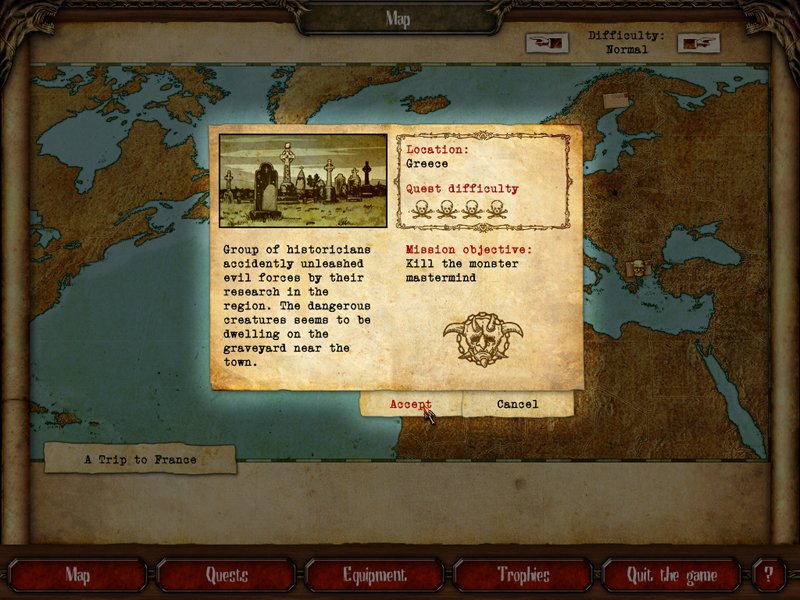
When you start the game, the first screen you encounter is the mission map. Here you can select from three difficulty settings; easy, medium and hard. The default setting is set to medium difficulty, however before you can select the difficulty settings you have to scroll through a few windows that recounts the supporting story to the game; which is about an agency; that is dedicated to the investigation of paranormal events. You start as mentioned above, in the map room. You will see several envelops stuck on the map which contain information about the various missions open to you; that includes the location of the mission, the quests, and difficulty level, which is denoted by the number of skull and crossbones given to the quest. You’ll also see the mission objectives and a short story to set the scene. As you complete missions more are added to the map. (You can see what these look like by following one of the image links). You can read about each mission before you actually opt to complete that mission. Missions are graded on how difficult they are, starting with the lowest grade up to ones with 5 or 6 skull and crossbones. The lower the number of this emblem on the mission info sheet, the easier the mission is. You’ll find red envelopes which cannot be taken (but can be read until you’ve attained a specific level.
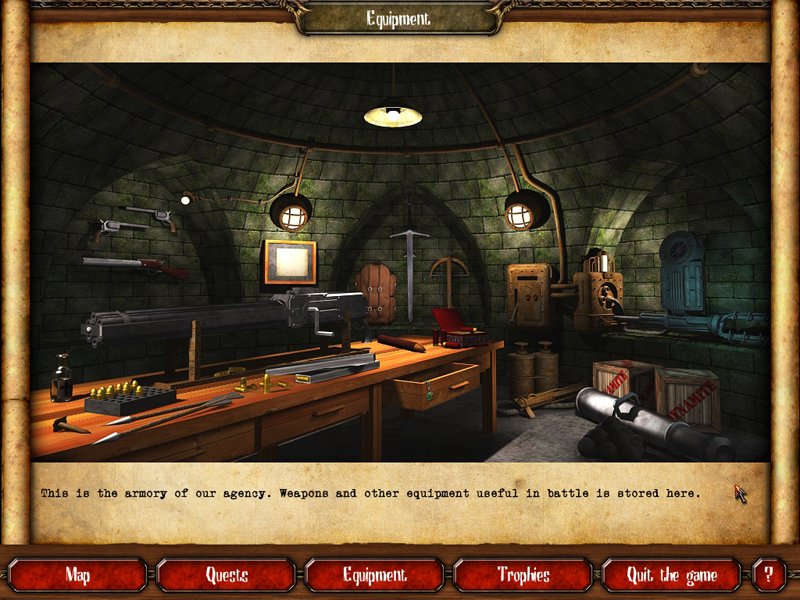
Along the bottom of the map are several buttons that give access to other areas of the agency; for example, the equipment room where you’ll find all the weapons you have. This room looks rather bare early on in the game, but as you start to collect better weapons, the room fills up. There’s also a button to the trophy room and a help button which details all the bonuses as well as basic information about the game.
Your first missions include tutorials to help you on your way. There doesn’t seem to be a way of turning these off, though once you’ve seen them once they do not reappear. Pressing F1 shows you information on the various controls you need to remember, F2 brings up a HUD that shows you useful information about your status. (see below for further explanations). Q will give you quick information on the task at hand. . Once the game starts proper, you use either the cursor keys or WASD keys to move and the Left and Right mouse buttons to fire primary and secondary weapons. The game is a top down perspective much like games like the RIP series and Alien Shooter, though the scale used is slightly larger with respect to characters, which look twice as large as the characters found in the games I’ve mentioned. (see links to alternative games below)
The left mouse button is used to fire your primary weapon, which at the beginning of the game comprises of a two handed sword which is useful for killing the numerous undead that are found in this game as well as a six shooter,. Secondary weapons include dynamite, which can be picked up and thrown using your right mouse button.. As you progress through the levels better weapons become available such as the shotgun, machine gun, flame thrower and even a crossbow. You can pause the game my clicking on P.
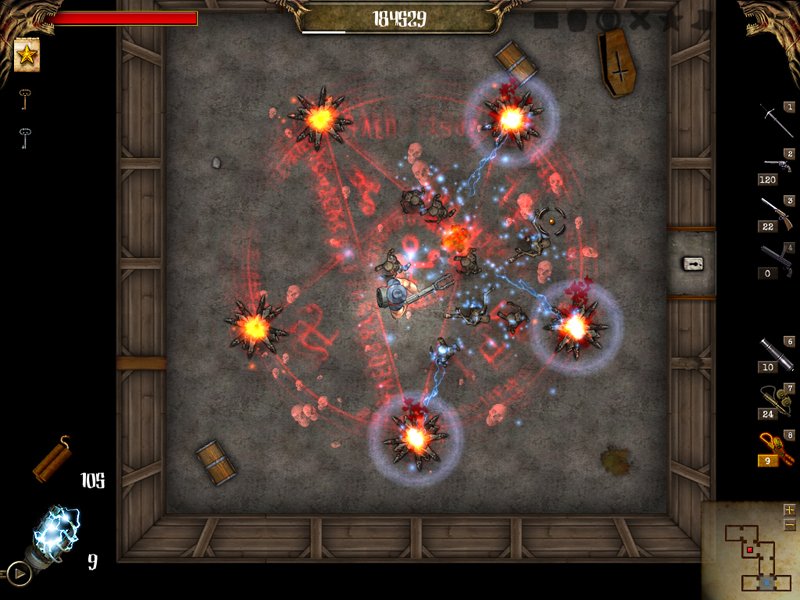
Bonuses, which can be found inside barrels and chests include extra ammo, armour that makes you almost invincible for short periods, a berserker power up that increases the damage you do to opponents as well as increases your résistance to attack, score multipliers (which can help to level you up) and fast walk. The games HUD shows your health staus as a red bar to the top left of the screen. There’s also a link to your profile, which can also be opened using Tab. The top right hand corner shows the bonuses that are active and to the bottom left are the weapons you’re carrying.. There’s a mini map to the bottom left, with a zoom facility, but this is of no real benefit because the dimensions of the minimap remain the same; only the image within the mini map changes.
Levelling up is dependent upon collecting points. Every time you do level up you’re awarded free skill points which can be added to the attributes you possesof which there are several. There are 30 level ups in the game which gives you a lot of scope to tweak your characters attributes. You can access you attributes at any time by clicking the Tab key. The profile details the characters statistics such as the level you’re at, score, score needed to make the next level, the length of time you’ve played the mission, the number of kills and the number of times you’ve died as well as the characters attributes which include observation, construction, resistance, luck, walking speed and melee combat. There are also other info tabs that include details of active quests, the difficulty of the quest and the objectives. Theres an information tab that tells you what you are carrying. By hovering your mouse over individual items you’ll get information about it. It’s worth checking this out because some weapons are less or more effective against certain enemies. For example, when hovering the mouse over the ‘default’ 2 handed sword, it tells you that supernatural enemies are often very resistant against firearms, which is very useful information when you’re beset upon by hoards of evil looking monsters. To toggle between the weapons you’re carrying use the mouse wheel.
There are 30 monsters that include vampires, the undead and Werewolves, plus more species. There are several primary weapons including the default sword and six shooter and include a shotgun and dynamo gun.. Levels are randomly generated, so effectively there’s no limit to the number of levels you can play. There are several different environments ranging from underground catacombs to spooky mansions and dark forests.
Reviews worth reading:
Initial impressions of Larvae Mortus – Rake in Grass forums
Follow to find reviews worth reading
Follow to find reviews worth reading
Follow to find reviews worth reading
Images:
See images all on one page HERE
See images as a slideshow HERE
Minimum requirements:
Operating System…………………………Windows XP/Vista
cpu…………………….…. 1.2GHz,
System RAM………………256MB
Graphics……………………OpenGL support (recommended)
Video:
See video of gameplay HERE
See video of gameplay HERE
See video of gameplay HERE
See previous comments from Jan 08 HERE
Conclusion:
Although this genre has been saturated with a variety of sub standard clones over the last few years, this one stands out above most of the others because of it’s upgrade system and the overall quality of production. It's as good as my favorite top down shooter of the moment Zombie Shooter 2. It’s worth a good 8 out of 10 for playability and fun. The game is well made and looks good. Apart from Jets 'n' Guns this is one of my favorite Rake in Grass games. I even bought it via Valves Steam client despite having the original giveaway. Well it was part of a bundle so I couldn't avoid getting it lol.
Alien Terminator Deluxe: (~38Mb)
The game installs without any shortcut so make a note of where it installs to. It installed to my root directory which is E: and then into my games folder E:\Games, however the root directory is usually C: by default so you’re more likely to find it at C:\Games\AlienTerminatorDeluxe. There is also no uninstaller, so to delete the game just delete the games folder. You’ll find the Gametop version, which I mention below does have an uninstaller, but you do get the usual browser opening when shutting the game down.
There’s a 4.35min video available to watch which will give you a good idea as to what to expect from this game. You can see it Watch video of Alien Terminator HERE
The Game
The first level is a tutorial level where you learn to maneuver your vehicle (using the keyboard cursor keys) to move around a maze like structure. The controls are a little twitchy; making it quite hard to control the turning of your vehicles, but it does get easier with a little practice. This is important as in later levels you have to maneuver around lots of objects. You’ll also be given the opportunity to try out the various weapons that you carry on your vehicle. The top mounted weapon is controlled by the movement of the mouse; the mouse pointer becomes the firing reticule and the fire button is the left mouse button; grenades can be thrown by using the right mouse button and the super weapon by using the space bar. All key bindings can be changed to keys more comfortable to the individual by going into the options menu via the main menu. Your main weapon can be changed from the default mini gun to a laser and pulse cannon using the mouse scroll wheel. It appears that all the weapons are upgradeable apart from the grenades, but I wasn’t able to confirm this as I only played as far as level 4 (the Jupiter level). You’ll find each level has a boss stage at the end of the level.
The basic set up of the game play is to destroy a building that holds the force field generators, then go collect the energy sphere that was initially protected by the force field. As soon as you collect the sphere you are attacked by hordes of aliens. As you progress the levels get steadily harder.
You’ll find several bonuses in game. You need to pick these up quickly as they disappear within around 20 to 30 seconds. These include the following:
A…....Armor (health)
S….…Super Weapon
G……Adds 10 grenades
T…….Time deceleration
Your progress is automatically saved at the end of a completed level. Failing to complete a mission means you have to start from the beginning of that level. You can replay any completed missions.
Conclusion:
Alien Terminator Deluxe plays well, though can become a little repetitive at times. I found it was quite enjoyable the first time around, but because I was taking notes while playing I kept losing my health and having to restart the level, which did make the game feel much too repetitive, however once I completed my notes I was able to progress. I think this is one of those games that you’ll either love or hate. It’s basically on the lines of Alien Shooter and games of that ilk, which I posted links to the other week.
I did find the vehicle difficult to control at first, but with practice it became much easier, but I was never really happy with it. Trying to catch bonuses sometimes became frustrating when trying to maneuver to catch them, especially in later levels where there are lots of obstacles to maneuver around; only for the bonuses to disappear before I had the chance to collect them.
The lack of a developers web site is worrying. We’ve has several games from Some Company; I’d expect to see some sign of a developers credentials and previous work if I was going to purchase this game, though as mentioned below, this game is free all the time at Gametop (very recent addition), so there’s no need (if you know of Gametops existence, lol – by the way, there are a couple more new games available from Gametop).
I’d still give this 7 out of 10 as I think it’s a great game to fill in the odd ten minutes here and ther, the graphics are good and it gets progressively harder.
Music.
The music fits well with this game. An energetic techno sound, however, if you wish to exchange the six tracks that are in the music folder all you need to do is re name the files to the ones within the folder which can be found by following the path:
C:\....................\Alien Terminator Deluxe\Data\Music
The music is in the MP3 format which is handy as it simplifies the process.
Slideshow of in game images:
http://s571.photobucket.com/albums/ss160/Whiterabbit04/Alien%20Terminator%20Deluxe/?albumview=slideshow
Similar games available for free:
If you missed today’s game the good news is, its available via Gametop as a 27/7 download. You do of course get the browser opening to Gametops home page every time you shut the computer down, there may be pop ups depending upon what security you have and you do have to uncheck boxes to ensure no toolbars or your browser home page is changed.
Get Alien Terminator Deluxe HERE
The following game is similar to /alien Termination in that you use a vehicle. You can get the same game with two different names from different free sites,
Crimson Road aka Humvee Shootout
Get Crimson Road HERE
or
Get Humvee Shootout HERE
RIP3:
Get RIP3 HERE
Ariel fire:
Get Ariel Fire HERE
Absolute Survival:
Get Absolute Survival HERE
The following game doesn’t have the annoying window opening up when you close the game down:
Theseus: Return of the Hero:
Get Theseus: Return of the Hero HERE
==================================================================================
Save | Cancel