Every day we offer FREE licensed software you’d have to buy otherwise.

Game Giveaway of the day — Mini Golf Championship
Mini Golf Championship was available as a giveaway on February 26, 2008!

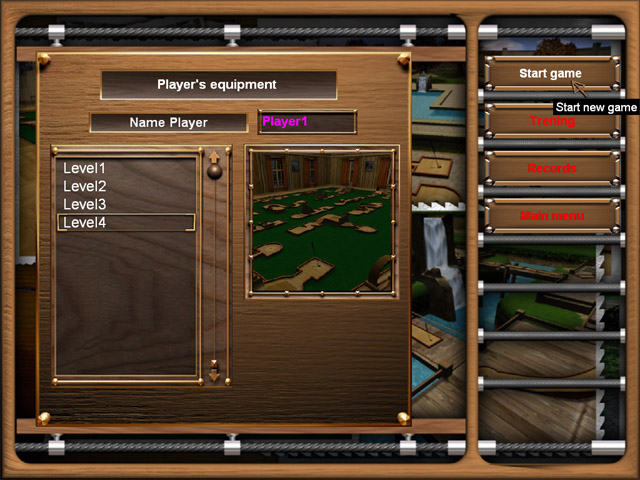
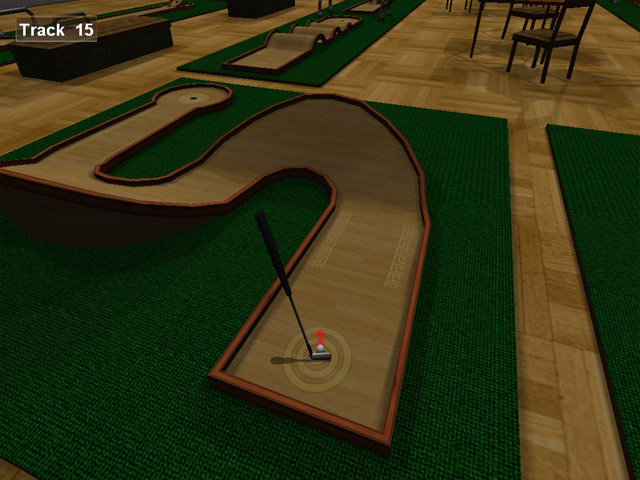
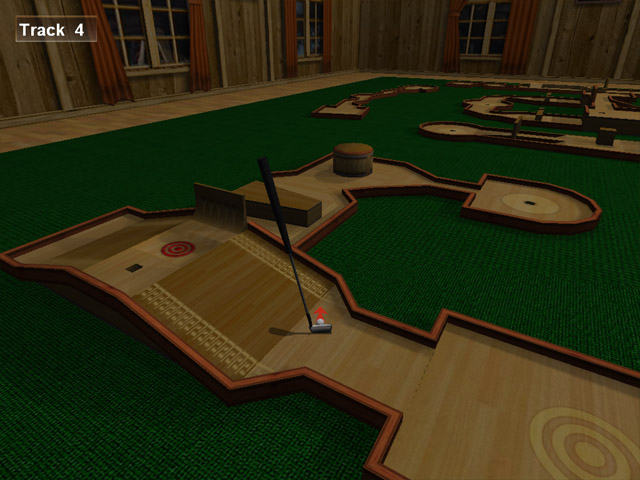
Treat yourself to a round of miniature golf on Mini Golf Championship’s refined greens, which mirror those of the world’s top courses. Test your skills against amateurs, pros, and masters or use the dedicated training mode to painlessly learn the ins and outs of Mini Golf Championship. Share the experience with friends and family with Multiplayer mode and show them what you’ve learned.
Features:
- Mini Golf delivers a realistic golf experience by way of advanced physics and graphics;
- Exquisite wooded courses in rich 3D world are reminiscent of some of the world’s finest golf establishments;
- Holes diverse in design increase in difficulty, offering even the most advanced players a serious challenge;
- Players can unlock numerous rewards for playing well, including prize ribbons, trophies and new courses.
System Requirements:
Windows 98/2000/Me/XP; CPU: PIII 1 GHz; Memory: 128 MB; Video: 4MB 3D Video Card; DirectX 9.0
Publisher:
Xing InteractiveHomepage:
http://www.merscom.com/File Size:
26.4 MB
Price:
$19.99
Featured titles by Xing Interactive

Ingenious is easy to play, but very difficult to master! Conquer the board through the careful placement of rows of colors. With every move, you create new possibilities. The more colored pieces are placed next to each other, the more points you can gain. The color that you need the most points in is the most important, because in the end, it will decide who wins or loses.

Help biologist Dr. Rose Thompson with her experiments in the creation and preservation of new species of flowers! Combine different combinations of free-floating proteins and cells to cause chain reactions, which will help grow all kinds of amazing flowers. Make sure she fills her daily quota before time runs out.
In this unique puzzle adventure, the world of Kuros is dying. As a descendant of the Elemental Masters, it is up to you to restore Kuros to its once beautiful state by harnessing the powers of Wood, Fire, Water, Metal and Aether. Powerful and ancient Glyphs hold the key to restoring Kuros to its former beauty. Break through layers of rock by matching Guardstones and uncover the mystery of the Glyphs.
GIVEAWAY download basket



Comments on Mini Golf Championship
Please add a comment explaining the reason behind your vote.


iPhone app giveaways »





Android app giveaways »





golf is a great sport but the equipments are quite expensive too'~"
Save | Cancel
PurePoint Golf Chip Shot Tips – Short Game
I recently played a round of golf with a friend of mine. Every time he had a chip shot, he used a sand wedge.
Save | Cancel
Froze my computer every time..
Save | Cancel
JohnnyHK and Easy_E, thank you for that.
Save | Cancel
I grabbed this game last night and before I even got to try it I had problems. My PC kept crashing. It caused all sorts of probs but giving it a fair go I tried again this morning....again it crashed.....hung my PC had to cold boot ....again. Uninstalled it soon after.
Save | Cancel
Tried it on WindowsME. It's buggy. Hangs up with a black screen from time to time and couldn't get back to windows or the task manager. Don't they have QA?
@#83: That's a rather stupid question. You have to see it the other way round: Why does some offer a game to be working on WindowsME and Vista when it doesn't work there (or only with a lot of hassle)?
Save | Cancel
#64 Why would you use ME or Vista, when XP and 98SE are better?
Save | Cancel
Based on my attempts to play Mini Golf Championship several times, it is completely incompatible with multi-monitor systems unless the secondary monitor is disabled before beginning play.
Save | Cancel
I believe to change the difficulty level, you must play against the computer .. Probably the difficulty level of the computer player is what they where going with.
Save | Cancel
The ball physics are extremely unforgiving, and at times seems to be harder than real mini golf. As others have mentioned it's hard to have a consistent shot each time because the indicators for power and direction leave you (at best) with a really good guess.
Graphics for the first level were nice, though gave me a bit of vertigo at times.
Too frustrating after 3 plays through without advancing to keep, not worth the trouble to perform the renaming cheat in Comment 68.
Nice game, but have to give it a thumbs down and uninstall.
Save | Cancel
Happy Happy! Joy Joy! I got this game last time it was offered but somehow it became corrupted and I am so pleased to be able to get it again! I was even looking at how to purchase it for Merscom but it wasn't available from their site, so thank you, thank you, thank you!
Save | Cancel
The difficulty setting only applies to the Computer vs. Player option.
Good game. Tied the computer on Expert and that unlocked the Club level.
Save | Cancel
Strangely, with Vista HP, I had no problems. Could it perhaps be that -before- trying the program I -read the instructions-? And also -read the comments- (even the whines), including the previous ones referred to by whabbit? And followed the suggestions? Absolutely amazing, isn't it, what can happen when you -think- first, -then- do?
One shortcoming, to me, of the game is the constant whirling, as if the camera were carried by some careening bird, of the point-of-view. It quite literally makes me ill. I wish there were a way to disable it, and there may be but I can't find it. All I can do is shorten some of it by left-clicks. I have tried the 8/2 keys, those only affect the view when the ball is at rest. While the ball is in motion the view is constantly changing.
I do suggest that prior to trying for par some time be spent in training mode. Bloody 'ell some of those ramps are steep. After the third or fourth rollback there is a heavy tendency to over-correct, once I think I almost sent the ball into one of the other courses.
Overall I find that, other than the tendency to motion-sickness, it is a quite enjoyable game with excellent graphics and good physics.
To those who consider it to be locking their computer I suggest waiting a bit before assuming such as it is -very- slow on loading, taking over one minute to start a game on a 1.73mhz dual core.
Save | Cancel
This is a great game! I did need to download the codec, so many thanks to whiterabbit for free codec website. The graphics and sound are awesome, and I found my mouse to be very responsive.
Save | Cancel
REPEAT...As they say in TV land.
Is'nt a bad game but soon gets boring for me.
I'd still have the original offering from here if my HD had'nt needed renewing but after playing again today, I can't see how I missed it!
Bring back the Brick smashing games!!
Save | Cancel
Thumb's up! Install/Activate works flawlessly and Automatically.
Fun and easy to play if you read the instructions. Sounds and Scenery are great. Good work. Worth $10-$15.
One VERY ANNOYING PROBLEM!
As a Multi Screen User; my pointer often strays into my extended desktop when I am lining up my shot alignment. As soon as I click anything; the game minimizes and I go to the other end of my desktop. :( It's VERY annoying to say the least. This problem rarely occurs with ANY other games.
Save | Cancel
A few points I'd like to make about GGotD:
1. the games are free (yay!)
2. GGotD needs a "digg-like" system for the comments so we can digg or bury comments based on their relevance, validity, etc.
3. the games are FREE
4. the games WILL work on Vista, stop complaining and RTFM
5. vista ain't so bad, it's just not for n00bz too dumb or lazy to make things work the way they want/need them to
6. if you run vista, ALWAYS install as admin, ALWAYS run the game as admin and when you have problems the first time, try again in XP mode.
7. most importantly, the stuff from GGotD is FREE!!! Treat it as such and stop whining as if it's GGotD's fault.
Save | Cancel
Like this one much better than the mini-golf game offered a few weeks ago.
Save | Cancel
sorry....that's 640 x 480.
Save | Cancel
I'm running vista ultimate/ windows xp on my sony laptop. I installed the game on Vista; had a few of the same problems others
were experiencing, changed the setting for the game to the 600 x 400 screen resolution (for this game only. It will default back to your original setting); ran as administrator.... and the game works fine.
Good game; thanks GOTD. Took me a few to figure out the controls though.
Save | Cancel
Downloaded and installed fine. Runs fine apart from one flaw, I cannot change the difficulty level and therefore it is stuck on Expert. Everything else works as it should.
Save | Cancel
Todays mini golf game is quite good. The aiming and swinging system does not allow precision shots or precision power. This makes the game impossible to get under par and advance to the next course. At least for me.
I could not find any cheats for the game but I managed to figure out how to play the other courses without advancing. This makes it much more entertaining with a variety of holes and difficulties I would never be able to achieve.
The levels are stored in the directory ...\data\levels. Each level has 3 files that define the attributes of the course. Rename all the level1 files to levelx. Then rename all the level2 files to level1. This allows you to play level 2. You can do the same with level 3 and 4.
Doing the above does not fix the water graphics. To fix this you must also rename a file in directory ...\data\models\levels. There are 4 ini files in this directory. Rename level1 to levelx and level2 to level1.
There is one more problem I have not figured out how to fix... The waterwheel shows up turning on each course. This is distracting but does not cause errors. So I just ignore it. I suspect there is a way to get rid of the waterwheel also..
Anyway now you can enjoy all 4 levels of this quality mini golf game without spending days..or weeks trying to get under par.
Thanks to GGotD and Merscom for a good game today.
COSMOS
Save | Cancel
After downloading I too had major problems getting it to run. I then thought "what have I got to lose" so I downloaded the Indeo codec (see the link from Whiterabbit in the first comment). Afterdownloading the link (it's like downloading here, you have to install it in your program folder) the game ran but not very well. In fact, it locked up my computer! I couldn't even get to the task manager so I had to "kill" my computer with the power switch. After re-booting I was going to uninstall the game but I decided to give it one more chance. Well, it works great now! :lol: So, the moral of the story is; if you are having problems, try the codec download then re-boot and try the game again.
The game has nice graphics and is much easier to play than the Minigolf game we were offered a couple of weeks ago. I will be keeping this one in my game file and plan to play it often! :P
Save | Cancel
Boring course and holes. No extras. Sorta fun one, then delete...
Save | Cancel
Another excellent game. Thanks to all concerned.
Save | Cancel
Buggy on Win ME and Vista.
Save | Cancel
It worked great for me on Vista Home Premium. It's definitely a worthwhile game, though there is a considerable learning curve for gauging the strength of tricky shots. I'm good at this type of game but it took me three attempts to get through the first course to unlock the second. Thanks for the early review Whiterabbit, knowing there were four courses available convinced me to spend the time of the download.
To those with problems, bear in mind it's a 3D game that needs a 3D video card. As for the indeo codec, it's needed to run that 4mb splash screen video at the start of the game. Developer vanity! They should have done it with code instead of wasteful video. You can't just delete the video to bypass the need for the video codec either.
For those who want more mini golf, or a working game today, try the freeware Neverball / Neverputt at http://icculus.org/neverball/
It's one of the highest quality freeware games ever, currently containing 75 Neverball levels and 62 Neverputt levels. Neverball is a marble madness / monkey ball style game and Neverputt is superb mini-golf game. They also require a 3D video card. There are other freeware mini-golfs worthy of note but I'll restrain myself from mentioning them (maybe later in the forum).
Save | Cancel
Hi there!
I am in exactly the same situation as # 28, same setup, get the same error message etc.!
I have read all the comments, and there doesn't seem to be anything new regarding 'the black-outs' I have installed it on my Laptop, running XP Pro. works fine on there. I have tried 5 times now, to install it on my Stationary PC, running XP Home on there, downloaded it in Firefox, and it 'blacked out. I downloaded it in IE, same thing happened, tried in Opera, same thing. Does ANYONE know how to go about this?
I am desperately wanting to get this game on my Stationary as that is my husbands 'toy' and relaxation fix. :-) (no harm in being in his good books :-)
Whiterabbit, You ARE thorough! Excellent! Thank You!
PS: tried the Golf Game you linked to, but having tried the Give Away today, it doesn't measure up at all.
Please someone come up with 'a cure' before my bedtime ;)
Kind regards
Habina!
Save | Cancel
Best Golf game I've ever downloaded, and I have several. The graffics are beautiful, the courses are challenging, and everything loaded up easily without any hitches.
Is it the same ones crying each day about the games not working on their 1992 K-mart blue-light special and/or Vista computers? Why don't these folks go find a different site to infest? We really don't need to hear "It doesn't work on MY computer" 50 times each and every day.
Here's an idea.
GET A DIFFERENT COMPUTER!!!!!!!!
For less than $300, you can pick up a Brand New Dell cpu that will blow anything from 1992 thru 2004 right out of the water. You don't need a new monitor or even a new keyboard for that matter.
I realize that everyone doesn't have an extra $300 laying around. If that's the case, please resign yourself to the FACT that 99% of the FREE software offered WILL NOT run on your computer. Constantly whining about it won't help.
Move on!
Save | Cancel
"Those complaining that this golf game doesn’t work, READ Stephen’s (aka Whiterabbit’s) EXCELLENT reviews. A previous giveaway of this game discusses how to run it on Vista. Steven’s review (the VERY FIRST COMMENT on this board for crying out loud) points you to the specific items to read, and he provides a clickable url. What more do you want? You want someone to come to your house and do it for you?
People, you are getting stuff for FREE. The least you can do is READ!
If I offend anyone, I’m not sorry. You shouldn’t be such a whiny baby and expect others to do everything for you!"
I have read the review, and I tried to run it in compatibility mode; yet, it still does not work for me in Vista.
I'm not being a whiny baby, simply letting others who use Vista know that it does not seem to work. Not to mention, I did thank the GOTD team, because this does seem like a great game. When I return home, I will install it on my XP machine and hope for the best.
In short, I don't think you should focus your posts at other users. If you don't like what people say, perhaps it would be better to simply ignore those posts.
Most of the time, things run in Vista just fine; if someone posts to the contrary, it is actually helpful to know that in advance.
Save | Cancel
Well I'm not a "whiny baby" but I'm not going to bother with a game that doesn't just work on my machine. I'm not going through a thing to get a GAME to work. That's a ridiculous waste of time that I don't have to waste, though I realize that some people do. GOTD gets the games they can get. If all they can get are games that are not vista compatible then that's the way it is. It's their site and people shouldn't complain.
Though there are only a few games that I can download, I do appreciate your efforts to bring people games and software. Thanks!
Save | Cancel
"people with Vista really ought not disappoint themselves trying to download software that isn’t actually designed for their particular operating system."
-Andrew
Many, many programs not listed as compatible with Vista work with Vista anyway. The reason you see these posts about it not working here is because the people are surprised because it DOES work most of the time.
Download away Vista users, download away.
-E
Save | Cancel
The graphics are terrific and the game is fun. This is the first game I've really really liked from gotd. Well worth the download.
Save | Cancel
Im a new visitor of GOTD and I must say that I really like this site. I also had problems when I launch the game and there was nothing more than a black flash on the screen. So I uninstalled the game, went to the Web site using the link above and installed the latest Indeo codec, then reinstalled the game and that problem was resolved.
The game also automatically started me on expert mode, so I played with it and found that if I clicked on player vs computer, then I could click back to beginner and then single player if you so desire.
My system is XP home SP2. While I have only tried the game in training mode, I must say that I really like the game.
Save | Cancel
im not a fan of golf but thanks ggotd for the games. good work as always.
~shorty~
Save | Cancel
The graphics and sound are very good. But the play controls are not very efficient and the hitting indications are not very helping for fine adjustments. It can not make fly-over shots. (Comparing to the Mini-Golf game gave-away on Jan 17 with better play controls and excellent graphics).
Save | Cancel
No, I am sorry and disappointed, it will not work on vista (home pre) not even with xp compatability.
Save | Cancel
OK, I know people are thinking it, so I'll go ahead and be the a$$ and say it (since everyone is already thinking it anyway) ...
I have Vista Home Premium on my machine. I do not really care for it, but it came with on the machine and I have gotten used to it.
With that out of the way, to those who whine about Vista non-compatibilities, I agree, some software simply does not run for us due to the graphic paging methods, etc. You CAN set the compatibility mode to use Windows BASIC mode.
Of ALL the software that is given away here on GOTD, every time I've seen someone complain that it does not run, I download it. I have not, to date, in my short 7 months or so of being aware of this site, NOT YET found a program that would not run (to some degree) under Vista. The only exception is if it is OBVIOUSLY STATED: THIS SOFTWARE IS NOT VISTA COMPATIBLE.
My advice to Vista users:
1. READ
2. See number 1.
Those complaining that this golf game doesn't work, READ Stephen's (aka Whiterabbit's) EXCELLENT reviews. A previous giveaway of this game discusses how to run it on Vista. Steven's review (the VERY FIRST COMMENT on this board for crying out loud) points you to the specific items to read, and he provides a clickable url. What more do you want? You want someone to come to your house and do it for you?
People, you are getting stuff for FREE. The least you can do is READ!
If I offend anyone, I'm not sorry. You shouldn't be such a whiny baby and expect others to do everything for you!
Thanks for allowing me to rant :-)
And thanks to the GOTD staff and the fine companies that partner with GOTD to make this site and all the wonderful games and software available to the computing public!
Save | Cancel
For those of you having problems with desktop icons being in the wrong places after screen resolution changes with these games, check this out for a way to save and automatically reset your desktop icons:
http://www.howtogeek.com/howto/windows-vista/save-and-restore-desktop-icon-layout-in-windows-vista/
This works for me on Vista, and the article says that it should work on XP also.
Save | Cancel
Well, one more person with no success on Vista... too bad. I was excited about this game.
Save | Cancel
Heh - I still have the version from the last time it was offered.
White rabbit as always has been and always will be invaluable.
I also had issues until I got that much needed CODEC (why do they not include such things?)
Back then I took me ages to figure out how to change the point of view to actually be able to make out the shots, especially in the latter levels. Again Rabbits and everyone else's pointers finally straightened me out on that little headache. (again thanks)
As golf games go its not too shabby, even if you are not a fan of golf games, its still an appealing diversion. Now if only someone figured out how to port Arnold Palmer Golf from the classic SEGA master system.. (yeah right) ;)
Save | Cancel
It doesn't help to win against the computer to unlock other courses than Water Park. If I understand the readme file right, you need to do less than pair . That means basically no mistakes to go further than the first level. Less than two strokes in average...
I've played it two times today, but I can't play more because of the graphics. I'll see if someone else likes this game, otherwise I'll unintstall it. But, to those of you who can stand the spinning graphics without getting nauseous, it's probably a great game.
Save | Cancel
At #43. Did have problems with the game hanging, but your tip helped on my Vista. Thanks!
Save | Cancel
Wow! Excellent game! I am running Vista Home Premium. I tried it without setting compatibility - no dice. So I right clicked on the desktop icon, set the compatibility mode to XP SP2 and tried again. You can click on the initial discus scene to move on. But it seemed to hang up in its title page. So, thinking it was not going to work, I alt + tabbed to get out. That gave me my mouse control back. Okay. Then I couldn't use the beginner setting. So I tried clicking on the play against computer bubble. That enabled me to go to beginner mode. Then I went to training. It did take a little longer than most to load, so be patient. The graphics are worth it! It will do a continuous loop of the course until you double click with your mouse. The play was intuitive and easy to control. Have to leave for an appt, so I can't look at it more now. But most definitely a keeper! Thanks GAOTD!
Save | Cancel
I've been visiting the site for only a few months, and I'm thrilled there is a golf game! I'd love to see a real golf game as well.
But, I'm grateful for this! THanks GOTD!
Save | Cancel
Downloaded ok but when I tried to run it it failed & would not run at all with no reason given
Win XP SP2 with 1 Gb mem
Save | Cancel
I'm no computer guru here, and I know the game says that it doesn't support Vista, but I got it to run great on my Vista 32 machine. After I extracted the files, I right clicked the setup button (before setting up the program) and went to properties and selected to run in Windows XP. Then I ran the setup program. The game works great! Very nice!
Save | Cancel
Downloaded fine. First try, my WinXP SP2 computer crashed as I started to play. Tried it a second time, and the computer froze after playing for one minute. I rebooted and now seem to be able to play.
Firstly to get out of "expert" mode, you must choose player vs computer, then choose beginner mode. You will now remain in beginner mode even if you play as a single player.
I expect I will uninstall because of the following:
As I aim my put with the mouse, the game does not allow the mouse to be accurate enough. It turns MORE than the movement of the mouse. It is becoming too annoying. Also, my mouse arrow moves very slowly, as if the game is causing it to delay. These two things affect the whole enjoyment of the game. Is it my computer? I don't normally have any problems with it at all.
For those with no problems...it looks like it could be a fun game.
good luck
Save | Cancel
Nice simple game which works well. Thumbs up today GGOTD. lets hope the rest of the week will be the same :-):-):-)
Save | Cancel
Great game, much better than the one we got a couple weeks ago, and I'm not into golf at all. I actually was able to get a couple of holes in one, and that was in advanced mode. Of course it took 7 shots for a few others so I was still way over par. Anyway, it's a neat game, I love the chirping birds and the graphica are pleasant, especially as I sit here watching it snow yet again. No issuew with xp.
Save | Cancel