Every day we offer FREE licensed software you’d have to buy otherwise.

Game Giveaway of the day — Christmas Puzzles
Christmas Puzzles was available as a giveaway on January 2, 2010!

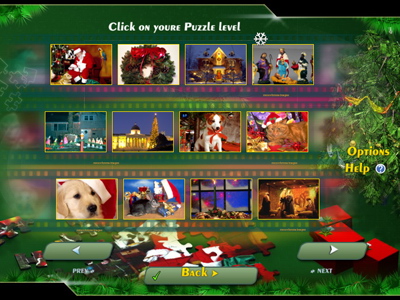
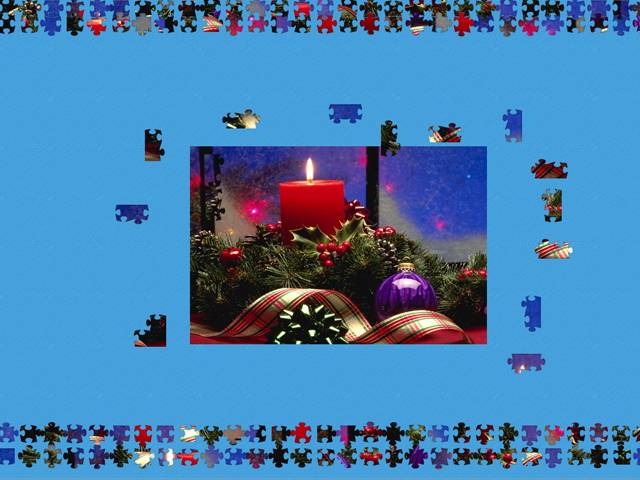
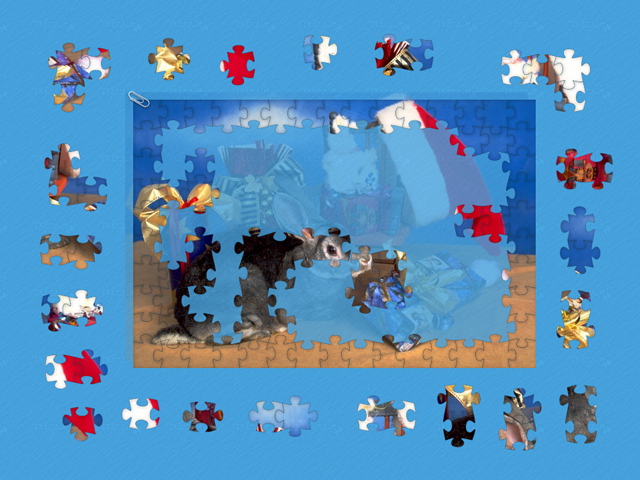
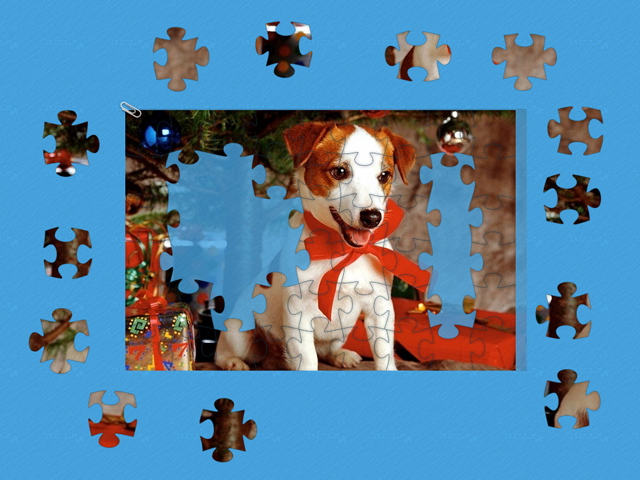
Christmas Puzzles will be Santa's gift for all the fans of classic puzzle games.
The goal of the game is simple: you have to combine small puzzle pieces into a large colorful picture. The game includes over 100 pictures of different genres. Beautiful sceneries, wild animals, city streets and many other views - you will find all of this in Christmas Puzzles. You can also choose the necessary level difficulty matching your mood. Got a short break at work? Assemble a small 50-piece puzzle.
This exciting game will be enjoyed by children and adults. A simple puzzle helps you improve attention, logic, memory and imagination. The game also has a piece rotation mode.
System Requirements:
Windows 98/ME/2000/XP/Vista; Processor 500 Mhz or better; 64 Mb RAM; 25 Mb HD space; 8 Mb of video memory
Publisher:
Xing InteractiveHomepage:
http://fly-games.com/index.php?option=com_content&task=view&id=47&Itemid=30File Size:
11.4 MB
Price:
$6.99
GIVEAWAY download basket




Comments on Christmas Puzzles
Please add a comment explaining the reason behind your vote.
iPhone app giveaways »



Android app giveaways »




surement un bon jeu mais quel dommage que la clé ne soit pas valide...
.................Moderator Comment....................
translated using Google:
surely a good game but what a pity that the key is not valid ...
----------------------------------------------------------------------------------------
...........................Modérateur Commentaire...........................
Vous devez cliquer sur l'icône activer. J'ai posté une image à un commentaire # 11.
J'espère que cela sert à quelque chose.
Observe
W.R.
Save | Cancel
Too many Santas, otherwise another good puzzle game.
Save | Cancel
Thanks GMMan for the hint on how to get rid of the logo.
Yes you can replay any puzzle just click on Menu and then hit Play again and it will let you select difficulty. Then hit play and next screen will ask you if you want to restart level or not.
The Gallery addition helps.
Thanks GOTD
P.S. My game (downloaded from website as suggested) started with with Santa.
Save | Cancel
Norton Internet Security 2010 sees the activate.exe as an extreme threat and quarentines the file. I had to restore the file from quarentine before it would activate. I had to do the same thing last week on the glamour puzzle file. It would be appreciated if a separate activation code could be offered in the readme file that we can copy and paste when our antivirus programs show this as a threat.
Save | Cancel
Have only played one puzzle so far, busy in the garden....why is the picture about half a row shorter than the ghost picture??? don't know is this is general or just the one I tried first
Save | Cancel
activation.exe appears to be trojan according to VIPRE antivirus&antispyware ....please give me licence! it is not fair I cannot have it just coz it is trojan:S :(((
....................................Moderator Comment........................
The nature of the activation file is possibly why your AV program is flagging it as malware. I would suggest turning it off just until you've activated the game then turn it back on. It's almost certainly a false positive.
Save | Cancel
I've finally finished the file format documentation, which can be found here: http://pastebin.com/m2bf3398. I also have made a fully working custom .box puzzle. It's not exactly pretty, and may be somewhat difficult to do, but it certainly is custom made, which proves that you can make your own puzzles, with enough skill. Check it out here: http://www.mediafire.com/file/zkl2hhmuhxn/test.box
Yes, I know it's difficult to piece together bits of text because they're so similar looking, but just marvel at how different it is from everything else. It should also work with last week's puzzle game (not tested).
PM me with a 600x400 jpg if you want me to make you a custom puzzle. Enjoy!
.........................Moderator Comment...................
Thanks for all the hard work. I've downloaded the test file and will check it out when I have the time. :)
Save | Cancel
This is a great puzzle game. I love the pictures and the sound effects. It's just a pleasant distraction from other things. I really like it. Thanks.
Save | Cancel
re Mod's comment #22: I've almost written up a structure description, but I lost most of it because I thought it was saved and it was not (doh!). Anyways, I did figure out that the progress is saved right together with the .box file, so if you remove that part it should reset. Of course, I'm not done experimenting with the file format, so it'll be a while before anything useful comes out.
P. S.: I'll try posting a sample custom puzzle once I finish writing up the file format description. Stay tuned!
..............Moderator comment..................
Thanks for taking the time and making the effort. Much appreciated.
Save | Cancel
Yes the game is a bit late but the designs are rather nice. I did finally get the music to stop without moving the file. It appears that it does not care what NAME you use as long as it's an MP3 file. I had to change "mp3" to "mpx" to get the music to stop.
However, there is one thing strange. The puzzles appear to be listed in a random order that is fixed once you're installed. From the starting point (the candle), move "previous" one and you'll see a puppy (it looks like a Jack Russell). That one STARTED at 75% done for me for the small size (60 pieces). Also, there were pieces under the puzzle that got locked with it. I tried to move the completed part out of the way so I could move them and they wouldn't move. I stopped and re-started and then that part worked.
How did I get a puzzle already partly completed (over 5 minutes according to the time)? Also, is there a way you can RE-DO a puzzle of a given size?
Diane
...................Moderator Comment................
That's a good point Diane. One way of doing it is to clone the activated game. Once its been activated the game is free standing, so, if you create a second copy and keep that as a cloning file you can create as many copies of the game as you like on your computer. That way you can play the same puzzle again. however I'm sure there will be a way of wiping the savesyouve made. hopefully GMMan will have the time to figue out how. I haven't the time to see myself at the moment. :)
Save | Cancel
Good jigsaw puzzle you can have it as hard or easy as you like
Save | Cancel
I just downloaded and installed this game, and when I tried to run it I am told I have 30 minutes of gameplay. Did I do something wrong?
Xmombakerx
P.s. Thanks wr, love to read all your comments.
Thanks to gotd crew, have a wonderful new year.
......................Moderator comment...............
Hi xmombakerx, thanks for the nice words. You probably forgot to activate the game by clicking on the activation module that look s like a orange square icon with a key on it. Just click on that to change the game into a full version. If you want shortcuts and an uninstaller download the demo from the developers site and use that instead of the giveaway file. both activate using the key wrapper.
Save | Cancel
I installed this on Windows 7 and played one game to try it out and did not have any problems with it. Nice game and I did not mind the music.
Save | Cancel
I just got a look at the game. There are a few things that I would like to report.
1. What everyone wants to know: The .box does have a custom file format, but it's just the header. I'll post its structure after I dig a little deeper.
2. Bypass the DRM, because it's basically pointless. The game itself is in the file game.dat, and it's unprotected. So if you're having trouble launching the game or would like to make it portable, just rename game.dat to game.exe.
3. Get rid of the MyGameCity logo (I have no idea what it's there for). Go into the fsdata folder, and delete the file MPL_LOGO.jpg. It's that simple.
4. The engine of the game is actually the same as Infinite Jigsaw Puzzle, from sifting through the game exe's resource data. The game also have something to do with www.ifd.com.
.......................Moderator comment.................
thanks for the top re: getting rid of the MyPlayCityLogo. :)
I do think your tips would be a good accompaniment to the FAQ's document I'm still working on. :)
Save | Cancel
If there is a piece or 2 missing, go back to the menu and reload the same puzzle, then you see the missing pieces and can complete the puzzle. No problems here with malware or bugs. About the music- see the comment of AnnieAppleSeed or turn the volume lower. Really enjoy this gaotd!
Save | Cancel
okay, here's the scoop for those who downloaded and played the puzzle game from a couple of days ago: MUSIC OFF is simple, just rename the sound folder so the executable won't recognize it. if you don't want two games of the very same blood on your computer, simple procedure is to incorporate the images from one game into the other. i did and it works flawlessly. they are located in the BOXES folder of your installation files (wherever you put the game). as for the malware alerts, i have had no problems with any downloads from this site. some of the freeware antivirus will signal false positives with some games, depending on their configuration, because the virus software merely scans for behavior and not actual known threats from various internet databases as do the higher end antivirus software. if anyone needs further instruction on moving files, just ask.
Save | Cancel
I downloaded and tried it out without any problems. Thanks so much for all the free games, I've been downloading various offerings the past year, a little something for everyone!
Save | Cancel
I'm going to try this one. I downloaded last week's, played one puzzle, closed it and left the computer. When I came back it wouldn't work again :( The exe file lists something like "ToDo",
and I haven't been able to make it open the puzzle. Anyone else have that problem? And yes, I got last year's puzzle and have enjoyed it and also the ability to import photos of my own to do in the puzzle.
Only thing I could ask for now is if another TriPeaks comes around again.
Happy New Year to all.
S
........................Moderator comment.....................
Hi Stacey, so long as you activated last weeks puzzle you can download the demo from the developers (Fly Games) site and install that. The activation code works on the demo as well. The advantage of using the demo for last weeks and todays is you get the normal shortcuts that you'd expect plus an uninstaller file as well. I've posted a link to the demo page in last weeks review, however you can follow the link I've provided above, then click on the home button to the top left of the page then select the correct page so that you can download the demo.
W.R.
Save | Cancel
Since I enjoy jigsaws I downloaded this and the music was a bit irritating so I tried removing it from the music folder and it worked fine without any music. Then I tried putting my own mp3 in the folder and it played while I worked the puzzle so you can adapt this a bit to your own liking. To me that's a plus!
Save | Cancel
easy installed.. I have scanned it with avira and found no virus or any threat in it.. the game is fun, real a time killer :D
Save | Cancel
I downloaded this and my Fix-It programme said it had a severe Trojan and relegated it to the virus vault. So I cleaned my PC and downloaded it again. Same deal. Severe Trojan threat. It is NOT a good programme, people.
................Moderator Comment....................
The game has installed fine on two of my computers with no warnings from either of the malware programs I had switched on (Kaspersky and Returnil) Are you using the free or the purchased version of Tune Up? The giveaway team rigorously tests all software with the best malware programs. They do not giveaway virus ridden software. What you are getting has to be a false positive. (Though I wonder whether its related to the problem we had with the installer over the past several weeks i.e. the ????????????? problem, which appears to have been fixed, but it may have left some residual problems that are being flagged as malicious - just a thought)
Unfortunately I can't request the link to the teams scanning results because they have taken a holiday (I've been given details of the next weekends games as well as this because of their vacation but unless i ask I don't automatically get to see the malware scanning results).
For anyone who is concerned about this I suggest you use a program like Buffer Zone or Returnil (Both of which have been previous giveaways, though I think you can get freeware alternatives) that create a virtual computer, so that you can see if there are any adverse effects. Personally I will rely on the giveaways good name and the fact that my well respected malware program has shown this program to be safe though I do appreciate anyone’s concern over possible malware attacks on any software given away here. I just don't want to see hysteria created over what is probably a false positive result.
If you’re really not happy despite what I’ve said, there are loads of free alternatives available from the links I’ve provided at the end of my review at comment #1. All those sites are green for both MacAfee’s Site Advisor and the Web of Trust (WOT)
Save | Cancel
Don't do it!
Couldn't turn the sound off, hotkeys didn't work and wouldn't exit, until I killed the processes in Task manager! But the sound still continued!!!
As there was no uninstaller, I had to manually remove this and run several utilities to clean my machine of this app.
Avoid!
..................Moderator comment...................
Probably a problem with one of your drivers/computer. This game has installed absolutely fine on two of my computers.
Save | Cancel
hey, whose complaining should be who's as in who is and not whose review is this
and also in the conclusion part images is written twice (enough christmas themed images images). just thought I would let you know so you could correct the errors mr. rabbit
...............Moderator Comments.....................
Thanks for the English lesson (I'm never too old to learn from the mistakes I always make :)
Save | Cancel
Sorry to say it guys, but after I got a Trojan with last weeks offer, I'm avoiding Your "free" games ! The game is Air Bandits and were detected positive with Panda online scan, Avira, a-squared Free and ad aware.
I think it's a bit unprofessional to offer games guaranteed free of malware, and then drop such a bomb. I considered this site safe, and have had nice pieces of good software, but never your games again - unless it's offered from a well reputated manufacturer. Sorry for my rant, but I just think, you should know, since you apearrently didn't !
Kindest regards and happy new year. Allan Fibecker
.......................Moderator comments.....................
Thank you Allan, Happy new Year to you. Warnings are always appreciated so for that I'd like to say thank you. I also got a warning for last weeks game with one of my cheaper AV programs, as did a few others, but that same program also said my reinstalled copy of Mirrors Edge (an official DVD copy) was infected as well as several word documents that I'd created. All game giveaways are throughly tested with the best AV and antimalware software. I think you'll find most of the ones you quoted are usually at the lower end of the scale when being tested for efficiency. The giveaway staff were aware of this warning because I informed them before the giveaway was put up. They replied with a link showing (which i posted for the community) the results from several very reputable Malware programs and all of them gave negative results. I'm much more inclined to believe results from reputable Antimalware programs to those of Malware programs that rarely get into the top ten malware programs listings when they are being compared. My best AV software Kaspesky found the game clean. I downloaded demos of that game from several different 'reputable' sites and all of them threw up the same warning with one of my other malware programs (Returnil Virtual System). I doubt these reputable sofware distributor/developers would all allow such a file to exist in their catalogues if it wasn't a false positive. Also most giveaway community members didn't get the virus warnings which would certainly indicate the warning was a false positive. As for not downloading any more games from this site (unless they are from what you deem to be reputable distributors) thats your perogative but also your loss.
Save | Cancel
Having played last week's offering a few times now, I have to admit to finding a couple of bugs already.
One of the puzzles I completed had a piece missing! Yes ... Really! Therefore the puzzle didn't come up as solved.
A couple of the puzzles came up with overlapping pieces locked together. This meant the other pieces couldn't line up properly.
Other than that, it is an enjoyable game so I'll be downloading this version as well.
Save | Cancel
Thanks!! White rabbit, for again this give-away puzzles, as i sadly missed the 1 of 26-12-2009. Great to solve them, thanks for the instructions and links to other jig-saw-sites. Wish you and all the visitors a Lucky and healthy 2010!
Save | Cancel
Very nice game, this
Save | Cancel
Almost forgot... one minor quibble with both games... if you are using the ghost picture and complete the border there is a lock function that snaps the border to the outside of the ghost picture. Only problem is that every additional piece entered shifts the puzzle slightly so it is necessary to re-pin it. Not a big deal but annoying none the less.
Save | Cancel
I really liked last week's offering and like this one as well. I will, however, be changing the music ASAP. Thanks for the instructions as always WR.
As usual with freestanding games you will have to create your own shortcut. The application name is the same as last week's so you will have to change the shortcut name as well.
I do like the fact that this one shows a gallery as well as thumbnails of the next and previous puzzle pictures, something last week's did not do.
Since I am a major jigsaw fan this should make my family happy as I will no longer be taking over the diningroom table for days with my puzzles :)
Hope everyone had safe & happy holidays and a big thanks again to GGAOTD and Whiterabbit for all his hard work.
Save | Cancel
Hey hey, Fly Games are back. Their website seems fully functional, with some of their previous games. I'll definitely check this one out, as I missed last week's. I'll try to post a hacking guide for this game if I can figure out how it works. (Though later, because it's midnight and I'm on my iPod.
Save | Cancel
Christmas Puzzle:
Introduction:
Here’s another jigsaw puzzle game from Fly games. It’s basically the same as last weeks game except it has Christmas images, so I’ve just edited my review from last week to take account of the changes. This game would have been much more appropriate last week, but hey, who's complaining. :) As usual with most game giveaways, no shortcut is installed to the desktop or Start/Programs menu. So make sure you make a note of the install path. The install path may be different depending upon where you installed last weeks puzzle (if you did). Mine went to E:\games and tried to install into the same folder as last weeks game, so you may need to change the install path manually, however it shouldn't stop the game working if it is installed to the previous weeks folder. See the problem section below for information about using the official demo to get shortcuts installed to both the desktop and Start Menu.
Unfortunately Fly games no longer seem to feature the game that they gave away last year that I mentioned last week called The Infinite Jigsaw puzzle. It had many more features than the series of puzzles they now sell. Anyway, the following is the developers (Fly Games) introduction to the game:
Reference accessed HERE on 31st Dec 09
The Game:
You get loads of images to choose from, some of which I've posted here in this comment; with themes that complement the Christmas period (We’ve still got three days of Christmas left) You have to scroll through the images to select what you want. There is no facility to add new images and it seems like you can’t add images manually as all the images found in the games installed folder are of a format I’ve never heard of before (Box). Once you’ve chosen the image you wish to create a puzzle with you select the difficulty level. There are three of those; Easy, Medium and Hard. The easy puzzles can probably be completed in 10 to 20 minutes, or even faster if you utilise the ghost image which is an exact fit to the puzzle image (see the second image of Tower Bridge below). You can further increase the difficulty by allowing all pieces to rotate. Once this is done you can start solving the puzzle. There are several buttons that allow you to perform certain functions such as creating a ghost image within the puzzle area that gives you a framework to build your jigsaw; this can be made to look more solid or virtually disappear altogether, depending upon how easy you want to make the puzzle. There’s also a preview button that brings up an image to the top left of the playing area. This has three settings, the first being a small thumbnail and the final setting (number 3) fills about a third of the screen. You can show hints which will drag a piece of jigsaw to the correct location on the board, but then will spring back, so you have to watch where it is going otherwise you may lose the position, especially on the more difficult settings. There is a counter to tell you how many hints you’ve taken. There’s also a B key that makes the central pieces disappear so that all you can see are the border pieces.
If you want to leave a puzzle part done and start a new one you can do so and then return to the partially finished puzzle at a later date. Apart from the in game buttons there are several keyboard shortcuts which I’ve detailed below.
Useful keyboard keys:
F10…………………………Boss Key
Ctrl + A………………….Select All pieces
Ctrl + S………………….Select All Border
Ctrl + D………………….Select All unsolved
Esc………………………….Back to game menu
Features:
• 73 built-in levels and many more available for download.
• 3 difficulty levels
• Simple and intuitive controls
• Various puzzle shapes
• Classic rotation of puzzle pieces
• Interactive hints
Problems with the game?:
If you have trouble getting the game to work try downloading the demo from the developers site. You can get it HERE The activate file will register that demo as well as the set up file we get. The advantage of using the demo from Fly games is you get a desktop and Start Menu/Programs shortcut plus an uninstaller as well. That should solve the problems some are having being able to find the executable once installed. :)
You can download the demo from the following link:
http://fly-games.com/index.php?option=com_content&task=view&id=45&Itemid=30
Images:
You can see around 40 images, most of which are from the jigsaw images by following the link below:
http://s571.photobucket.com/albums/ss160/Whiterabbit04/Christmas%20puzzle/?albumview=slideshow
SYSTEM REQUIREMENTS:
Windows 98/ME/2000/XP/Vista
Processor 500 Mhz or better
64 Mb RAM
25 Mb of hard drive space
8 Mb of video memory
Music:
If you don't like the intro or in game music you can easily change it for any of your MP3 collection. There is no file conversion needed because the file used by the developer is also MP3.
If you've installed the game to its default location you should find the music files by following the path:
C:\games\puzzle\Christmas Puzzle\MUSIC (this path may be different depending upon where you installed last weeks game. however the last part of the path is the same (i.e. Christmas Puzzle\Music)
You should rename the files you are using to replace the original to the same names as the originals otherwise they won’t be recognized
Conclusion:
Today’s game giveaway is a functional jigsaw puzzle with enough Christmas themed images to keep you going for a couple of months or longer, depending upon which difficulty level you play on. I do think the images were a little limited compared to last weeks offering, too many images of presents and not enought scenes from Christmas cards. snow bound villages and glittering lights would have been nice; still, theres a reasonable selection of images with the yuletide theme to them. The main disappointments with this game was the inability to add additional images to the stock already there, the lack of any alternative jigsaw shapes, the often annoying habit of the pieces to jump slightly out of place when you locked a couple of pieces together and the ability to change the number of pieces from very few, which would be ideal for children to thousands for the die hard jigsaw fan. Despite these omissions I still think the game is worth 7 out of 10. It has come a little late for this Christmas, but I’m sure some will enjoy solving the puzzles out of season.
-----------------------------------------------------------------------------------------------------------------------------------------
Alternative Games:
I posted the following link last week, but just in case you missed last weeks game or you didn’t get the chance to follow the link, here it is again.
There are hundreds of jigsaw puzzles available for free via the internet. This
link to Caimans leads you to just over a hundred different Jigsaw puzzle games all of which are free.
Thanks to Naomi who suggested we visit Jigzone last week. You can find loads of free jigsaw puzzles:
http://www.jigzone.com/
Copmom suggested http://www.brainsbreaker.com/. It’s not free, but you can create puzzles that you can send onto friends as copmom does. The program is actually very good with the ability to create puzzles with many more pieces than todays game. Also you can upload your own images and use different interlocking pieces plus other features.
Save | Cancel