Every day we offer FREE licensed software you’d have to buy otherwise.
$5.90
EXPIRED
Game Giveaway of the day — Bio Guardian
Take the control of S-NMA [Scalpel Nano Machine Unit] and begins a fantastic journey through a microscopic world. Discover the root of the evil that threatens to end the life of Nimbos inhabitants while you try to discover your own secrets.
$5.90
EXPIRED
User rating:
161
20 comments
Bio Guardian was available as a giveaway on May 7, 2011!
Today Giveaway of the Day

Destroy the entire mountain in fifty hits.

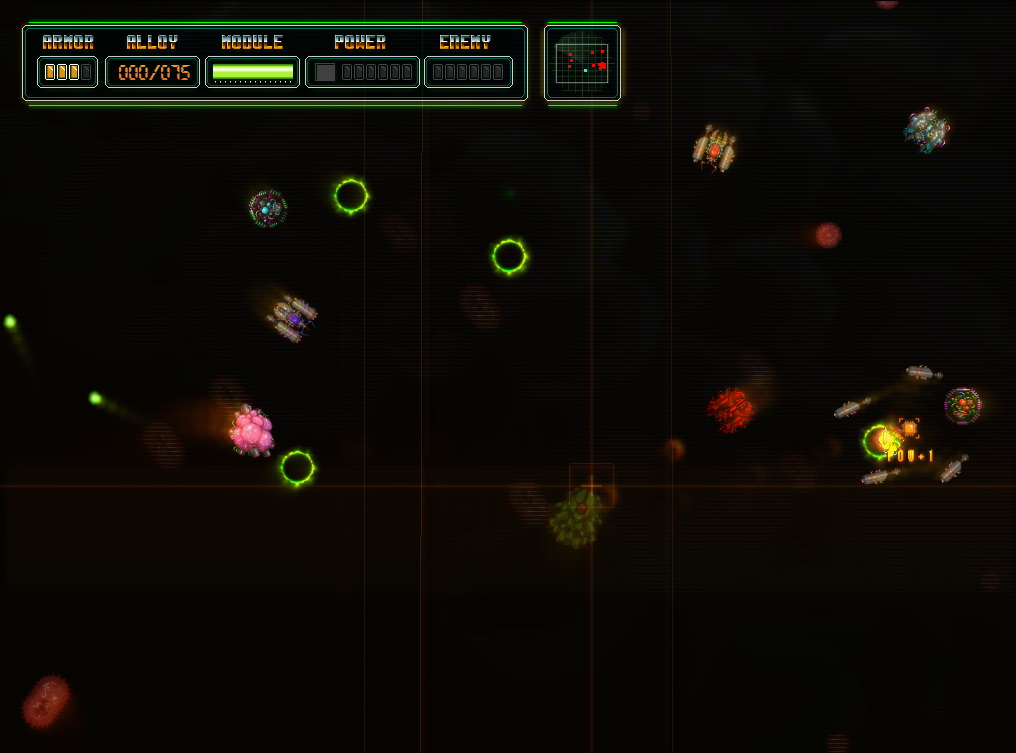
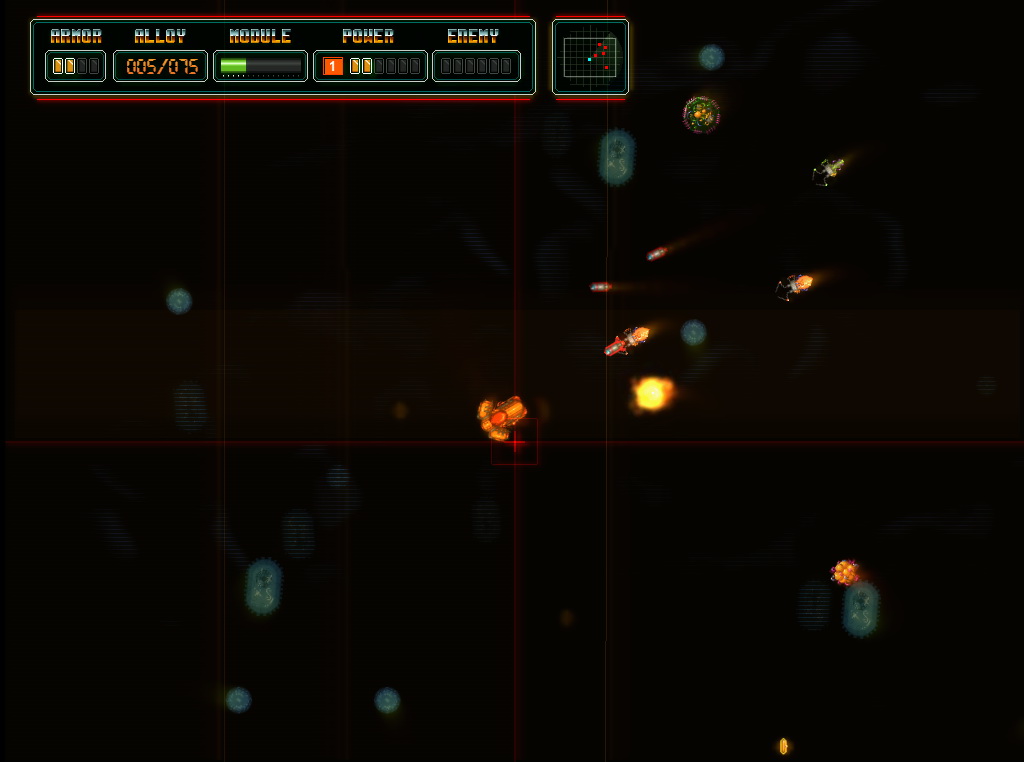
Take the control of S-NMA [Scalpel Nano Machine Unit] and begins a fantastic journey through a microscopic world.
Discover the root of the evil that threatens to end the life of Nimbos inhabitants while you try to discover your own secrets.
Key features:
- 6 challenging levels;
- Personalized Game Experience: play with one hand, fight against inertia or select Turbo Mode;
- +18 different chassis to personalize your machine;
- +20 Different enemy designs;
- +10 Power Ups;
- +10 Different weapons;
- Multiple boss combats;
- Immersive screen filters.
System Requirements:
Windows XP/ Vista/ 7
Publisher:
Xing InteractiveHomepage:
http://www.oniric-factor.com/bio-guardian.htmlFile Size:
7.21 MB
Price:
$5.90
GIVEAWAY download basket

Developed by Electronic Arts

Developed by PopCap Games

A challenging MOBA set in a fantasy world.

Developed by Overwolf
Comments on Bio Guardian
Thank you for voting!
Please add a comment explaining the reason behind your vote.
Please add a comment explaining the reason behind your vote.
iPhone app giveaways »

$6.99 ➞ free today

AirDisk Pro allows you to store, view and manage files on your iPhone, iPad or iPod touch.
$4.99 ➞ free today

$0.99 ➞ free today

$19.99 ➞ free today

$0.99 ➞ free today
Android app giveaways »

The must try game for any real hack and slash fan who already got bored with just mindlessly smashing buttons.
$0.99 ➞ free today

Embark on the ultimate cosmic journey in the premium edition of the hit space idle RPG!
$0.99 ➞ free today

$2.49 ➞ free today

An idle game where you adventure by collecting various weapons and powerful heroes.
$0.99 ➞ free today

$1.49 ➞ free today
I disagree with #13, mike. Although I have 7-Zip, I don't use it for GOTD. Windows built-in zip support extracts to a folder of the name of the GOTD zip file. Never right-click Setup and Run as administrator, that will give the setup routine permission to damage Windows more than it otherwise might, and will prevent Windows from performing automatic multi-user handling for programs which aren't multi-user aware. If a Setup routine needs to have Administrator privileges, Windows will figure that out automatically and prompt you to re-run setup with the proper settings automatically. That doesn't apply to games which simply extract to the Games folder without installing, you don't need to rerun Setup on those, Windows is complaining because those don't have an Uninstall.
..........................Moderator Comment....................
As always, thank you for your feed back Fubar. Glad you are still around. There are not many from the early days that still bother to comment.
Save | Cancel
Since I'm still up forgot one - Ghost in the Sheet. A pure adventure type. The story has it's gruesome bits and the places you have to explore are well bloodied. Everyone in the factory - the game's main location - was killed and it's up to Gits (abbreviation there) to investigate. The underlying tone oddly enough is of one of dry humour. The voice acting is very good and you get to interview the other souls to find out what happened to them, get hints as to what to do next and move the story along.
Gits is no poltergeist and can't actual touch things. As a new ghost he now needs to acquire skills by accomplish certain tasks. These skills then give powers to interact with objects in his environment.
It's important to try look at everything - even papers on the floor, or a book. Never know when info. will come in handy. You'll need a notebook to write stuff down in though - no in game diary. So basically, you walk about and occasionally hear things like "Oh look, another bucket." in a sardonic tone as Gits is exploring.
Is that what Myst is like?
Took a while to get through and needed help with one task. Cut scenes are done chalk board style - but it worked.
Only thing to remember as you puzzle is that Gits is trying not to damage his precious sheet, ^_^. Only annoying puzzle was one with fireflies - don't remember any others being terribly frustrating.
.....................Moderator Comment...............
Ahhh! Ghost in the Sheet. We were given this one a few years ago. I've still got it. Yes, this was one of the better giveaways.
Though I consider today’s game also one of the better ones, but then I'm biased as I love shmups. apart from a few issues that have already been mentioned above I though Bio Guardian was an excellent game well worth the money the developer is asking. Please do take note of the suggestions made here and perhaps come back to the giveaway project with an update. In any event I will be keeping an eye on your site and will happily purchase the game if it is updated to take account of some of the problems that the community have uncovered.
Save | Cancel
I was just thinking I didn't have enough shmup's. :)
I really love Bio Guardian's gameplay. It's very addicting. It's also challenging, but not in an aggravating way. The controls were very comfortable for me. It's a plus that the developer included multiple control schemes, although I only tried Alpha.
I seemed to have more of a difficult time with the Quarantine part. I understood what it wanted me to do, but I found myself failing repeatedly.
Graphically, I think it looks very nice for the style it's going for. I found the intro to be just okay, but still good enough to draw me in. Some of the text was a little uncomfortable to read, however. Perhaps the developer could make the font a little easier to read (or have an option to change it a bit).
For me, the challenge level of this game is just right, but it might appeal to a wider audience if there was a way to adjust difficulty. I noticed there's a way to make the game harder by increasing the speed, but an option to adjust enemy and player health or how much damage enemy and player shots deal could be useful for those who want an easier game.
All in all, definitely good for shmup fans at such a low price.
Thanks GGAOTD and Oniric Factor!
.....................Moderator Comment....................
Thank you very much for your feedback. Glad you really like the game.
Save | Cancel
Hi again. Went off for a few hours but now I'm back and really, thank you so much for the lovely and thoughtful comments on my post - Mike and Mr. WhiteRabbit.
First off, finding good, free software (and crochet patterns :P) is an obsession of mine. Most of the games I've found recently have been availabled on Gamehouse.com as the Free Game of the Day. Lately it seems that the sponsored ad will pop up when you switch screens in game, but you can click the x and close it after 10 seconds.
Typically these games should be available as 1 hr demos to 'try before you buy'. All of these have Adventure/Inventory elements.
**
Midnight Mysteries: The Salem Witch Trials
Interesting even if you don't the history - which I didn't. The main character is a ghost who was a writer who died in strange circumstances - a freak winter storm in the middle of May. He was a friend of the then President of the USA.
The cast of characters are varied - nefarious, greedy, young, old and there will be a mischievous Poltergeist. You have to use your head to figure out what you need to collect to work through her puzzle... but that's more fun than hiding in a body bag right? (Enough spoilers :P)
There are conversation options - don't know if they make much of a difference having once played through once. Going to play again!
Notes: (murder mystery, some blood in scenes and werewolves )
**
Paige Harper and the Tome of Mystery
- Poor heroine gets trapped in a book and there's of course inventory and some back tracking through the chapters. That's the literal layout of the game. It's like a pop-up postcard or children's book. Not only can you open up objects like desk and topple chair, but you can ROTATE THE VIEW to see behind, over, under things and way inside cabinets. In addition to helping Paige, these chapters are part of actual stories with characters you know - the last one being that of Sherlock Holmes!
Notes: No graphic (gory) illustrations. There will be a sequel.
**
A Gypsy's Tale: The Tower of Secrets (the one from Amaranth games)
This is a game that wants you to play and enjoy it.
One of the few games where collecting the special items was useful - the crystals you find in select scenes are used
1) to generate a map that lets you instantly go back to that scene by clicking on the location.
2) as currency later in the game.
Unlike Dream Chronicles, they tell you how many crystals you can find in each scene and for those hard to see ones, occasionally they will sparkle.
The game is beautiful and designed for you to look at - really look, not for HO's but just to enjoy the artwork. In so doing, you'll notice things - like matches near the entrance to the Gnome hideout that you can't use right away. You have a goal list that sometimes just says "Explore the maze" - it shouldn't ever get boring.
Notes: (The demo from Gamehouse glitches - when you switch screens, the background goes black and stays that way. Closing it and reopening is the only workaround to date. The demo from the game website works fine, but is time limited.)
Mortimer Beckett and the Spooky Manor
- first in the series of these. Good for kids as the premise is simple and lighthearted. You find pieces of HO's instead of a whole thing, put it back together and then replace the item in the correct location - you may be back track a bit to finish up. All in the series are good solid, not too easy games. My computer couldn't run the very last 1 well. Mention although they're not a favourite - detest pixel hunting.
Notes: (pixel hunting: randomly pass the mouse over the scene and see if the cursor changes so you can interact with an background objects)
>>>V. tired and not sure how much sense I've made so I'll wrap up with a few more:<<<
Marooned - the most RPG like one - Your inventory items can be worn! Another kid friendly one.
Murder, She wrote - wonderfully voice acted, no gore - different stories to work through - not all set in Maine. :P
Hidden Magic. Basic story - your fellow wizard is kidnapped and you must rescue him or her (choose your male or female main character). This one has a fighting element! The objects you find are ingredients to potions that your character needs to power up, heal and defend himself and of course, attack whatever is attacking you at the time. Yes you can die, but it's not a game over death. The mechanic is that you have a finite time in which to make your next move. If you can hit the monster before its turn comes around, you delay its next move. Defeat the monster to move to the next part of the map and closer to finder your partner. It is a very long game and the HO's segments outside of battle aren't terribly difficult.
Notes: (Kid friendly, Harry Potter is a wizard too, no?)
Ancient Spirits: Columbus' Legacy - only played the (full) Beta, but was good and hopefully only got better. Some scenes will have a dreamy, misty quality - do not adjust monitor: time travelling will do that...
Can't forget Ravenhearst and Return to Ravenhearst - doubt much needs to be said for these.
Now playing:
Golden Trials: The New Western Rush - so far so good. You're a Sheriff on vacation who ends up with a bank robbery to solve. Not sure about child friendly - you gather more hints by shooting the random gangsters that pop-up on the screen. There is some pixel hunting, but usually to uncover an object under something else. If you have a rake in your inventory or to find, then yes, point your mouse at that suspicious haystack.
Just for fun: Nightmares the Adventures - a series of free Flash games; about 5 in all. Played them all - not too difficult and charmingly animated. Fine for family. ^_^
Was I too vague? Perhaps I can post a better list / reviews in the forums? Please advise Mr. WhiteRabbit, Mike or anyone else who take the time to consume all this.
Cheers.
..........................Moderator Comment....................
Thanks for your input Dana. I've still got some Big Fish credits from over 2 years ago, so will probably try at least one of your recommendations. :) Yes please do post in the forums. The shame about your post above is that most community members wont see it becasue although this comment section remains open only the developer and a few members will revisit it to leave more comments.
Save | Cancel
Thank you for your feedback. It is really useful for us to improve our games. In our next launch we will create a gameplay more appropiate for a wider public. Looking the game with a retrospective vision, i can understand you. I really enjoy playing the game, but... I have designed it, so i think it is easier for me. Our betatesters have a very hardcore profile.
A few tips that perhaps can be useful to you:
1.- using the standar control: do not try to put the pointer over the enemies, just forget it. Only move the mouse (the ship follows the pointer) keep your eyes on the ship and keep the autoaim button pressed.
2.- To get more armor, collect as alloy as you can.
3.- If you have a slow machine, you can deactivate some screen effects, pressing "B" button during the game.
Thanks again, i hope you enjoy the game. If you need to ask anything, please, feel free to do it.
.........................Moderator Comment.........................
Hi Jorge Romero, thank you for popping into the comments section; it's always a bonus when the developer actually leaves a comment. If you require any more beta testers I have done a lot of Beta testing over the past several years for developers such as 2DBoy, Alawar, Dejobaan Games, Ubisoft, EA Games and Pie Eyes Games as well as for modders for games such as Battlefield 2 and Crysis. Just PM me in the forums or leave a contact here. I'm retired so will always have time to help.
Save | Cancel
Installed ok on Vista 32. Good gameplay once you get used to the controls. I like the power ups as well. Could be just me but I found the instructions in the tutorial difficult to read due to the size of the font and color. Also the "tutorial" should be an "in game" tutorial vs just the instructions IMHO. I agree with #2 there were no adjustable sound options sound options. And again may be just me but couldnt understand the female voice either. I think this is a great shmup, and with a few tweaks/improvements this could be even better. Here is the gameplayt trailor (I like to preview gameplay before I purchase a game...)
http://vimeo.com/18251219
......................Moderator comment......................
Thanks for posting the video. I did look briefly, but couldn't find one in the time I had. Also thanks for the feedback
Save | Cancel
Has anyone else encountered the following error when they try to use a player name that is nine characters or longer? When you select "ignore" it just resets the player name screen and if you try again to use a nine character name will just keep repeating the error.
I am running Windows 7 Ultimate 64bit and am not running the program in compatability mode.
___________________________________________
ERROR in
action number 1
of Draw Event
for object o_mportada:
In script sc_gettext:
Error in code at line 11:
^
at position 48: Unknown variable output
Save | Cancel
#7: "My problem is still the same (I’ll click on Setup and the Activating… box remains on)..."
If it helps... GOTD downloads feature a zipped file, that decompresses or expands into 2 or 3 files usually. Windows has it's own .zip file handling, but I like the free 7-zip http://goo.gl/Hz81c which via the right click context menu puts everything in a folder of the same name. Most of the time you'll see a Setup.exe with an Orange icon with a white key on it -- double-clicking that brings up a message box while it contacts the GOTD servers to make sure you're running setup.exe on the day of the giveaway -- in Vista/7 you're better off right clicking that file & selecting Run as administrator. Your firewall software *may* ask for permission to let setup.exe connect on-line - if you select no or if there's a problem with the firewall blocking it usually the message window will tell you it can't connect. It is possible for your AntiVirus software &/or firewall to cause problems, with no messages at all giving you the impression it's stalled -- in that case it might not hurt to post your prob. in the forum along with details on your AV software brand etc. The last item in the FAQ http://goo.gl/Jz8Ir talks about what else to check for with Internet Explorer.
"... I don’t understand what... the cookies are... I don’t know how to get rid of them or clean them."
Cookies are small files that web sites can ask your browser to store on your hard drive -- their purpose is to let a site know something about you, like your preferences for a site. They can also be used for tracking, so you might read a lot of bad things about them. To delete Internet Explorer's stored cookies in Windows through Vista you can usually right click the Internet Explorer icon on the desk top or in the 1st part of the Start Menu & select properties -- otherwise & in win7 you can go to Control Panel & select Internet Options/Properties, or you can go to the Tools menu -> Internet Options in Internet Explorer while it's running... The 1st tab of the Internet Properties window has a Delete button [under Browsing History in ie 9 -- don't remember the heading in earlier versions], & if you click that button you'll see an option to delete stored cookies.
* * *
#10: "Just want to say something here. I can crochet, knit and sew but I’ve never had the coordination to be able to play fighting, flight simulation or shooter games. (Sad because would have like to go through Winback!)
This is the 2nd time I’ve seen the opinion that Hidden Object, TM’s and Match 3′s aren’t challenging. Personally, the last 2 genres bore me despite the recent diversification in their game play and mechanics – just can’t hold my attention..."
Don't feel badly about it, Dana! ;-)
World's made up of all kinds of folks. My wife's a master at crocheting too BTW, but *Will Not* play a game that uses the keyboard, has zero interest in *Any* sort of shooter, but will give any *casual* game [as Amazon calls them] a good try. Her sis is a WOW fanatic, as is our 1 son, while the other son's more into strategy games. Me? My brain's broke [it really is], so I think you're all *off* :-) . Watching family members play, my attention span is somewhere around 30 seconds max. :-)
[I just come here in case they have something my wife might like]
.....................Moderator Comment....................
Thanks for the info Mike
:)
Save | Cancel
#7 Wolverine: Try disabling any firewall/antivirus/internet security software you have. If GGAOTD setup runs normally, then the solution is to add an exception to your security software.
Today's game is an old school action game instead of the usual casual fare, which is a nice distraction. The game seemed interesting, but ran too slowly on my ancient computer. I'll report back if I can try it on a faster one.
Oniric appears to be a start up company based in Spain. They seems to have an unique style and would be able to reach more audiences if they could lower the system requirements. I wish them luck & hope to see more old school games from them.
Save | Cancel
I tried a screen resolution of 1024x768 (was using 800x600) and it plays fine then, so I suppose it's a requirement of 800x600? Anyway, just confirming that changing the screen setting did fix the issue...
..................Moderator comment..................
Thanks for the information Avid Gamer. It's always good to get feedback :lol:
Save | Cancel
Just want to say something here. I can crochet, knit and sew but I've never had the coordination to be able to play fighting, flight simulation or shooter games. (Sad because would have like to go through Winback!)
This is the 2nd time I've seen the opinion that Hidden Object, TM's and Match 3's aren't challenging. Personally, the last 2 genres bore me despite the recent diversification in their game play and mechanics - just can't hold my attention.
However, not all Hidden Object games (HOGs)are a "Where's Waldo" or "I Spy imitation with fancy graphics. The examples I've loved lean more to Action/Adventure often with inventory item and interaction that people always say are a "Myst" like concept. (Don't know, have never played any Myst game). You DO need to think what to next. In fact, I'm pleased to that with companies like Amaranth in the mix, HOGs are leaning towards RPG like game play with intriguing and increasingly intricate plot lines.
This is long post and perhaps too close to a rant, but felt to add my two cents today. Thanks for always reviewing these games Mr. WhiteRabbit. I'll be happy to suggest a few of the more interactive HOGs if anyone is interested....
Cheers.
......................Moderator comment....................
Hi Dana, please do. I don't discount HOG's altogether. i have at least 20 plus in my games library and occasionally do like to play them. I was generalizing when I said " People seem to prefer Hidden Object, Time Management and Match three’s to something a little more challenging (IMO)". Developers of these game shave had to diversify as I’m sure a lot of HOG lovers would have quickly become bored. I am just very wary of purchasing any more HOG’s. I'd love to hear some of your suggestions especially if they lean towards RPG because that's one of my favourite genres. I used to have a Big Fish account, but cancelled it when all I saw was HOG's being released every day. The last HOG I bought was the last Dream Chronicles game. Hmmm, actually I bought one via Steam several months ago, but have forgotten its name. I thought it was a ghost hunting game, on the lines of Ghost Master. :)
by the way, Myst is a beautiful point and click adventure game. It's 10 years old but still sells well. I recently purchased a boxed set that includes all of the Myst series. I think I have several of the games at least twice and in some cases three times. PM me and i'll happily send you one of my duplicate copies. :)
Save | Cancel
Thanks for another game GGAOD; and many thanks to the developer. Game downloaded and installed with no problems on my Win7/64. Although not my genre I found it to be challenging. I'm still in the very first level. Don't know what I may be doing wrong, but I eliminated all the enemies and then just up and died!
I'll be keeping this one for a while to see if I can make any progress.
I would give this game a 6.75
Intro – 6/10
Menus – 8/10
Graphics – 9/10
Game play – 4/10
Save | Cancel
Correct link for Whiterabbit's slideshow:
http://s571.photobucket.com/albums/ss160/Whiterabbit04/Bio-Guardian/?albumview=slideshow
....................Moderator comment...................
Thanks Fubar. I was unable to access my photobucket account while working on the review so copied it over from my secondary computer,, exchanging the 0 for a o, lol
I've fixed the error. :)
Save | Cancel
My problem is still the same (I'll click on Setup and the Activating... box remains on). I did read the last answer, but: 1) I don't understand what, in internet, the cookies are 2) I don't know how to get rid of them or clean them.
Luckily I'm not interested in this game, but someday the good game comes (about programs, I do miss X region player that was given away and I couldn't get it).
......................Moderator comment............................
cookies are basically the pages that load up on your computer when you visit a site like the giveaway project. They help to load the page when you revisit the site. Cookies are stored in a Temporary folder that is hidden. You need to go to folder options and uncheck the box that keeps hidden folders hidden, you can find the folder in Control Panel. It's easier to find if you switch to small icons view (in Win 7 or traditional view in XP (or something like traditional)
To get a clearer and more in depth explanation google 'what are Cookies' or ,where can I find cookies on my computer, I have guests so can't spend the time explaining, sorry.
Save | Cancel
My ancient graphic card can't handle it. And it's made in Game Maker, so it was bound to be slow.
Save | Cancel
Interesting shmup. The most annoying thing is the intro, which you cannot skip through. I am used to being able to click the mouse and jump to the next screen in intro's, but this one makes you suffer through it. Plus, the graphics in the intro are jittery and bother my eyes.
The game is decent, it is pretty easy to hit your targets since the ship automatically locks on to them as long as you are holding down the fire button. Moving while firing doesn't make you lose targeting. One of the boost guns fires at a "V" configuration, which makes the targeting useless until the target is closer to you, because it is in the middle of the "V" and just misses to either side when further away.
The missle boost will sit there for a while, and trying to collect it right away is not a good idea, because it fires immediately upon collecting, and if you have no targets, the missle is wasted.
My only complaint about gameplay is that a couple of times the new enemy ships materialized right on top of my ship, (superimposed onto my ship) and I was unable to get away before dying.
I was only able to get through level 1 scenario 1, starting scenario 2, but failing to complete it. I did only play for a few minutes, so I'm sure with practice I will progress much further.
Overall, I would give this a 7-1/2. It's definately a keeper.
.........................Moderator Comment...................
Thanks for your feedback Joe. Got to agree with you about the intro. There should be a way of skipping it quickly. You can skip individual pages by pressing the Esc button, but it should be totally escapable with just one click, or better still :idea: a toggle in the options to switch it off :idea: ; also once seen you shouldn't have to sit through the intro every time you restart.
Save | Cancel
Installed fast on Vista Biz with no problem.
Intro was good....but long and each time you die you get info screens. You can escape through the info but why have them there?
I found the game to be more of a chase game (me being chased) than shooter. The Ammo regeneration could be increased a little. If you are a good player it might be great but if your like me you will get bored running around.
The movement controls of dragging your ship around the screen take me back to the early days. It's not a bad thing but with the predominant control today being direct, I'm not sure a younger player would enjoy the disconnect for long.
Intro - very creative
Menus - easy to follow
Graphics - Good. A stronger 3-D look to the characters might add a lot.
Game play - Slow unless you like running away.
Overall rating 7 out of 10
........................Moderator Comment.................
Thanks for the review. Much appreciated. :)
Save | Cancel
Seems buggy to me... I had difficulty clicking on the "Exit" button to exit the "Tutorial" as the game would not allow my mouse to move down to the bottom of the screen to reach it. I finally had to use Windows Task Manager to forcibly close it... Also during gameplay I experienced the same bug as I could not move my ship to the far right side of the screen. Maybe it's just my system? Don't think so but I've seen stranger things when it comes to computers... My 2 cents.
......................Moderator Comment........................
Thanks for the feedback. Have you tried changing your screen resolution. That may fix the probleem. When I have tme I'll run through all my screen resolutions to see if I get the same effect. At the moment the game plays perfectly for me.
To the community:
I'm a little pushed for time today as we have guests for dinner. I will continue to modederate, but it will be in a reduced capacity until this evening (around 8 - 9pm GMT when we expect our guests to leave).
Save | Cancel
For what this is worth - I found the controlling of my ship(?) rather difficult - maybe it is just me - I was using the mouse - you also have to wait a while between firing to get a second shot. It doesn't seem possible to turn the background sounds and voiceover off - I found these really irritating. Even though I thought I was doing OK I died twice out of 2 goes and rather lost interest.
On the up side - the colours are dramatic
If you want to avoid the doom laden sci-fi monologue opening - press the escape key - but be careful - press esc too many times and you are out of the game altogether.
Not a keeper for me, but thanks anyway
........................Moderator Comment.........................
thanks for your feedback
Save | Cancel
Bio-Guardian:
Installation:Summary:
This is a retro shmup (arena space shooter) with colourful graphics set against a dark space. There are three control options the first uses full mouse control for both movement and fire control, the other two options use either the WASD or Cursor Keys for movement with fire control initiated by the mouse buttons (LMB and RMB) RMB fires the special weapon. While in game you destroy enemy organisms/ships. Some of these leave power ups or energy pods that you have to move over to pick up. These are time limited so watch out for them. The energy pods are used for the special weapons. The special weapon power indicator can be seen across the top of the arena. It will recharge slowly automatically, using a power pod charges it to full power immediately.
You initially have three choices of ship to use, each with a different configuration. As you progress there will be another 15 to unlock. The configurations include Fire Power, Propulsion and Fire Speed. Firing at enemy organisms appears to be automatic.
Today’s giveaway is a 7.21MB download that unpacks to a readme file and a dual activation and setup file. The game installs to:
C:\Program Files (x86)\Bio-Guardian\Bio-Guardian.exe (64bit operating systems)
or
C:\Program Files\Bio-Guardian\Bio-Guardian.exe (32bit orerating Systems)
Shortcuts are installed to the desktop and the Start Menu\Program Files.
The game plays on my 32bit XP Pro , 64bit Vista home Premium , 64bit Win 7 ultimate and 64 bit Win 7 Pro.
(Image copied from Indie Games)
Introduction:
Reference http://www.oniric-factor.com/bio-guardian.html accessed 30th April 2011
The Game:
This is a retro shmup (arena space shooter) with colourful graphics set against a dark space. The game starts with a general introduction (see first two images below), that introduces the story line behind the game and sets the scene for some medium to difficult shoot 'em up gaming. You can avoid watching the intro if you want to get right to the action by clicking on the Esc key once. to escape the game fully click on the Esc. you can't avoid the option menu or the set-up screens. I've described these below. Once in game you can pause the game by pressing the Esc key once. This then allows you to either return to the game or escape to the desktop. On first starting the game, once the intro story has finished (remember, you can skip this using the Esc key) you will get the profile page where you have to enter a name before you can proceed.
There are three control options, Standard, Alpha and Beta. The keyboard options also have two more control options which can be accessed via the options menu and include lateral crossing (where you cross the arena in a lateral motion and secondly an inertial challenge. You can find out more about these two options via the Help button that’s located in the main menu. The keyboard options add more difficulty to the playing experience, but when achieved successfully will give the player a greater sense of achievement. (Well , it should do, :lol: )
Standard – Mouse for movement, LMB fire weapon, RMB fire special weapon
Alpha – Keyboard WASD keys for movement, weapons same as Standard
Beta – Keyboard Cursor Keys for movement, weapons same as Standard.
In the options menu you’ll find a couple of graphic options. A retro filter that can be used on those computers with slow C.P.U. speeds (these speeds haven’t been quoted by the developer). If you have problems running the game I suggest turning the filter to ‘ON’. There’s also a glow colour that enables you to make several choices that change the colour scheme of the game and include Oil, Light, fire, red, ice, blue, venom, green and yellow.
The game speed (difficulty) can be changed from Normal (default) to Quick or Turbo and you can switch from ‘Full screen’ to ‘Windowed’. There’s space for three profiles, which is adequate for a small family.
The first control option uses full mouse control for both movement and fire control, and the other two options use either the WASD or Cursor Keys for movement with fire control initiated by the mouse buttons (LMB and RMB). RMB fires the special weapon. While in game you have to destroy enemy ships/organisms. Some of these leave power ups or energy pods that you have to move over to pick up. These are time limited so watch out for them. The energy pods are used for the special weapons. The special weapon power indicator can be seen across the top of the arena. It will recharge slowly automatically, and using a power pod charges it to full power immediately. There are different colored energy pods. The most effective energy pods are those that are the same colour as your ship. These will recharge the energy bar.
Initially you only have three ships chassis to choose from, but once all chassis are unlocked there will be a total of eighteen chassis types. The three that are unlocked at the start of the game are called Mercury 1, 2 and 3. Each ship chassis has different characteristics that includes firepower, propulsion and firing speed as well as appearance. The graphics make it hard to distinguish between the various ship appearances, but there are differences that can be seen when you look at the Equipment Selection screen. In some cases the only difference is in the colour of the ship, but you may also see very minor differences in the ship markings. The Mercury I chassis has class 2 firepower (which does more damage per hit), a class one propulsion unit and a class one fire speed control, whereas Mercury 2 has a class 2 propulsion unit and Mercury 3 has a class 2 fire speed control. Each of the three ships also has a different colored chassis, Mercury 1 = Yellow, Mercury 2 = Blue and Mercury 3 = Green. You will also see some very minor differences between the shapes of each chassis., but these are not obvious at first glance.
Power=-up’s:
Energy pods enable the use of your special weapon that is activated using the RMB. The power ups that you can collect from destroyed ships include a Stop power-up, that stops all enemy movement for a short while, making it easier to collect bonuses without enemies attacking you , clear arena that destroys all enemy ships in the arena at the time you collect the bonus, a weapons bonus that doubles the fire power of your weapons; (you will see two energy bolts as opposed to one) and a bonus that upgrades your weapons.. Firing your weapons depletes your energy reserves so try not to fire unnecessarily. The ship you control will automatically point towards the nearest enemy ship making it easier to shoot enemies and also making it ideal for novices to the shmup genre (Shmup =Space sHoot ‘eM UP). You still need to move you ship to pick up the bonuses. Bonuses only remain on the arena for a limited time, which is where faster ships come in very useful.
Energy:
More energy means more fire power. When your energy is low attacks become weaker. To improve your attack strength pick up the energy modules left by destroyed ships these are smaller in size to the other bonuses and will have mod in small letters above the module.. As you progress through the levels better chassis will become available that give you better attribute such as being able to store more energy or fire your weapons faster.
Images:
You can see a slideshow of around 30 images (introduction, options menus, help pages and in game images showing various energy pods and power-ups via the following link:
http://s571.photobucket.com/albums/ss160/Whiterabbit04/Bio-Guardian/?albumview=slideshow
Conclusion:
This is a decent space Shoot'Em Up (Shmup) IMO; it's got all of the elements of an arena shooter apart from a shop, but you earn upgrades simply by progressing through the levels. It's not a particularly easy shooter, even on the easiest settings. I've been playing games like this since space invaders and still found it difficult to pass the first level. You must avoid being touched by the organic ships. This does serious damage to your ship unless you've picked up a temporary shield and you'll soon find yourself restarting the level. You don't have any second lives' it's all or nothing. Once you've passed a level you can return to it at any time, or start where you left off.
I like the automatic lock on to enemy ships. It saves a lot of hassle manouvering your ship. It doesn't make the game to easy as you'd expect.
Shmups are one of my favourite arcade and indie games so I'm a little biased with regards to scoring this game. Judging by the number of these gams being released by the big arcade developers they are not very popular. People seem to prefer Hidden Object, Time Management and Match three's to something a little more challenging (IMO); bearing that in mind I’m going to give this game two scores, one from a biased position and one from (hopefully) an unbiased one. With all the elements you get with this game I'd happily purchase it and think it's worth a good 8 out of 10 that comprises of 8 for graphics, 8 for game play and 8 for sounds/music. I actually really like the sounds and music. The omission of a sound controller by the developer is rather unfortunate as I think the music will get very annoying for some. I would suggest (amongst other suggestions detailed below) that the developer updates the game to include the ability to turn down or at least toggle off the sounds and music. I'd also add a shop to buy upgrades rather than give them automatically. It adds another dimension to the game IMO. All the best Shmups have shops to buy upgrades. :lol: I'd also consider adding some mini games that could include moon landers and traditional space invaders.
From an unbiased point of view I’d score this game a 5.67 due to the limited audience that will enjoy this genre. None of the previous shooters have ever done really well apart from one. That includes 5 for music, 6 for graphics and 6 for game play.
I’d definitely give this game a trial. Give yourself plenty of practice before you scrap the game out of hand, because I think you’ll find the game well worth keeping once you’ve mastered the controls. It’s definitely a keeper for me. Thank you to the developer and the game giveaway team for getting this developer onboard. :D
Other Info:
I posted loads of Shmups in a thread called ‘Space Shoot ‘Em ups or Shmup’s: A longish list of FREE games’, which you can find via the following link:
http://www.giveawayoftheday.com/forums/topic/2724#post-18808
or via the free games synopsis:
http://www.giveawayoftheday.com/forums/topic/4534
You can also get several commercial versions via Gametop for free:
http://www.gametop.com/category/action.html
or from MyPlayCity (almost 40):
http://www.myplaycity.com/free_space_games/
Save | Cancel